The post Server-side tagging use cases: How can you benefit from data stream consolidation appeared first on Piwik PRO.
]]>In one of the sessions, Simo Ahava discussed server-side tagging and one of its capabilities – data stream consolidation. He provided a step-by-step guide on expanding a single GA4 data stream into multiple outputs and shared best practices for using it.
In this article, we provide a transcription of the session and explain the process of data stream consolidation.
Learn more about server-side tagging:
What is server-side tagging
Server-side tagging refers to implementing and managing tracking tags on a dedicated tag manager server. For example, you can use the server-side Google Tag Manager to receive data from the client-side tracker, process it, transform it if needed, and send it to different vendors and tools, such as GA4, Meta Conversions API, and others.
Server-side tagging offers additional capabilities, such as data validation and enrichment, data redaction, and data stream consolidation.
Data stream consolidation
Data stream consolidation is one of the key features of server-side tagging. It involves taking one incoming data stream, such as GA4, Piwik PRO, Stape, or others, and distributing it to many outputs. Instead of sending the same event to different vendors – for example, when a customer adds an item to a cart – you send it to the server container, which distributes the event to various platforms.
Because you run all the logic on the server side, you get to keep the client-side tracker lightweight and maintain better performance. You can also control your data streams, which is one of the essential things about server-side tagging.
Let’s go through the process of expanding one data stream into multiple outlets, including GA4, Meta, and Piwik PRO.
GA4 and sGTM
We are using the Google Analytics 4 (GA4) client-side tracker. GA4 hits are sent from the browser to server-side Google Tag Manager (sGTM), which then forwards them to Google Analytics 4. One of the benefits of server-side GTM involves maintaining control over what data Google receives.
If you use Meta Ads, you may want to collect a Facebook conversion whenever a purchase is made. You have two options for tracking this information:
- Collect data in the browser through the Meta pixel.
- Add a Facebook Conversion API tag to server-side GTM and use it to collect purchase data for the Conversion API.
The latter provides privacy and security benefits by not communicating with Meta’s domains from the user’s browser. You can manage what is sent to Meta instead of Meta having full control via the pixel.
Regarding data stream consolidation, you won’t add any client-side code or tags. Instead, you will use the Meta Conversion API event to “piggyback” on the GA4 purchase event.
To do that, you need to do the following:
- Install the Facebook Conversion API template created by Stape.
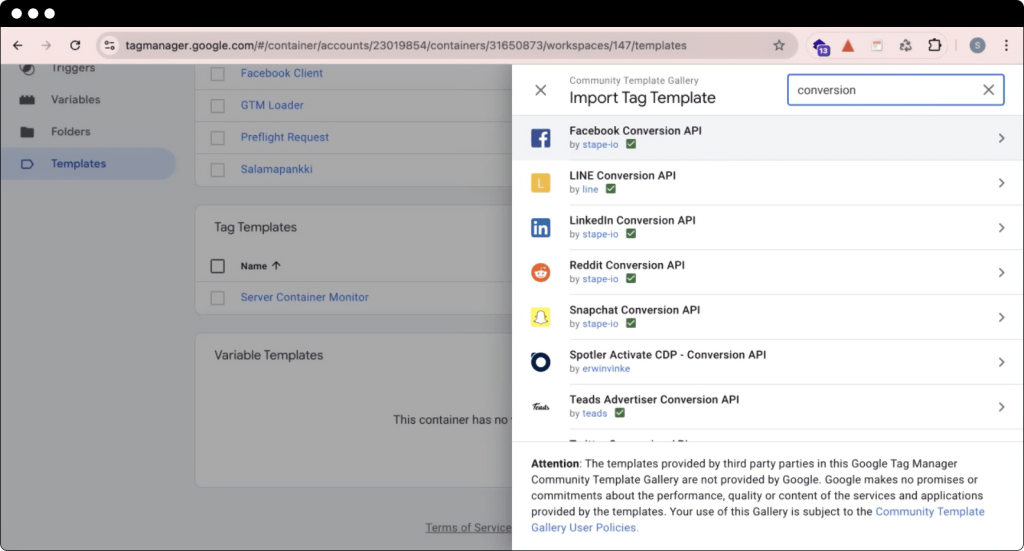
- Create a new Facebook Conversion API purchase tag.
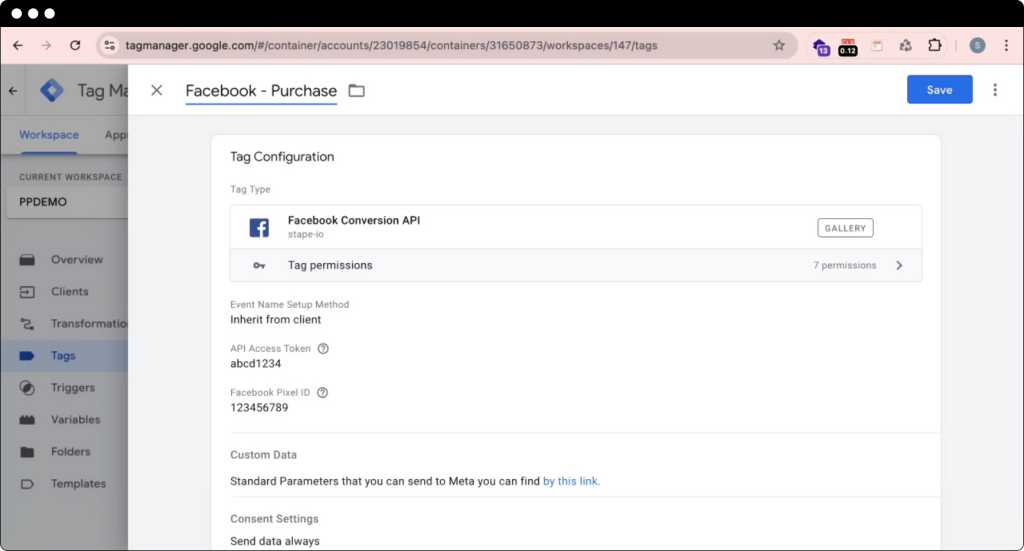
- Add a GA4 purchase event as a trigger.
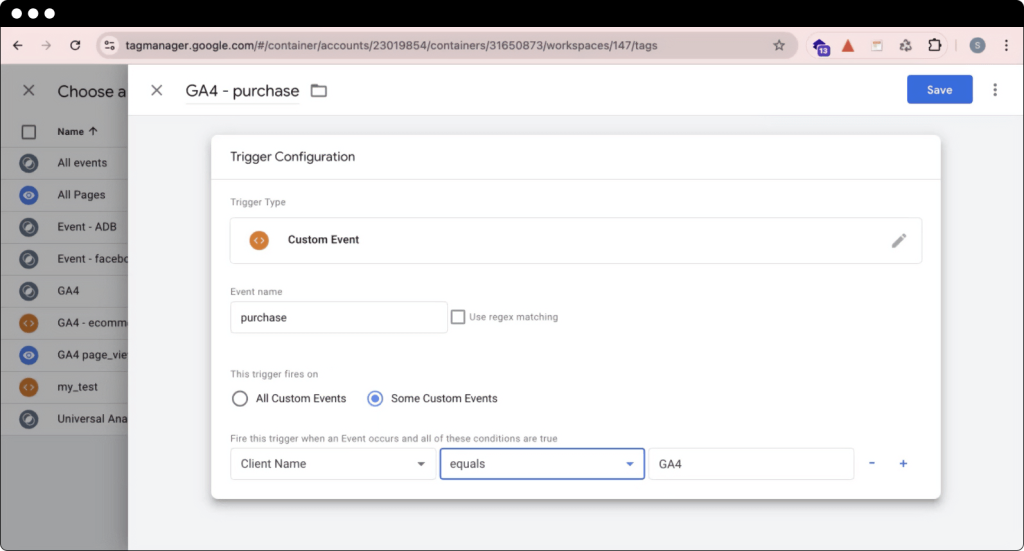
The Facebook purchase tag fires after the purchase event comes in from GA4. The tag parses data from the incoming GA4 event into the purchase event. You now have a single GA4 data stream coming to the website and sending it to both GA4 and Facebook for specific events.
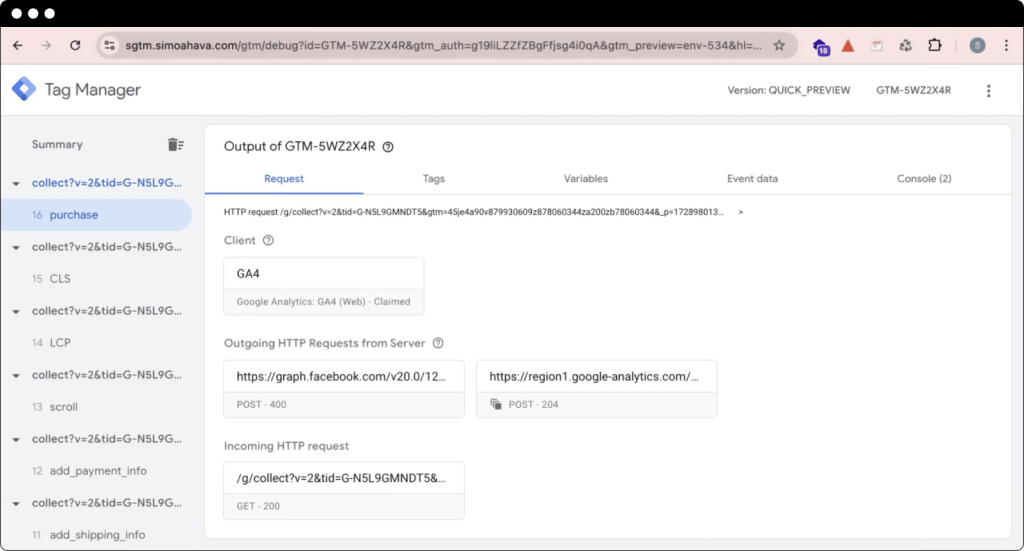
Let’s say you want to add additional information to the purchase event, such as a user’s email address, but don’t want to share it with Google Analytics. In that case, you can apply a transformation to strip out specific parameters from some of our tags.
For example, you can apply an “Exclude parameters” tag transformation and remove the parameter’s user data and event ID from any tag that isn’t Facebook.
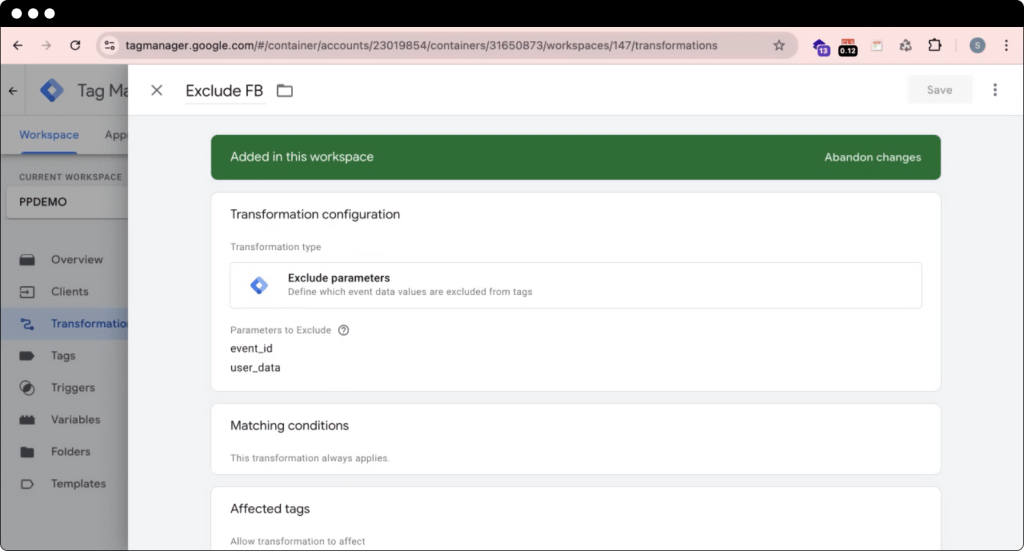
This way, you ensure that specific user data is not available to other tags, such as Google.
Experts opinion
Simo Ahava
Co-founder at Simmer, Partner at 8-bit-sheep
Transformations are a great way to ensure that only some of your tags can carry the parameters you set on the client side. This is a canonical way of doing data stream consolidation.

Piwik PRO
Now, you want to use a different analytics platform, such as Piwik PRO Analytics Suite, but re-tagging the entire site would take too much time. Instead, you can run GA4 on your website and transcribe its data stream to the Piwik PRO format.
To do that, you need to:
- Install the Piwik PRO tag template, built together with Simo Ahava.
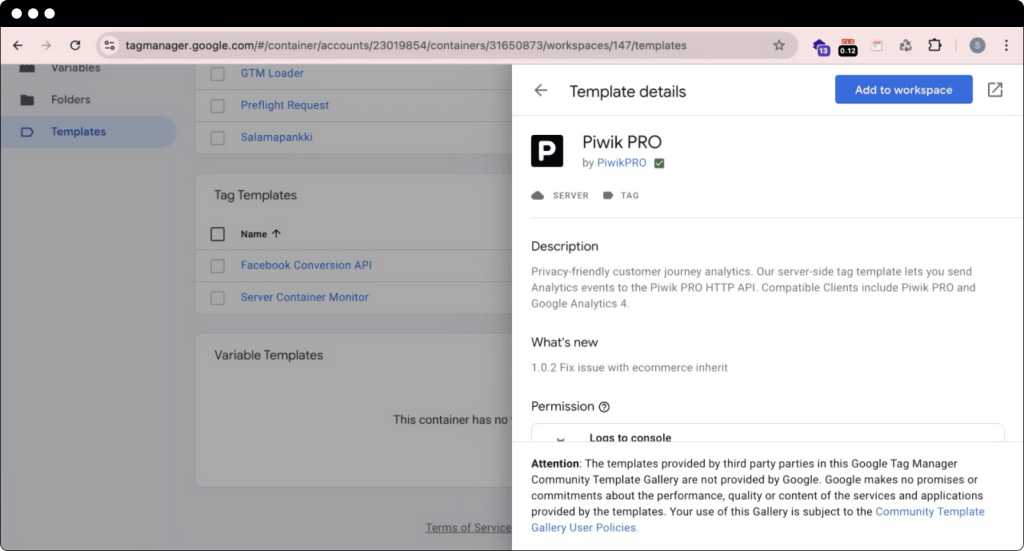
- Create a new Piwik PRO tag.
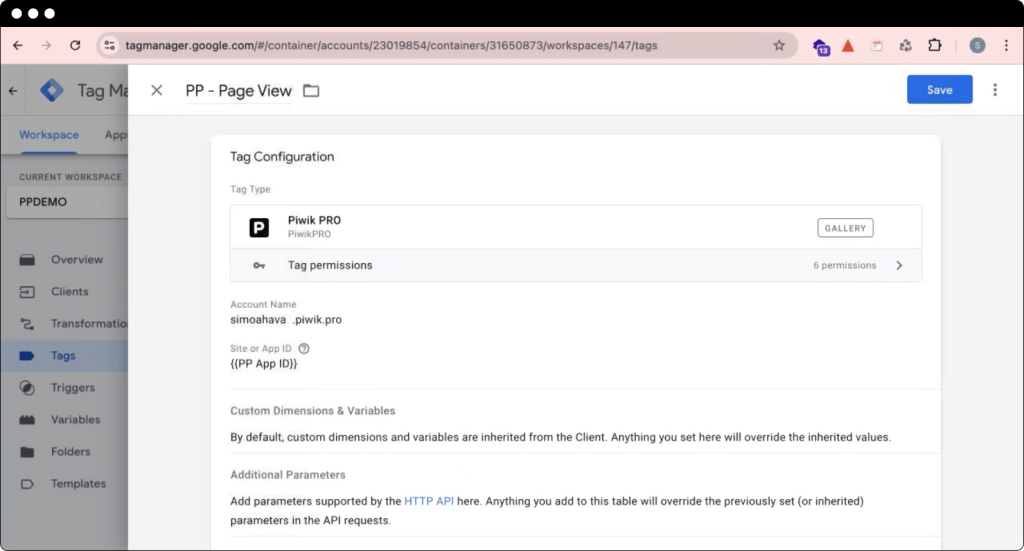
- Add a GA4 page view event as a trigger.
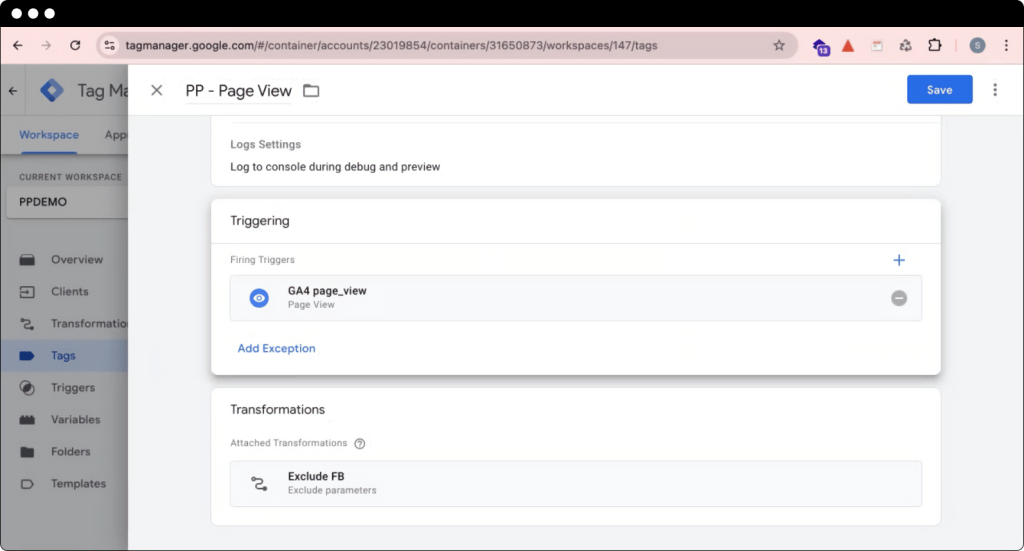
Since this is not a Facebook tag, the previously created transformation is applied automatically. As a result, the user data object and the event ID are not included in this Piwik PRO hit.
After the page view event comes in, the tag fires.
Here, you can see the page view event collected by GA4:
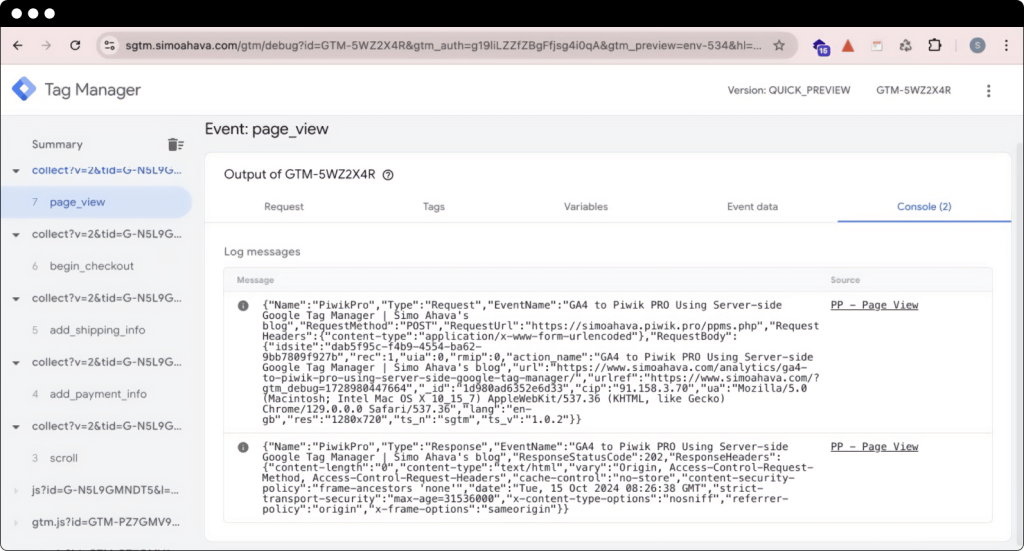
The data is collected and transcribed to Piwik PRO:
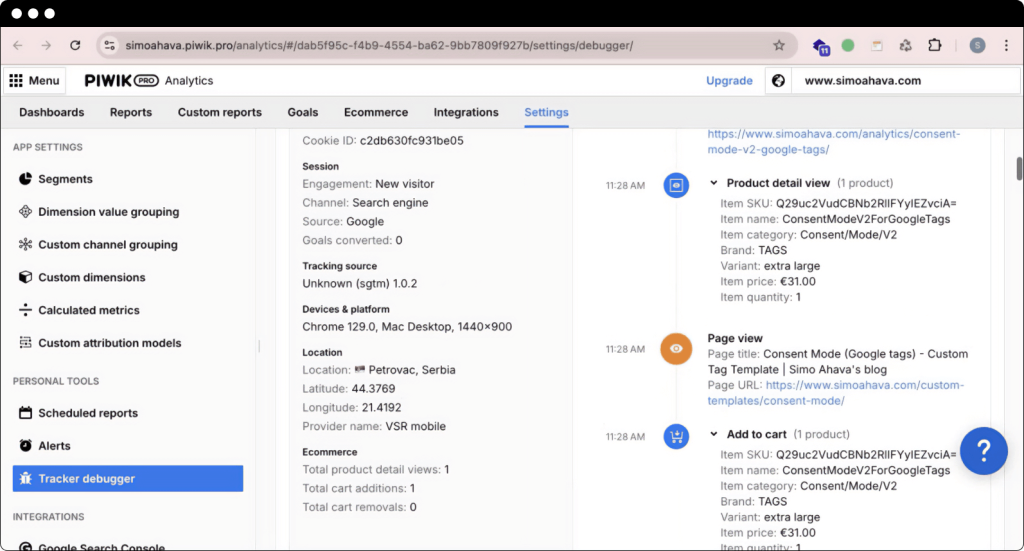
You are using the incoming GA4 stream and sending that data to Piwik PRO.
Without almost any customization of the Piwik PRO tag, all information is collected and automatically parsed from the GA4 event. You can see data about different events. For example, you have ecommerce data – like the product detail view, such as the add-to-cart and user-specific information.
Experts opinion
Simo Ahava
Co-founder at Simmer, Partner at 8-bit-sheep
The Piwik PRO template we built with Piwik PRO is really good for taking the GA4 stream and automatically converting it to a Piwik PRO event. I’ve been running it on my blog for months now, and I can see the results really nicely. My Piwik PRO data is almost one-to-one, so if I were lazy, I wouldn’t even have to touch GA4. I could just keep GA4 running client-side and then use Piwik PRO server side.
You can also create similar data streams for other vendors. For example, you can add tags for Amplitude, Snowplow, TikTok, Pinterest, and dozens more.
Best practices for data stream consolidation
There are some principles you need to follow when using data stream consolidation.
1. Use a broad client-side stream
Start with a stream that provides access to a broad range of information, then narrow it down server-side to only the events you are interested in.
Analytics libraries, like Google Analytics 4 and Piwik PRO, are great for incoming data streams because they collect a lot of data that can be used for behavioral analysis, data warehousing, conversions, audience building, and so on. These streams are dedicated to comprehensive measurement and are great for various server-side tagging pipelines.
Using a client-side conversion pixel for server-side measurement, you can gather data on conversions and build audiences. However, this method doesn’t work for broader data collection – for example, you won’t measure scroll or page view events.
You can also consider implementing a custom solution, such as image requests and HTTP dispatch. For example, Stape has an excellent client data tag combination. While these solutions are suitable for all kinds of pipelines, they might require extensive customization and re-tagging of the site because they must be created specifically for server-side tagging.
2. If you’ve already tagged the site with GA4, use it as the data stream
If you’re already running GA4 client side, keep using it for server-side GTM. By using GA4, you’re already producing data in the correct format for server-side GTM.
GA4 also has a multipurpose data model, like Piwik PRO, so it’s well-suited for different use cases, such as ad integrations, audience building, conversion measurement, behavioral analytics, and more.
3. Enrich client-side, trim with transformations server-side
Suppose you want vendor-specific information on the server side. In that case, you need to perform client-side data enrichment and apply server-side transformation to remove all the unnecessary information from other tags.
Like in the example above, you must add information to the GA4 tags even if you don’t want to collect it for GA4. The server-side Facebook tag can’t generate them if they’re not included in the incoming GA4 stream. This is one of the downsides of data stream consolidation.
Transformations are available to ensure all Facebook-specific parameters are automatically excluded from any tag that isn’t Facebook.
4. Use trusted templates
In most cases, a trusted template will be built by the vendor, such as Pinterest, Vimeo, Piwik PRO, Amplitude, Quantcast, Snap, and TikTok. Another thing to look at is when the template was last updated – if it was two or three years ago, it may have been abandoned.
Conclusion
You’ve just learned how to use a detailed client-side GA4 data stream and add different tags in server-side tagging, all “piggybacking” off the GA4 data. You may still need to add customizations to your server-side tags, like specific parameters, transformations, or event names that the template might not automatically recognize.
To learn more about data stream consolidation in server-side tagging, watch the full session conducted by Simo Ahava on Piwik PRO Day:
Improve data control and quality with server-side tagging and tracking
Explore options for implementing server-side tagging and tracking with Piwik PRO’s own solutions and integrations with our partners.
The post Server-side tagging use cases: How can you benefit from data stream consolidation appeared first on Piwik PRO.
]]>The post How can server-side tracking help your business? appeared first on Piwik PRO.
]]>One of the first-party data strategies is server-side tracking, which enables the collection of first-party data while staying GDPR compliant. What exactly is server-side tracking and how can you benefit from it?
The benefits of server-side tracking
With server-side tracking, you manage your data entirely on your own server rather than in the user’s browser. This offers several key advantages:
- Better control and data reliability: You have direct access to your data without relying on browsers and their limitations.
- Improved page speed and performance: Running tracking scripts server-side reduces the load on the browser, resulting in faster page load times.
- Enhanced data privacy: By managing the data yourself, you can support your compliance with strict privacy regulations like GDPR.
Learn more about the benefits of server-side tracking.
What makes server-side tracking a futureproof approach
Server-side tracking can be implemented in a way that supports the highest data privacy standards, helping businesses comply with increasingly strict privacy regulations. By managing and processing user data on their own servers, businesses can handle data more securely and maintain better control over it. They can ensure they only collect the necessary data and prevent most types of sensitive information from being shared with the browser.
Privacy-conscious businesses can choose providers such as TAGGRS, which offers secure servers strategically located across the globe, independent of major US cloud providers. Businesses operating in the EU can choose to store data within Europe or even their own country.
However, it’s important to know that server-side tracking still requires you to either collect valid visitor consent before collecting personal data or fully anonymize your data.
Experts opinion
Ate Keurentjes
Head of Marketing at TAGGRS
Server-side tracking is a strong step towards improving user privacy. As a website owner, you have better control over your data and can decide where to send it. By storing the data on a local server, you have the option to ensure that it never leaves the country.
How to set up server-side tracking
Piwik PRO users have three options to set up server-side tracking:
- Pure server-side tracking with Piwik PRO’s API and SDK
- Server-side tagging with sGTM
- Server-side tracking with a first-party collector
Setting up server-side tracking can be challenging. However, there are ways to simplify the process. With TAGGRS’s sGTM server-side tagging solution, you can protect your marketing data in the new privacy era by making it 100% first-party.
TAGGRS provides servers located around the world, meaning your data is secure and benefits from faster load times. Distributed data can be delivered quickly to you or your end users, enhancing website performance.
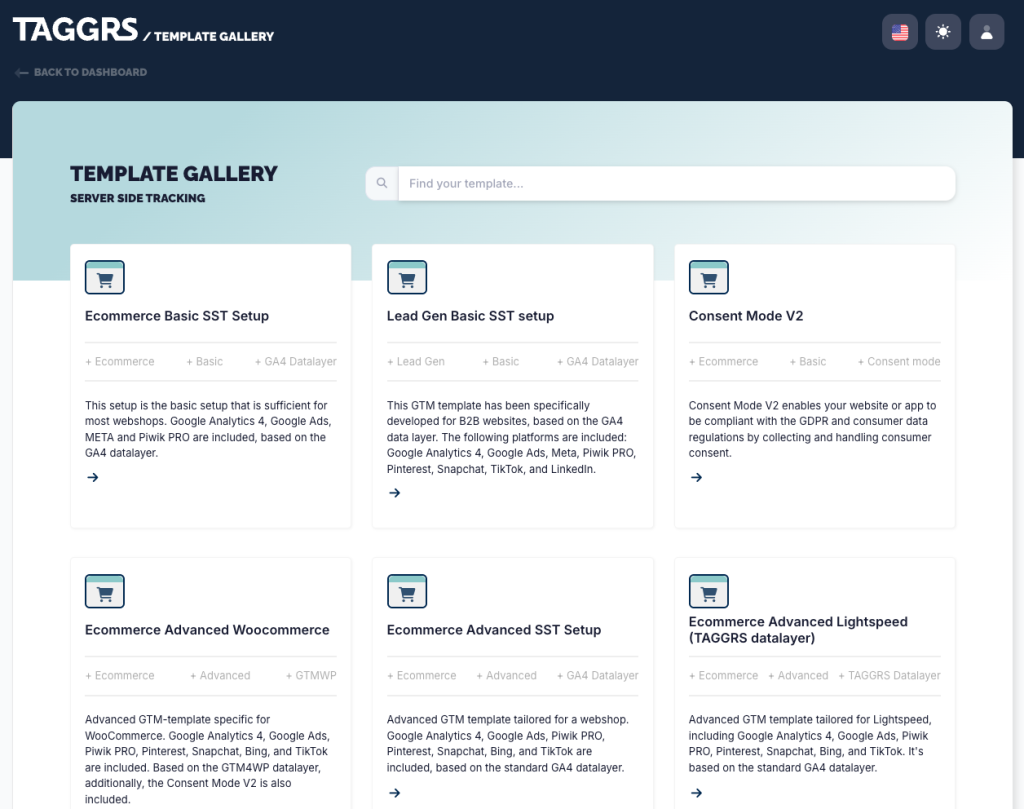
With TAGGRS’s ready-made Google Tag Manager templates for server-side tagging, you can set up server-side tracking in less than 30 minutes, easily integrating with platforms like Piwik PRO.
Here’s a complete guide to setting up Piwik PRO server-side tracking with TAGGRS.
Experts opinion
Niels Olivier
CEO of TAGGRS
Our goal is to make the best server-side tracking accessible to every business. We achieve this by simplifying our setup with templates. We’ve added analytics and monitoring tools for deeper insights and to ensure everything runs smoothly – all backed by our outstanding support.
Who can benefit from server-side tracking?
Server-side tracking can be beneficial for companies operating in all industries. Let’s look at three specific use cases for different types of businesses:
- Ecommerce: Accurate data collection for optimizing ad campaigns and customer experience. Key PII, such as email addresses, can be easily anonymized.
- B2B: Collecting customer interactions and optimizing long sales cycles, such as for cars or scooters. With server-side tracking, you can extend cookie duration that is otherwise restricted, allowing for longer customer interaction tracking.
- Healthcare: Managing sensitive patient data with maximum control and privacy. Since you manage everything on your own server, you have more control over where specific data is sent, ensuring sensitive data doesn’t leave the country.
In general, the more data you measure, the more essential server-side tracking becomes. Since B2B businesses typically measure less data than ecommerce platforms, server side tracking often becomes more crucial for online shops.
When server-side tracking won’t be the right option
Server-side tracking isn’t suitable for everyone. If your business doesn’t rely heavily on data for marketing strategies, the benefits might not justify the investment. However, for companies that spend significantly on advertising, precise data collection can make a substantial difference.
3 ways to measure the impact of your server-side tracking (SST) setup
The benefit of server-side tracking in combination with Google Tag Manager (sGTM) is that you can effectively measure its impact by running your current setup alongside the new server-side configuration. You should compare the differences in measured data while you implement the server-side setup. After confirming the numbers, the client-side setup should be removed so as to not track redundant data.
Here are three ways to compare the data between setups:
1. Meta (Facebook)
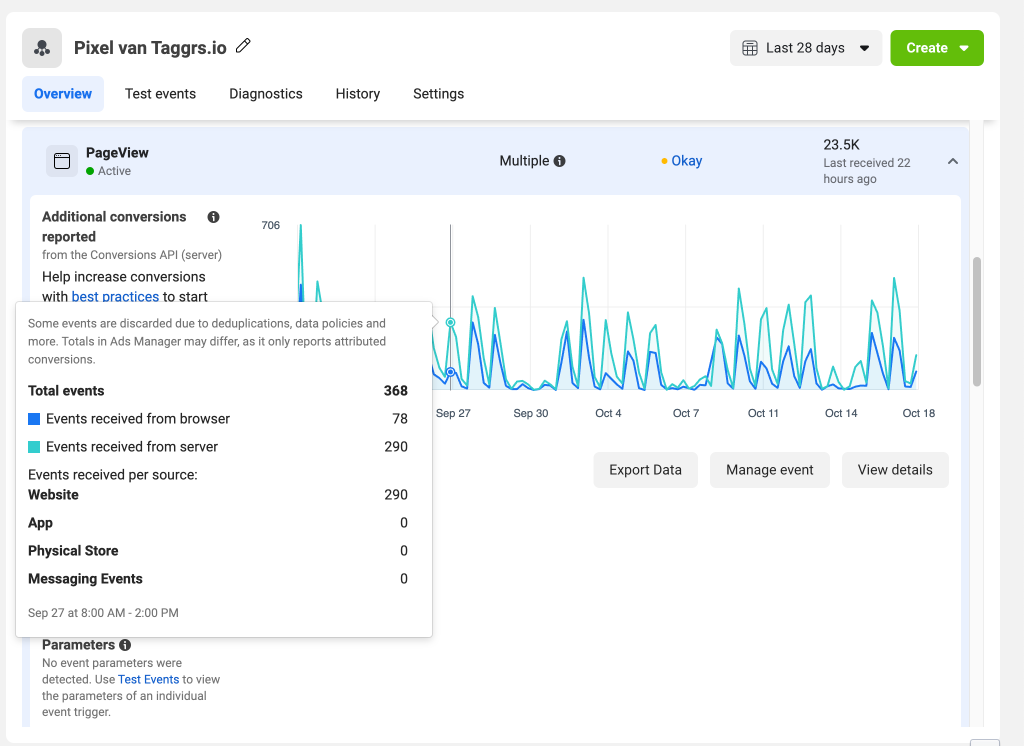
When you log in to Facebook Business Manager and navigate to your conversions, you’ll notice a difference between browser-based and server-based measurements if sGTM is set up. The green line represents server events, while the blue line represents browser events. In this example, server-side tracking captures 22% more data.
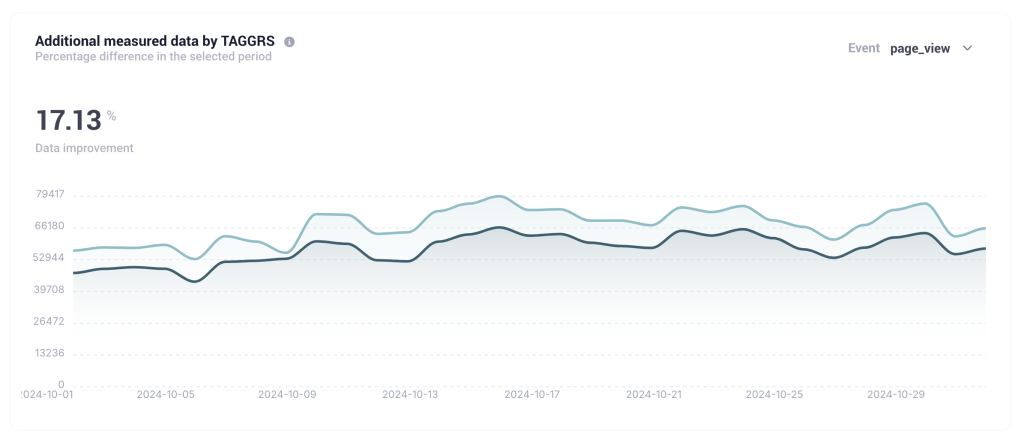
2. TAGGRS
TAGGRS offers a range of server-side analytics features essential for anyone looking to measure and analyze the effects of server-side tracking. Within the TAGGRS Analytics dashboard, you can track the impact of SST across all the platforms you measure.
3. Google Ads
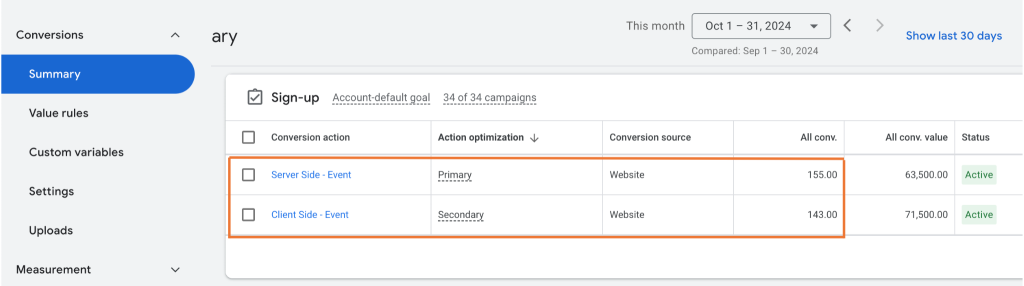
In the Google Ads dashboard, when you go to your conversions, you can see a difference in the number of conversions measured between client-side and server-side tracking.
Conclusion
Server-side tracking offers numerous benefits, including improved performance, enhanced data governance, and compliance with privacy regulations. While setup can be complex, TAGGRS provides ready-made solutions that are easy to integrate with platforms like Piwik PRO. This way, you don’t have to tackle all the technical challenges yourself and can still take full advantage of the benefits offered by server-side tracking.
Improve data control and quality with server-side tagging and tracking
Explore options for implementing server-side tagging and tracking with Piwik PRO’s own solutions and integrations with our partners.
The post How can server-side tracking help your business? appeared first on Piwik PRO.
]]>The post How to use raw data in web analytics appeared first on Piwik PRO.
]]>SUMMARY
- Raw data is the unprocessed, complete set of information collected directly from various sources. In contrast, aggregated data is processed and summarized, making it more accessible. Organizations often prefer aggregated data for quick insights, but raw data offers greater flexibility for advanced analytics and custom reporting.
- Accessing raw data enables organizations to perform sophisticated analyses that lead to a better understanding of customer behavior and marketing effectiveness. It allows for the blending of data from multiple sources and supports advanced statistical analyses.
- Organizations can use raw data in many ways, including tracking complete customer journeys, personalizing user experiences, conducting advanced A/B testing, predicting churn, fulfilling regulatory requirements, anomaly detection, and more.
- While raw data offers significant advantages, it also presents challenges, such as requiring substantial technical resources and expertise to manage effectively. Organizations must invest in the right tools and personnel to leverage raw data effectively.
Raw data offers infinite potential as a resource, as it comes in diverse forms from a wide range of sources. While it is highly valuable, raw data can also be challenging to organize and understand. It takes time, resources, and technical expertise to draw actionable insights from it.
Many companies settle for aggregated data in the form of reports and calculations that they can access in the UI of analytics tools. As a result, these organizations fail to utilize the tremendous potential of raw data.
Before organizations can harness the power of raw data to learn more about their customers and their sales and marketing campaigns, they must first collect the right data, organize it, and transform it into a more appropriate format. These preparatory steps are crucial for effective data analysis and visualization.
In this article, we will explore the benefits and challenges of using raw data in analytics and discuss its potential use cases for gaining valuable insights.
What is raw data?
In the context of web analytics, raw data is a set of events and sessions collected from visitors’ activity on a website or app, then processed to prepare reports. An organization can gather raw data from multiple sources, such as web analytics, mobile app usage, advertising platforms, search engines, social media, CRM, CMS, email marketing platforms and others. Raw data is the initial data collected directly from sources without manipulation or analysis.
Each source can provide data in different formats. Depending on what is supposed to be done with the data – for example, it may need to feed a data warehouse – it might require additional transformations, such as cleanup or reformatting.
Because raw data is not filtered or processed, it provides a complete view of information. It allows for in-depth analysis and accurate insights, but also may be voluminous and difficult to handle.
With proper tools, raw data provides more possibilities for exploring data insights and making them useful. Analyzing raw data like this can help marketing analysts uncover trends, identify customer preferences, and develop targeted marketing strategies to enhance customer engagement and boost sales.
Raw data vs. aggregated data
Raw data typically comes in its most basic form, representing visitors’ behavioral data (such as page views, clicks, impressions, scrolls, and more) along with contextual data (such as which ad was viewed or clicked, from what device, country, and others).
On the other hand, aggregated data refers to data extrapolated through aggregation performed on raw data. Such aggregations can be done by web analytics tools or, in more complex approaches, with the use of business intelligence (BI) tools that can pull data from a data warehouse or other sources. Aggregated data is most commonly available in the UI of analytics platforms in the form of reports, making it more accessible.
These differences between the two data types determine the needs they are able to satisfy and the depth of the possible analysis.
For example, building attribution models on your own can be very challenging and time-consuming, while web analytics tools can have them built in. In this case, you can access some insights much faster. On the other hand, if more advanced statistical analysis is needed to find trends and relationships or perform tests and experiments, working with raw data offers more control over that process.
Raw data
Advantages
- Opens the door to more advanced analysis like statistical analysis, custom attribution models, building customer journeys, and exploratory data analysis.
- Provides the ability to blend data from multiple data sources and create a more comprehensive picture for making data-driven decisions.
- Offers flexibility to revisit and reanalyze the data for a range of reporting needs.
Disadvantages
- Requires extensive resources in terms of technology and people who can build and maintain the data stack.
- Less accessible for inexperienced analysts who are not proficient in BI tools or SQL.
- Handling large datasets or using APIs for raw data extraction is more resource-intensive, particularly in advanced analytics.
- As a less technical specialist, you may experience delays between a request to the more skilled analyst or engineer and getting an update on data in the report or dashboard.
Aggregated data
Advantages
- Accessible to everyone regardless of experience level.
- Doesn’t require extensive technical resources and skills to visualize the data.
Disadvantages
- Limited to the capabilities of the aggregation engine in use in terms of filtering, grouping and aggregate functions.
- Less flexibility in case more advanced statistical analysis is needed.

Learn more about the differences between data types used in analytics: Raw data and sampled data: How to ensure your data is accurate.
What are the benefits of raw data in analytics
Raw data unlocks the door to more sophisticated and precise analytics, enabling a better understanding of information that often remains untapped in summarized data formats.
With appropriate expertise and technical skills on the team, businesses can dive deep into advanced analytics. Access to raw data allows analysts to work with complete datasets that they can review and modify at any time. They can apply new filters and visualizations and generate new insights or points of view.
Raw data analysis is highly relevant, specific to the research being done, and provides fresh information, making it suitable for supporting data-driven decisions. As it gives preliminary visibility to the dataset, it offers more freedom in data transformation. On top of that, raw data gives you a backup to refer to in case of problems after processing and analyzing your data.
Businesses can combine raw data from various sources, such as CRMs, transaction platforms, offline databases, and more. This allows them to connect the dots and make more data-driven decisions. Thus, companies can easily integrate analytics software with their existing marketing stack to maximize the benefits of their entire toolset.
Raw data can be exported from analytics platforms using other tools, enabling more extensive and insightful analyses. For example, you can export raw data to business intelligence (BI) and data visualization tools to gain more options beyond simple analytics reports. You get to connect multiple data sources and clean up, shape, and model your data set into the required use case. Such visualizations may show patterns that would otherwise remain invisible.
Exporting raw data from several different reports and combining it with other external data can give you a global view of your marketing performance across channels. For example, you can effectively use raw data to analyze multi-channel attribution.
What are the use cases of raw data
There is little value in holding onto raw data without the means to use it. This type of data offers many options beyond standard processed or sampled data approaches.
You can leverage the power of raw data to provide more detailed, accurate, and actionable insights for web and app analytics.
Let’s now discuss typical use cases of raw data.
Tracking complete customer journeys
Raw data from multiple sources can be used to track the complete customer journey and create a holistic view of user behavior across different platforms. This type of data represents consumers’ unaltered voices and behaviors.
Whether it’s the transcript of a focus group discussion or the record of online purchases during a holiday sale, raw data captures the market in its most natural state. By connecting these data points, organizations can understand how users move between different platforms and how their campaigns lead to conversions.
Personalizing the user experience
Leverage raw data to identify specific user groups with unique behaviors or needs. This enables in-depth user segmentation and cohort analysis, allowing for more targeted marketing strategies. Apply this information to dynamically adjust website layouts and provide real-time content recommendations and product suggestions, creating highly personalized user experiences.
For example, if you run an ecommerce business, you can perform a Recency, Frequency and Monetary (RFM) segmentation to identify your most valuable customers. Piwik PRO Customer Data Platform allows you to create audiences in the RFM model and enable marketing automations with personalized communications for specific audiences.
Advanced A/B testing
Use raw data to conduct complex A/B testing and multivariate analyses beyond simple conversion rates. Analyze user paths, interaction times, and behavioral patterns to understand why certain variations perform better and which copy, page design, or content format you should choose.
Predicting and preventing churn
Utilize raw data on user engagement, feature usage, and historical patterns to build predictive models identifying users at risk of churning. This allows for targeted retention strategies and personalized interventions to keep users engaged with your product or service.
Attribution modeling
Organizations can use raw data for attribution modeling, either by doing it themselves or using external partners that have the know-how and built in-house attribution modeling algorithms. They can then create advanced, custom attribution models that go beyond standard last-click or first-click models.
Attribution modeling involves using data analysis and statistical modeling techniques to determine the contribution of each marketing touchpoint in driving conversions or sales. Companies can understand how to allocate marketing resources to better convert their target audiences.
Custom dashboards
Businesses can approach raw data with different analytical tools and derive insights based on changing needs.
For example, raw data can be used to create insights dashboards in BI tools or companies’ apps for internal or external needs. Agencies might also compile reports for their clients using raw data. These dashboards can help organizations visualize their data and extract meaningful insights.
Fulfilling regulatory requirements
Certain client segments, such as government entities or media, may have to adhere to regulations that require them to send data to regulatory and controlling entities. Raw data can help organizations operating in various sectors adhere to regulations, for example:
- Healthcare providers often must send raw data to government entities for public health monitoring, research, and regulatory compliance. This includes data related to patient demographics, diagnoses, treatments, and outcomes.
- Banks, insurance companies, and other financial institutions often need to send raw data to regulatory bodies for compliance with financial regulations. This can include data on transactions, customer behavior, risk assessments, and more.
- Telecommunications companies may need to send raw data to regulatory entities to comply with regulations related to network performance, customer service, pricing, and more.
- Retailers may need to send raw data to supply chain partners or regulatory bodies. This can include data on sales, inventory, customer behavior, and more.
- Government entities often need to send raw data to other government bodies for oversight, coordination, and compliance with laws and regulations.
Public service organizations in the EU need to share information about the people who visit their websites with the Single Digital Gateway (SDG). To fulfill this requirement, use Piwik PRO’s integration with SDG.
- Media companies may need to send raw data to regulatory entities, primarily if they are based in countries with strict media regulations. This can include data on viewership, content, advertising, and more.
Accessing reports outside analytics platforms
Companies can explore methods for integrating raw web analytics data with other business intelligence (BI) tools and data sources. This can provide a more comprehensive view of business performance and enable more sophisticated data-driven decision-making across the organization.
Additionally, organizations might want to access raw data without creating accounts in their analytics platform. In such cases, downloaded raw data can be made available as reports in tools like Power BI, and anyone within the organization can access it.
Anomaly detection and alerting
Analysis of raw web analytics data streams allows you to identify unusual patterns or anomalies in raw server logs, user behavior, performance metrics, traffic sources, or conversion rates. With this information, you can detect system failures or performance issues as they arise.
For example, you could develop an automated system that alerts stakeholders about potential issues or opportunities, allowing you to take immediate action and minimize downtime.
How different analytics vendors handle raw data
The capabilities of accessing, exporting and using raw data vary across different analytics platforms. Here’s a quick overview:
| Access to raw data | Data export limits | Data access and tools | |
|---|---|---|---|
| Piwik PRO | Yes | Piwik PRO Business – data exports available through API. Piwik PRO Enterprise – data exports available through daily exports and API. – API is recommended for data sets of up to a few million events. – Daily exports are suitable for exporting up to 100 million events per day. | Full access to raw data through API, BigQuery and CSV. |
| Adobe Analytics | Access to raw data through its predefined tools. | No explicitly stated data export limits. | Several ways to access and use raw data, including Analysis Workspace, Analytics dashboards, Activity Map, Report Builder, Analytics APIs, and Reports & Analytics. |
| Google Analytics 4 (GA4) | Access to raw event and user-level data through BigQuery. | Export limit of 5,000 rows when you download a report as a CSV. | Raw data can be accessed and exported through Reports or Explorations in the GA4 web interface, Analytics Data API, and BigQuery. |
| Countly | Yes | No explicitly stated data export limits. | Several ways to access and use data, including through its server, a mobile SDK for mobile analytics, or a web SDK for web analytics. |
| Mixpanel | Yes | At most two recurring pipelines and one non-recurring pipeline for event export pipelines per project. The raw export API has a rate limit of 60 queries per hour, 3 queries per second, and a maximum of 100 concurrent queries. | Data can be accessed via HTTP API or direct database export. Raw data can be viewed in Mixpanel. |
| Matomo | Yes | No specified data export limit. The data can be exported in full. | Data can be accessed via HTTP API or direct database export. Raw data can be viewed in Matomo. |
| Amplitude | Yes | CSV report: 5,000 users from Users page, 100,000 rows of data per metric from Charts view. | Over 20 SDKs, HTTP API v2, Batch API, and SQL access. |
| Snowplow | Yes | No specified data export limit. | Storage options for data warehouses and lakes, loading data into Redshift, BigQuery, Snowflake, and Databricks, and querying data. |
| Heap | Yes | CSV report: 5,000 users from Users page, 100,000 rows of data per metric from graphs and funnels. | Tracking events, querying data, and using a data model to aggregate data. |
How can you benefit from raw data access in Piwik PRO
Piwik PRO gives you easy access to session- and event-level raw data to perform extensive data analyses.
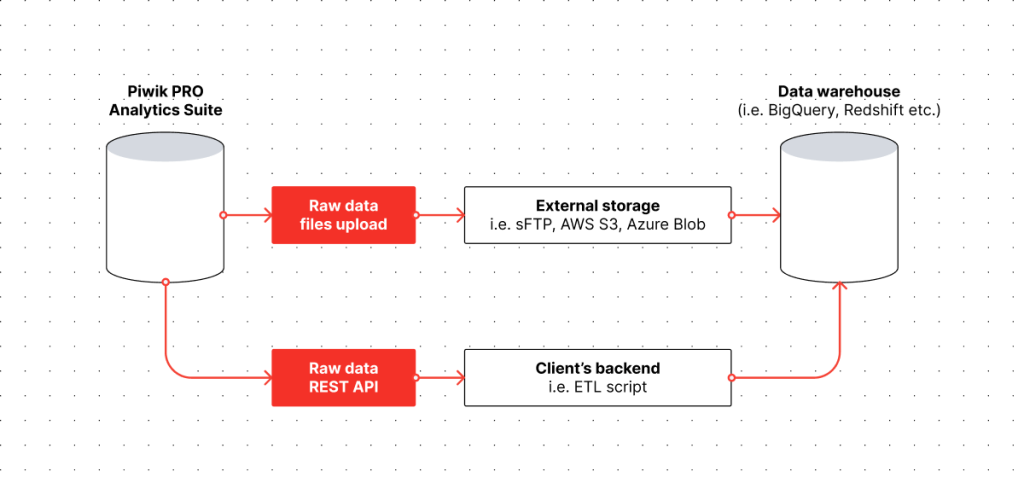
You can access raw data in Piwik PRO by:
- Uploading raw data files to your sFTP, AWS S3, Azure Blob, or BigQuery.
- Connecting to Piwik PRO’s REST API and pulling full or filtered raw data sets.
You can also use ready templates and connectors for tools like Power BI, and Looker Studio.
Piwik PRO allows you to use raw data without extra costs using the API. For a fee, you can also access raw data in daily exports. You gain access to historical data from up to 25 months ago. You can export the data from a report directly to a CSV.
You can integrate different types of data to build the necessary reports with ease. Here are a few methods for linking analytics data with another data set:
- Using BI tools like Power BI or Looker Studio by connecting them with Piwik PRO. This solution is fairly easy and accessible for many people. However, there may be issues with data integrity and low performance in the case of big data sets.
- Using data movement (like Fivetran) or data integration and management platforms (like Supermetrics). Both of these tools have native connectors to Piwik PRO. These platforms integrate with many data sources and can push data to many destinations. Additionally, Supermetrics offers the ability to extract data from different sources, blend it and prepare it for reporting – for example, in BI tools.
- API integration and building a custom data pipeline. This option offers more control and flexibility in data wrangling but can be costly as it requires developers to build the data pipeline.
Best practices for working with raw data
To start benefiting from raw data, you must set up an optimal process to cover its collection, export and analysis. By following this process, you can gain deeper insights into user behavior and make data-driven decisions for your business.
Here is a sample step-by-step workflow for effectively applying raw data:
- Identifying raw data sources – Begin by determining which data points you will need, such as events or user properties, and where the data will come from. This includes internal sources (like CRM systems, sales data, etc.) and external sources (market research, social media, etc.).
- Data collection and integration – Gather data from the identified sources. When retrieving the data for your analysis, ensure it’s comprehensive, accurate, and relevant to your research or project. Use an appropriate method, such as the API, to get the raw data from your analytics platform. If applicable, make sure you integrate data from multiple sources.
- Data cleaning and preparation – This step involves cleaning and organizing the raw data to make it suitable for analysis or visualization. Make sure you remove duplicate or irrelevant data points, handle missing or erroneous values, and standardize data formats and structures.
- Data export – Exporting the raw data helps broaden the scope of analysis and provides more detailed insights. Choose a suitable format (such as CSV or JSON) and export method. In the case of large datasets, consider incremental exports or using cloud storage solutions.
- Data analysis – Import the raw data into your preferred analysis tool. Apply various data analysis techniques to uncover patterns, trends, and insights. These include statistical analysis, predictive modeling, data visualization, and more. Create visual representations like charts, graphs, and plots to make complex data more understandable.
- Interpreting the results – Connect the insights from your analysis to business goals and KPIs. Based on your findings, you should be able to develop actionable recommendations. Communicate the results effectively by documenting the methods, findings, and conclusions clearly and concisely.
- Refining the raw data process – Continuously adjust your process to ensure its effectiveness. Update tracking and export procedures as your analytics needs evolve. Regularly validate the accuracy and relevance of your data.
Conclusion
Raw data can provide precision and depth, leading to more accurate and insightful decisions. Both sampled and raw data have their place in data analytics. They can significantly benefit decision-making processes and play a vital role in an organization’s sustainable growth and success. However, in the end, accurate data fuels accurate decisions. Raw data is a way to do more with your data, perform in-depth analysis and use your insights in data-driven marketing.
If you want to learn more about how you can use raw data in Piwik PRO to do more with advanced analytics, reach out to us:
The post How to use raw data in web analytics appeared first on Piwik PRO.
]]>Users are blocking and deleting cookies due to a lack of trust in the AdTech industry and what happens with their data. To build trust, companies must adjust their data collection processes to be transparent and respect users’ consent choices. Advertisers and marketers need to adapt to new methods and technologies for tracking and targeting users across different websites and devices that help build trust with users.
The post How do Google’s Enhanced Conversions and Meta’s Advanced Matching impact analytics appeared first on Piwik PRO.
]]>SUMMARY
- Advertisers and marketers need to adapt to new methods and technologies for tracking and targeting users across different websites and devices that help build trust with users.
- Google and Meta have introduced Enhanced Conversions and Advanced Matching, respectively, to improve ad targeting and conversion tracking using hashed first-party data.
- The two technologies raise serious privacy concerns connected with the potential for reidentifying users, lack of proper user consent and Google’s and Meta’s ability to reuse the data for their purposes.
- Companies should consider other options that don’t breach user privacy, such as contextual targeting for ads or privacy-compliant analytics with vendors like Piwik PRO.
Privacy regulations such as GDPR and CCPA have significantly changed how companies can track and measure user interactions online. Additionally, the rise of adblockers and browser tracking restrictions limit the use of third-party cookies on the web.
Users are blocking and deleting cookies due to a lack of trust in the AdTech industry and what happens with their data. To build trust, companies must adjust their data collection processes to be transparent and respect users’ consent choices. Advertisers and marketers need to adapt to new methods and technologies for tracking and targeting users across different websites and devices that help build trust with users.
To mitigate the impact of these privacy-facing developments, tech giants have created their own solutions – Google has introduced Enhanced Conversions, while Meta has launched Advanced Matching. They aim to enhance conversion tracking by leveraging first-party data, earning them the nickname “cookies on steroids“. However, recent guidance from the Federal Trade Commission (FTC) suggests that these solutions are not as privacy-compliant as they claim. Using them comes with significant privacy risks: once the data is captured, it is out of the user’s control, giving Google and Meta unlimited possibilities to use it to their benefit.
Today, we will explore Google’s and Meta’s initiatives more closely, looking into how they work and how privacy-compliant they actually are. We will also discuss other solutions that companies can utilize to combine privacy compliance with effective leveraging of data.
Before we dive in further, let’s explain some security concepts that will be relevant throughout this article:
- Hashing involves changing data into a deterministic string that can’t be turned back into its original form without employing extensive resources.
- Salting refers to adding a random string of characters to a piece of data prior to hashing to add an extra layer of protection and guarantee a unique output.
- Time-to-live (TTL) counts the time until data becomes useless and needs to be refreshed or replaced.
What are Google’s Enhanced Conversions?
Google’s Enhanced Conversions are designed to improve the accuracy of conversion measurement by using hashed data from your website. Enhanced Conversions are part of the Google Privacy Sandbox initiative, which is Google’s attempt at developing measures to support advertising without relying on third-party cookies.
As part of Enhanced Conversions, Google captures the data that prospects input on your website when filling out a form or completing a purchase. Examples of this data include visitors’ names, phone numbers, and email addresses. The data is kept pseudo-anonymized with a hashing algorithm known as SHA-256. Through hashing, identifying information is transformed into a character string.
Once the hashed data is sent to Google, it is matched with signed-in Google accounts to attribute campaign conversions to ad events such as clicks or views. The platform can then attribute conversions across devices and platforms so advertisers can build retargeting audiences.
Note that the hashed first-party data referred to here doesn’t fit the standard definition of first-party data – instead, it is a concept created by Google. Google collects the hashed first-party data via gtag and doesn’t give advertisers direct access to it.
What is Meta’s Advanced Matching?
Like Google’s solution, Meta’s Advanced Matching leverages data from your site or app to enhance conversion tracking.
This feature is part of the Conversions API (CAPI), which is Meta’s response to privacy updates like Apple’s iOS 14 changes and the introduction of the App Tracking Transparency (ATT) prompt. The Conversions API allows advertisers to send data directly from their servers to Meta, bypassing the browser’s privacy features.
Advanced Matching enables a website that uses the Meta Pixel to automatically collect visitors’ data and match them with users on their platforms. If you use a form on your website, the technology gathers form data like email addresses and phone numbers, hashes it, and then transfers it to Facebook or Instagram.
Benefits of Enhanced Conversions and Advanced Matching
The two technologies come with several advantages for businesses:
Improved conversion tracking accuracy
By using first-party data, these technologies offer a more precise way to attribute conversions, even across different devices and platforms. This leads to better-informed marketing decisions and optimized ad spend.
Enhanced ROI
With more accurate conversion tracking, businesses can better measure the return on their advertising investments. This allows for more effective budget allocation and improved campaign performance.
Data security
Both Google and Facebook emphasize the privacy-safe nature of their solutions. Enhanced Conversions and Advanced Matching use secure hashing techniques like SHA-256 to anonymize personal data before transmission, safeguarding the data while enabling detailed conversion tracking.
Privacy concerns
Despite Google’s and Meta’s claims that their solutions are privacy-compliant, there have been serious concerns about the ethical implications of scraping and utilizing personal data for conversion tracking.
Many argue that while this approach can enhance ad targeting and conversion tracking, it may compromise user privacy. The balance between effective marketing and respecting user privacy is a critical issue that needs to be addressed to maintain user trust and comply with privacy regulations.
Here are some additional criticisms concerning privacy:
Potential for reidentification
The Federal Trade Commission (FTC) has highlighted that hashing does not fully protect user anonymity and can still allow user identification. Hashing transforms data into a unique string of characters, which can still be reversed or matched with sufficient computational effort and supplemental data. Thus, hashing does not fully anonymize the data, and businesses must remain vigilant in their privacy practices. This undermines the privacy safeguards that hashing is supposed to provide and raises concerns about how securely user data is being handled and stored by Google and Meta.
GDPR compliance
There are also concerns about GDPR compliance when using Google’s Enhanced Conversions and Meta’s Advanced Matching. GDPR mandates that personal data be processed lawfully, fairly, and transparently. Businesses must ensure data minimization – collecting only what is necessary for the intended purpose – and that they only use the data for the specific purposes for which consent was given.
Privacy experts argue that Google’s and Meta’s practice of scraping form data and using it for ad conversion tracking may not fully align with these principles, particularly if users are not adequately informed or do not have a straightforward way to opt out of tracking.
On top of that, even though the data is hashed, it does not eliminate the privacy risks associated with collecting and processing personal data without explicit user consent. Under GDPR, businesses must obtain clear and explicit consent from users before collecting their data and be transparent about how this data will be used. Consequently, companies that are subject to the relevant privacy regulations and want to adopt these technologies must ensure they obtain the necessary user consent.
Implementation challenges
Next to privacy concerns, Google’s and Meta’s technologies may come with implementation challenges. More advanced configurations require technical knowledge. Additional expertise might also be required to configure tags and manage data privacy settings. In practice, this rarely happens as decisions are left to those with technical knowledge of how both platforms work rather than privacy teams that should oversee the setup process.
Adding a salt to the wound
A salt is a random value added to the data before hashing, meaning that even identical inputs produce different hashes. Adding a salt to the hash could enhance privacy by making it significantly more challenging to reidentify users. This approach mitigates the risk of attackers using precomputed tables to reverse-engineer the original data, thereby providing stronger protection against reidentification.
However, this added privacy measure would lead to lost revenue for companies like Google and Meta. The reason is that salting would disrupt their ability to effectively match hashed data across different sessions and devices. Without consistent hashes, it’s impossible to track user behavior accurately and attribute conversions, which is critical for optimizing ad targeting and measuring campaign performance. Consequently, the precision of ad targeting would decrease, leading to less effective advertising strategies and reduced ad revenue for these platforms.
How hashing works in Piwik PRO
Google and Facebook operate an ad business, while Piwik PRO provides analytics. Hence we can’t directly compare their features. However, we’re still able to contrast their approaches to privacy.
Unlike Google and Facebook, which store hashed emails or phone numbers, Piwik PRO temporarily only links events with one visitor session.
Google and Facebook use hashed data to track and reidentify users across different platforms, such as websites and mobile apps. Meanwhile, at Piwik PRO, temporary linking is utilized for pre-consent data tracking to ensure user data cannot be reidentified across sessions.
Here’s how hashing works in Piwik PRO:
- Data protection: When users visit a site, their client device characteristics are hashed and salted using secure techniques.
- Active session detection: Piwik PRO maintains a session hash, which is a mechanism linking the visitor and session in memory for up to 30 minutes from the last update.
- No reidentification: Unlike Google and Facebook, Piwik PRO drops the link between the visitor and their session (usually after around 30 minutes, which is the session hash’s time-to-live (TTL)). This means that once the data has been processed – for example, a visitor’s session has ended – for its intended purpose – such as anonymized analytics – the session hash is discarded, making reidentification of the user impossible.
- User consent: Before any data that could identify a user across sessions is collected or processed, explicit consent is obtained from the user. This aligns with GDPR and other privacy regulations prioritizing user control over personal data.
This methodology ensures that Piwik PRO’s use of hashing adheres to privacy best practices, offering a robust solution for businesses that need to track user interactions without compromising privacy.
Experts opinion
Brian Clifton
Digital analytics and privacy expert
A business thrives by encouraging people to buy, subscribe, and make contact. A big part of that process is giving people plenty of reasons to trust you. A remarketing approach based on a surveillance economy breaks that trust. Contextual remarketing is an alternative – it has been around for decades and works without profiling your customers. Whether you use remarketing or not, I would posit that the gains of building long-term trust with your customers and prospects, will far outway the short-term benefits of remarketing by stealth.
The bottom line
Google and Meta are pushing advertisers to adopt their technologies – without that, they will lose huge amounts of data that they currently use for their own purposes to target individuals for ads.
Let’s not forget that having explicit and informed user consent makes it possible to track users through access to their hashed first-party data and send it to Google or Meta. However, each business should individually assess its compliance and whether they have valid consent for such data processing purposes.
Substituting third-party cookies with hashed first-party data, as applied by Google and Meta, carries privacy concerns. Businesses should be aware of the negative privacy implications of Google’s and Meta’s technologies and consider more privacy-friendly options rather than risk loss of customer trust.
Without hashed first-party data, it will be harder for companies to perform personalized advertising due to the limited ability to stitch user sessions together, resulting in less personalized ads, though contextual advertising alternatives do exist (ironically, Google was an early leader in the field of contextual advertising until it changed its approach).
However, businesses can still collect vital data with platforms like Piwik PRO Analytics Suite. They can successfully use it to optimize their website or app, improve user experience, and inform marketing campaigns or content initiatives. They’re also still able to run ad campaigns through Google or Facebook or turn to other forms of advertising, such as contextual targeting.

Learn more about using Piwik PRO with Google Ads:
Learn more about how you can effectively collect and analyze user data while maintaining privacy compliance with Piwik PRO:
Read more:
The post How do Google’s Enhanced Conversions and Meta’s Advanced Matching impact analytics appeared first on Piwik PRO.
]]>The post “Cookieless future” is just a buzzword – Here is all you need to know about the end of third-party cookies appeared first on Piwik PRO.
]]>SUMMARY
- The “cookieless” future won’t be entirely cookieless. While major browsers are transitioning away from third-party cookies in the face of user privacy and security concerns, first-party cookies remain an integral part of the web.
- The demise of third-party cookies will particularly impact digital advertising practices. Advertisers and marketers need to adapt to new methods and technologies for tracking and targeting users across different websites and devices.
- Alternatives to third-party cookies are emerging, including Google’s Privacy Sandbox initiative, contextual targeting, data clean rooms, and cookieless identifiers like universal IDs. However, new ad industry standards without third-party cookies are yet to be developed.
- Marketers should turn to first-party cookies, which still dominate in marketing and analytics tools. They should prioritize first-party data collection to balance transparency and privacy with effective marketing strategies.
Cookies have been a vital part of web browsing for years. While some cookies provide essential functionalities like maintaining visitor sessions, third-party cookies have been controversial due to their ability to track users across the web without their knowledge or consent. People have grown more conscious about using and sharing their data, and many feel uneasy about the vast amount of personal data amassed through cookies.
Apprehensions surrounding third-party cookies have come to the forefront, spurring legislative changes. This has motivated tech giants like Google, Apple, and Mozilla to transition their browsers away from third-party cookies.
However, while other types of cookies face different restrictions, such as a limited lifespan, they are not going away. Although alternatives to cookies have been popping up, they have yet to be widely adopted. Thus, we don’t know what the future of marketing and advertising will look like.
Today, we will explore the challenges of the demise of third-party cookies for marketers, businesses, site owners, and consumers. We will look into new methods of tracking users and collecting analytics data and show you how to navigate a future that will not be so cookieless after all.
What are cookies
Cookies are small pieces of data stored on a user’s device that contain information about their interactions with websites.
Cookies are used for various purposes, such as:
- Session data management.
- Personalization and authentication.
- Tracking user behavior for analytics.
- Tracking users across different websites for targeted advertising.
Types of cookies and their differences
There are two main types of cookies: first-party and third-party cookies.
First-party cookies
First-party cookies are set by the website the user is currently visiting.
They are usually used to enhance user interactions with websites. For one, they help maintain sessions and remember login credentials, preferences, and shopping cart items. They also enable the personalization of content and advertising based on browsing history and interests and collect analytics data for website improvement.
Some first-party cookies provide essential functionalities on a website and aren’t considered invasive.
Third-party cookies
Third-party cookies are created by domains other than the one that the user is visiting.
Third-party cookies gain access to your visitors’ browsers through external services embedded in your site, such as:
- An embedded YouTube video.
- A social media widget.
- An ad widget from an ad display network.
Third-party cookies are used for cross-site tracking, retargeting, and serving curated ads to users via ad platforms or social media based on browsing history and other online behavior across different websites.
These cookies enable brands and vendors to gather a significant amount of personal information about a user, making it possible to create detailed user profiles. They can also be used for malicious purposes, such as tracking users to steal their personal information or deliver malware.
On the other hand, they let websites provide certain functionalities, such as live chats. However, the absence of third-party cookies does not typically affect a website’s core functionality.
Why are third-party cookies being phased out
When cookies were first created in 1994, sites gained the ability to track information across pages, which enabled many useful functionalities, such as running online shops. At the same time, the vast potential for abusing the technology and violating user privacy and security became clear.
These concerns were so apparent that in February 1996, the Financial Times published the first article about the dangers of cookies.
Third-party cookies allow advertisers and trackers to follow users across the web and collect sensitive information without explicit consent, which can breach trust between all parties. Because of the widespread use of cookies, data is scattered across various apps, websites, and services, making it difficult to control what happens with it.
Consequently, cybercriminals can use cookies to impersonate users, gather financial data, steal passwords, and engage in other nefarious online activities.
Internet users have been sensitive to the unauthorized collection and use of their personal data, viewing it as an invasion of their privacy. For example, users have been turning to ad block extensions to protect themselves from intrusive ads and trackers online. As of 2022, 37% of internet users worldwide had adopted ad blockers.
Concerns about third-party cookies have led to increased scrutiny and regulatory efforts to respect user privacy. Regulations like the CCPA & CPRA and GDPR view cookies containing identifiers as personal data. These privacy laws specify the requirements for gathering consent to track and collect user data online.
Under the jurisdiction of these laws, websites must, among others:
- Obtain explicit user consent before firing cookies, collecting or storing data on users’ browsers, or processing personal data for tracking and advertising.
- Clearly inform end users about the tracking technologies they use, detailing the providers, purposes, and duration of data collection.
- Keep consent records and provide the data in case of an audit or data subject access request.
- Allow users to change or revoke their consent preferences as easily as they gave consent.
These regulations impose severe fines and penalties on data collectors who don’t adhere to their requirements.
For years, cookies have been integral to the online experience. However, as major browsers withdraw support for third-party cookies, they’re paving the way for marketing and advertising that don’t rely on them.
Experts opinion
Julien Coquet
“While the move away from third-party cookies is good for privacy, it is not so good for advertising, targeting, and remarketing. The treasure trove of data hoarded by ad networks for years to identify users and their preferences is becoming worthless “overnight.” But first-party cookies are here to stay, which means that data strategies need to shift to first-party and zero-party data. The problem is that companies should have adopted that shift as soon as the first sign of third-party cookie blocking became apparent.
Customer data platforms (CDPs) offer a way to federate information about a user based on first-party/zero-party data they provided elsewhere. Though CDPs are great for enriching user profiles for activation elsewhere, at this time they aren’t optimal for realistic, real-time updates and personalization. What options are there? My bet is on server-to-server integration and personalization for logged-in users, which we are starting to see.
Concerning advertising, the loss of third-party cookies lowers the targeting accuracy of ads, but that doesn’t mean advertising platforms won’t work anymore. There are various projects to replace third-party cookies, especially the Privacy Sandbox initiative carried by Google, for websites and Android apps. We should now focus on making data collection smarter, privacy-friendlier, and more frugal.”
The deprecation of third-party cookies in Chrome
Compared to other browsers, Chrome has been slower in imposing restrictions on third-party tracking. Third-party cookies power digital advertising, which is a vital component of Google’s business. Also, given Chrome’s 67% market share, Google’s approach to cookies impacts the entire industry.
- In January 2020, Google announced that it would phase out support for third-party cookies in Chrome, beginning with trials on conversion measurement and personalization by the end of 2020.
- In July 2022, Google announced a two-year delay to the end of 2024 for the of third-party cookies.
- Testing started in January 2024 with the rollout of a new Tracking Protection feature. Google restricted third-party cookies for 1% of Chrome users worldwide.
- In April 2024, Google announced it will not complete third-party cookie deprecation during the second half of Q4 as it previously expected and postponed it until 2025.
- On July 22, 2024, Google announced that it will not deprecate third-party cookies in Chrome. Instead, Google will introduce a new experience in Chrome that lets users make an informed choice about their web browsing, which they can adjust at any time.
Despite Google’s recent change of heart on third-party cookies, the technology has declined in prevalence due to the associated privacy concerns and is unlikely to recover. The quality and reach of third-party cookies have been continuously decreasing. If users get the option to opt out of tracking, they may additionally contribute to the technology becoming a thing of the past.
For years, the web has been moving away from third-party cookies in favor of more privacy-first technologies. Due to Google’s continuous promise to move away from third-party cookies and their deprecation in other major browsers, marketers had to adjust their approach by considering alternative solutions. The online advertising industry, which is particularly affected by cookie-related changes, still needs to adopt new ways of targeting users.
While other browsers aim to transition away from third-party cookies, Google’s “cookieless” alternatives don’t necessarily focus on privacy. Google wants to preserve control over the majority of online advertising and the revenue generated from it. As the world’s largest ad platform, Google is strongly interested in maintaining its ad-targeting capabilities.
When Google announced it wouldn’t be deprecating third-party cookies in Chrome, the company vaguely explained its next steps. Google stated that it has been discussing its new path with regulators and will engage with the industry as it rolls out. The company will also continue working on the Privacy Sandbox API, which it has been developing as a privacy-focused alternative to third-party cookies.
To get another perspective on Google’s recent decision to retain third-party cookies, read the interview: Piwik PRO Head of Marketing Dominika Gruszkiewicz On Why Google Third-Party Cookies Will Stay
What will replace the third-party cookie in Chrome?
Introduced in August 2019, the Privacy Sandbox is centered around developing measures to support advertising functionalities without relying on tracking users across websites.
The Privacy Sandbox has been an iterative process, with different APIs developed and deployed for testing. This process reached a breakthrough when the Privacy Sandbox initiative announced the release of six new APIs for Chrome in July 2023.
These APIs include:
- Topics
- Protected Audience
- Attribution Reporting
- Private Aggregation
- Shared Storage
- Fenced Frames
Here are their specifics:
Topics
Topics allow the browser to infer a selection of recognizable interest categories based on recent browsing history to enable sites to serve relevant ads. Unlike third-party cookies, Topics will only share users’ general interests, rather than granular behavior, across multiple sites.

Google’s Topics API is the second iteration of the Federated Learning of Cohorts (FLoC) proposal, which was ultimately abandoned due to privacy concerns.
Protected Audience
Protected Audience enables advertisers to run ad auctions using JavaScript code within the browser. Advertisers can also run targeted remarketing campaigns to custom audiences or groups of people with a common interest.
Attribution Reporting
Attribution Reporting allows measuring conversions from ad clicks and views, and ads on other platforms without tracking user activity across websites. It employs two types of reporting:
- Event-level reports – Providing detailed conversion data without revealing user identities.
- Summary reports – Presenting summarized data across large groups of users.
Private Aggregation
Private Aggregation makes it possible to generate aggregate data reports using data from Protected Audience and cross-site data from Shared Storage.
Shared Storage
Shared Storage allows sites to store and access unpartitioned cross-site data. This data must be read in a secure environment to prevent leakage.
Fenced Frames
Fenced Frames enable securely embedding content onto a page without sharing cross-site data.
Privacy Sandbox and the ad industry
There are mixed opinions about the Privacy Sandbox. Although it’s a viable alternative to third-party cookies, it will only operate in Chrome. While Chrome has a majority of market share, other browsers are still responsible for large chunks of traffic. Chrome is also not representative of traffic from other browsers and devices, where users may behave differently.
The identifiers created with Privacy Sandbox aren’t owned and stored by the advertisers, so they can’t be passed and activated in other systems.
According to a report by IAB Tech Lab:
“In its current form, the Privacy Sandbox may limit the industry’s ability to deliver relevant, effective advertising, placing smaller media companies and brands at a significant competitive disadvantage.”
In the end, Privacy Sandbox will not be the only solution to the deprecation of third-party cookies, but it is one of the alternatives that advertisers can consider. You can monitor the Privacy Sandbox timeline, as various proposals are currently in different development and testing stages.
Experts opinion
Jason Packer
Analytics Architect and Consultant
“Third-party cookies have several functions, and when they finally disappear in Chrome, that functionality will fracture into many solutions for different scenarios.
For example, third-party cookies utilized for ad targeting will be replaced by a patchwork of tech: hashed first-party data sent to ad networks, walled garden logged-in user data, the Topics + Protected Audience APIs from Privacy Sandbox, IP addresses, and probabilistic browser targeting. View-through attribution will be replaced by another set of technologies. From an advertiser’s perspective, this is a big challenge to the old model of open web with no login required.
The third-party cookie is clearly a problematic technology, but its replacement requires learning different things depending on what you are using third-party cookies for. There will be a period of time when we see which solutions really catch on. Despite 1/3 of users already rejecting third-party cookies and all the talk during the run-up to this turndown, the selection and winnowing of replacement tech hasn’t really happened yet.”
The phase-out of third-party cookies by other vendors
Many browser vendors have been employing restrictions on user tracking for years.
Apple
Apple has implemented Intelligent Tracking Prevention (ITP) in Safari. ITP blocks third-party cookies by default and restricts first-party cookies and other browser storage options.
Additionally, Apple has introduced App Tracking Transparency (ATT). This user privacy framework requires all iOS apps to request permission via a pop-up to access the Identifier for Advertisers (IDFA) or device ID and track users across apps and websites.
Firefox
Firefox offers Enhanced Tracking Protection, which lets users block cookies and storage access from third-party trackers. Thus, users can decide what level of privacy they want to set up in their browsers.
Brave
Brave has been a privacy-focused browser from the start, blocking third-party cookies by default. It also enables many additional privacy and security features, allowing users to customize their privacy settings more granularly.
What does the demise of third-party cookies mean
Organizations that rely on third-party cookies will face challenges as certain functionalities won’t be available.
Activities that will be impacted include:
- Audience buying based on third-party data.
- Data activation on the web.
- Retargeting on the web.
- View-through advertising attribution.
The phase-out of third-party cookies signifies a massive transformation in digital advertising, making it more challenging for advertisers to track users across different websites.
As cookies become a thing of the past, the focus is on developing new technologies and methodologies that align with the evolving digital advertising ecosystem and enable marketers to deliver relevant and personalized content.
Experts opinion
Josh Silverbauer
“Third-party cookies have been a fundamental part of the web for nearly three decades. A shift in usage is going to create a huge change for less technical marketers. Advertising companies that rely on “just placing a pixel on a page” will need to adapt to more sophisticated methods of first-party data exchange, data stitching, and data modeling. They will also have to become more comfortable with gaps in tracking due to opt-outs and rely more on AI to “fill in the gaps.” This shift may lead to a perceived loss of control and a feeling of uncertainty and distrust in the data.
As a result, some marketers may pull back on digital marketing spend and return to more traditional advertising methods, while others may allow AI to take more control and operate in a state of ignorant bliss. Couple all of this with the fact that people crave personalization, and the loss of cookies increases the difficulty to personalize results… it’s going to be messy. But dessert is a messy dish, so I’m here for it.”
How to navigate the future without third-party cookies
The “cookieless future” refers to an impending reality in which third-party cookies are no longer part of marketers’ toolkit. It’s a landscape without access to user data collected through third-party cookies, impacting how we perform user tracking, generate leads, retarget ads, and understand user behavior.
This future, although challenging, presents an opportunity for innovation and growth in the digital marketing sector.
Focusing on first-party cookies
If your company uses first-party cookies as its primary marketing fuel, your activities won’t be affected much. These cookies will continue to work and remain an option, delivering measurable benefits even in the face of the changes concerning third-party cookies.
There are many first-party cookie-based methods you can still use in your marketing, such as:
- Web analytics. You can track users visiting your domain and collect analytics insights to improve user experience and drive better marketing results for your business. That’s possible with analytics tools that use first-party cookie identifiers, such as Google Analytics or Piwik PRO.
- Product analytics. Analyzing user journeys in digital products is based on a first-party identifier, like a first-party cookie or mobile app identifier generated by the SDK. In both cases, platforms like Mixpanel or Piwik PRO will function normally and provide useful data.
- Marketing tools. Most marketing tools already utilize first-party cookies, meaning you can use them despite changes to third-party cookies. For example, you can benefit from A/B testing tools (like AB Tasty, Optimizely or Convert) or marketing automation platforms (like SALESmanago, Hubspot or Marketo).
- On-site personalization and remarketing. You can personalize user experience on your website by applying first-party data-based technologies, be it Optimizely or Piwik PRO Customer Data Platform.
- Retargeting and tracking on iOS and Android. You can still retarget and track users across native mobile apps on iOS and Android using mobile identifiers.
Creating a first-party and zero-party data strategy
If you want your company to prioritize customers’ privacy and trust, you should focus on first-party data collection, supplemented by zero-party data.
First-party data is collected through direct interactions between the audience and the brand. It includes personal details, contact information, behavioral data from different channels, social media activity, purchase history, consent records, and more. Companies can enhance their first-party data approach by integrating analytics with data from other tools, such as CRM, marketing automation tools, email software, and many more.
Another valuable type of data is zero-party data, which refers to information intentionally and proactively shared by individuals with a company or organization. Zero-party data can be collected from customer reviews or comments, product-related preferences, newsletter opt-ins, or notification settings.
First-party and zero-party data are valuable because their collection relies on transparent, consent-based data practices and help establish trust between the company and its customers. These types of data are also accurate and reflect your customers’ behavior, making them relevant and practical when applied to initiatives like marketing or advertising campaigns.
Find out how to create a first-party data strategy from our blog post: What is first-party data and how does it benefit your marketing.
“Cookieless future” and advertising
The ad tech industry stands to lose from the demise of the third-party cookie.
Ad tech vendors and digital advertisers have been using third-party cookies for features like:
- Identification.
- Frequency capping.
- Measuring performance and attribution.
- Audience activation.
- Cookie-syncing or matching between, for example, demand-side platforms and supply-side platforms.
The advertising industry needs to adopt effective methods that don’t raise privacy and transparency concerns like third-party cookies did. Striking that balance is often challenging as new industry standards must be created.
Some alternatives for digital advertisers include:
Contextual targeting
Contextual targeting is a form of targeted advertising that focuses on aligning ads with the content of a particular page. For example, it may involve placing an ad for kitchen utensils on a recipe site or an ad for a tour operator on a travel site.
Ads are segmented based on keywords, site topics, language, and location, and then matched with relevant content. By making ads reliant on a page’s context, brands can reach audiences with ad placements that are likely to resonate with visitors. Research from Sapio Research and DV shows that 69% of consumers are more likely to look at an ad if it’s relevant to the content they are reading.
Contextual targeting is a more privacy-friendly alternative to behavioral targeting, which is based on personal browsing data. Previously, contextual targeting faced issues with the quality and efficiency of classifying content. However, thanks to AI, modern contextual targeting can understand the nuances of content, thereby increasing engagement and effectiveness.
Contextual targeting offers numerous benefits in the “cookieless” world, such as:
- It offers the ability to reach large, diverse audiences, including acquiring new customers.
- It respects user privacy and doesn’t feel intrusive.
- It can help users find what they want and increase their purchase intent.
- It’s easy to start and optimize.
- It doesn’t rely on third-party cookies or users’ personal data.
- It can positively impact brand perception and reputation.
- It works across different channels.
Learn more about contextual targeting: Contextual targeting – a privacy-friendly alternative to invasive ad tracking.
Data clean rooms
A data clean room is a collaborative environment where two or more participants upload their first-party data and compare it to the aggregate data added by other companies.
Data clean rooms allow brands and advertisers to glean insights from each other’s first-party data under strict controls. They can use data clean rooms to:
- Run targeted advertising campaigns.
- Apply frequency capping.
- Perform audience analysis and enrichment.
- Measure and report on campaign performance.
- Run attribution.
All the data stays within the data clean room. Even though user-level data is added to a data clean room, it is not exposed to other companies.
There are different types of data clean rooms:
- Clean rooms as a service – Many data clean rooms exist as a service, meaning they are provided by independent vendors or platforms. These clean rooms are often the most flexible regarding what data can be used and how users can configure it. Examples include AppsFlyer, Habu, InfoSum, LiveRamp, and Snowflake.
- Private clean rooms – This generally includes large publishers with massive amounts of user data and content, like Disney, Spotify, and TikTok. These companies have proprietary private clean room technologies to monetize their customer base and create their own walled-garden advertising ecosystem.
- Walled garden data clean rooms – Walled gardens operate within a closed ecosystem and are owned and offered by big tech providers such as Google, Facebook and Amazon. They provide hashed and aggregated data to companies that use their advertising platforms, typically without the ability to combine data from other sources.
By securely aggregating and connecting customer data sets in a clean room environment, marketing teams can draw insights from a wide range of sources to better understand their customers while meeting data privacy requirements halfway.
Experts opinion
Vibeke Specht
“The future is not “cookieless” since first-party cookies are in it for the long haul, providing leverage to walled gardens. However, the future is definitely more fragmented and privacy-aware but also more open and diverse thanks to strong antitrust enforcement by the EU Commission, among others. This makes the present moment an excellent opportunity for marketers who want to reassess old truths, KPIs, tools, and where they spend ad dollars.
As marketers, we have the right to demand more transparency and, for example, a way better placement reporting than we have today. So, the future will bring us better marketing and ROI – if we want it to. The choice is ours.”
Cookieless identifiers
Ad tech vendors and the ad tech ecosystem are developing alternative universal IDs to replace third-party cookies. Without third-party cookies, ad tech and data companies can’t perform cookie syncing like they used to.
The advertising industry needs to find alternative ways to create IDs, such as turning a person’s login details (e.g., email address) into an ID.
The selected ID alternatives must:
- Work across all digital channels.
- Provide the consumer with greater control.
- Operate in transparent ways.
- Better explain its value to consumers.
Balancing these aspects is challenging; hence, no solutions have been widely adopted yet. At the same time, this could mean that Big Tech companies will manage to increase their market share with their solutions at the expense of independent ad tech.
Here are some potential identifiers that have been introduced:
Universal IDs
A universal ID is a unique user ID that allows ad tech companies to identify users across different websites and devices. Universal IDs can operate within one environment, such as browsers, or identify users across various environments, such as browsers and mobile devices.
While universal IDs perform the same functions as third-party cookies, the difference is in how they are composed. Universal IDs are created using probabilistic data (e.g., IP address, browser type and model, and user-agent string), deterministic data (e.g., email address or phone number), or both. They help solve issues with cookie syncing and user identity.
Some notable universal ID solutions include:
Unified ID 2.0
Unified ID 2.0 is an identity framework that operates through a single sign-on to capture a user’s email address and consent once they visit a publisher’s page that supports UID 2.0. This consent is applied to targeted advertising across all publishers within the UID 2.0 network. Once the user logs in and consents, a hashed and encrypted identifier is created.
ID5
ID5 provides the advertising ecosystem with a stable encrypted user ID that replaces cookies and Mobile Ad IDs (MAIDs). Publishers, advertisers, and ad tech platforms can use these IDs to recognize users and deliver campaign objectives across different types of devices.
ID and device graphs
ID resolution services like ID and device graphs rely on taking and merging first-party IDs.
These IDs are taken from online and offline channels, such as websites, mobile apps, and customer and data platforms (such as CRMs, CDPs, and DMPs), and sent to the ID graph. Next, they are matched with other IDs in the graph using a combination of deterministic and probabilistic methods.
The main goal of ID and device graphs is to piece together IDs to create a centralized view of consumers rather than use these IDs for online media buying. Thus, companies can identify customers across different devices and channels and run various cross-device activities, such as ad targeting, personalization, and attribution.
For ID and device graphs to be lawful, users sharing their data must provide valid consent.
Learn more about advertising IDs that are alternatives to third-party cookies: Identity in AdTech: Meet The Various Universal ID Solutions.
Piwik PRO and the demise of third-party cookies
The phase-out of cookies won’t impact the web analytics capabilities in Piwik PRO, but it may affect your use of third-party tracking scripts.
Here are the specifics of how cookies work in Piwik PRO:
First-party cookies
Piwik PRO exclusively utilizes first-party cookies for data collection. Users can continue to rely on our analytics platform without concerns about the removal of third-party cookies. Even without third-party cookies, you won’t see any difference in collecting analytics data from Chrome users.
Check out our help center article on Cookies created for visitors by Piwik PRO for more details.
Third-party scripts
Tag Manager allows you to implement third-party scripts like Meta Pixel or LinkedIn Insight Tag. Third-party scripts on your website can set both first- and third-party cookies. As a result, some scripts may not work as before without third-party cookies. This could lead to issues like incorrect campaign displays and difficulties in collecting campaign data.
Handling these issues depends on how ad tech companies like Facebook or Google Ads approach the transformation and what alternative solutions they provide for their pixels and other tracking tags. At Piwik PRO, we will do our best to adapt to any changes the vendors make.
For now, the consensus on the new ad tracking methods is not there yet. There are already things you can do to prepare for restrictions on third-party cookies:
- You can export goal conversions from Piwik PRO to Google Ads or Bing Ads. These exports will be helpful if Google Ads or Bing Ads cannot collect this data due to the lack of support for third-party cookies.
- The Meta Pixel has the option to rely on first-party cookies, which you can adjust in the pixel’s settings.
- Use the Piwik PRO Customer Data Platform to activate your data in other marketing tools and create targeted campaigns, send personalized emails, show relevant ads, and more.
Cookieless tracking
Piwik PRO also offers cookieless tracking, which involves alternative user tracking mechanisms, such as with a session hash.
Since cookies play a pivotal role in recognizing and tracking returning visitors along with their browsing sessions, cookieless tracking has certain limitations and can impact the precision of data.
However, cookieless tracking helps you align with strict cookie requirements. It still lets you collect valuable analytics data, such as events and traffic sources. This makes it a great option if you can’t use cookies for tracking purposes due to privacy laws.
Learn more about tracking options in Piwik PRO: Collect data in a privacy-friendly way.
Getting ready for the end of third-party cookies
To make your company well-prepared for the future, make sure to:
- Revisit all your tools and understand your first-party and third-party cookie situation. Analyze what role these cookies have in your current marketing and advertising strategy.
- Develop a first-party data strategy. Focus on trust and transparency in your relationship with users. You can support your efforts by showing users the value exchange behind sharing their data.
- Make sure you adopt any relevant data privacy and transparency measures. Implement a consent management system (CMP) to collect and manage user consent.
Google’s Consent Mode v2 APIs communicate with GA4, Google Ads, and a range of Google’s other ad-tech products. Google has also made Consent Mode v2 mandatory, so to continue using Google’s products, ensure the CMP has a built-in integration with Google Consent Mode v2 – such as Cookie Information.
- Adjust your KPIs to focus on quality metrics. Prioritize engagement and conversion metrics. Focus on KPIs that reflect direct engagement and conversion on your site, such as session length, conversion rate, and goal completions.
- Get familiar with alternative marketing and advertising methods. Monitor the status of developments, like the Privacy Sandbox, and consider how they could fit into your company’s strategy.
Even without third-party cookies, you can benefit from a range of Piwik PRO’s features to collect, draw, and use valuable insights from your data. Reach out to us if you want to know more:
The post “Cookieless future” is just a buzzword – Here is all you need to know about the end of third-party cookies appeared first on Piwik PRO.
]]>The post What is behavioral data and how can it help you better understand your customers appeared first on Piwik PRO.
]]>What differentiates behavioral data from other types of data is that it reveals why users behave the way they do rather than just what they are doing. This powers data-driven decision-making across your organization regarding optimizing product offerings, website experiences, marketing campaigns, and more. Ultimately, behavioral data enables you to grasp what customers expect from your product and deliver more personalized, relevant experiences.
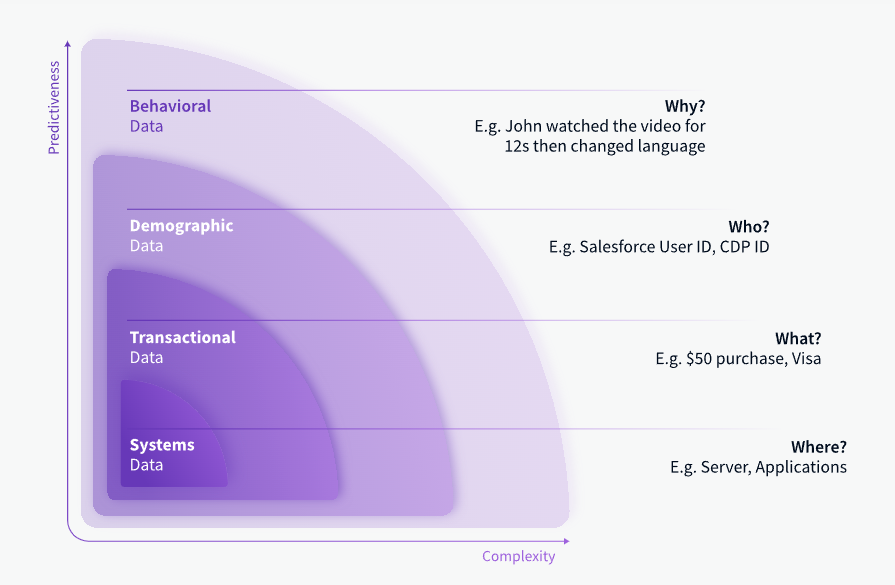
Examples and sources of behavioral data
Behavioral data represents real, observable actions customers take across both digital and physical environments. This information directly signals what customers do and eliminates the guesswork around their intentions.
Behavioral data can be obtained from both online and offline sources.
Examples of online behavioral data
- Website interactions: clicks, searches, page visits and video views.
- Mobile and web app usage data and metrics.
- Ecommerce store interactions: adding an item to a cart, abandoning a cart, creating an account and canceling an order.
- Form submissions.
- File or app downloads.
- Email metrics: open, click-through and unsubscribe rates.
- Customer service interactions across channels.
- Point-of-sale (POS) and transactional data.
- Social media interactions: likes, reactions and comments.
- Product reviews.
Examples of offline behavioral data
- In-store purchases and returns.
- Foot traffic patterns and in-store interactions.
- Call center conversation topics.
- Event participation and engagement.
- Loyalty program activity.
- Service and consultation appointments.
The first-party nature of most behavioral data makes it useful for brands looking to better understand their customers. Because first-party data comes from direct customer interactions, it is highly actionable for optimization and inherently compliant with privacy laws if managed responsibly.
Compared to third-party data, the use of which has been a growing ethical and regulatory concern, transparent first-party behavioral data collection minimizes various errors and misuse risks.
How behavioral data can help you better understand your customers
Businesses gain invaluable insights into customer preferences, needs, pain points, and expectations by analyzing the myriad of their interactions – from browsing patterns on a website to purchase histories. This data allows companies to tailor their products, services, and marketing efforts to better align with customer behavior. Such alignment not only enhances the customer experience but also drives business growth through increased loyalty and sales. In essence, behavioral data acts as a compass guiding businesses toward more customer-centric strategies.
Here are a few areas where behavioral data proves useful:
- Targeted marketing campaigns: Businesses can use customer data insights in other systems, such as CRM or marketing tools, to target customers with personalized content and offers.
- Cross-sell and upsell opportunities: Understanding past purchases and preferences allows for targeted cross-selling and upselling, enhancing customer value.
- Optimizing sales processes: You can boost your customer acquisition and retention efforts, reduce churn, and improve customer LTV.
- Personalized customer experiences: User behavior will tell you what content people read, which pages are most popular, how people navigate between pages, and what they look for using site search. With this data, you’ll know how to structure information for easy navigation.
- Insights for product development: Behavioral data is a trove of information on ways to make your products better.
- Improved customer conversion and retention: Tracking the customer journey enables targeted interventions at different stages, enhancing conversion and retention strategies. This is especially important for product teams trying to better understand users and improve their experience.
- Enhanced customer support: Behavioral data aids customer support teams in identifying friction-heavy touchpoints and providing tailored and effective support where needed.
- Identifying high-value customers to sell more: By analyzing purchasing habits and engagement, ecommerce businesses can segment users to target and nurture the most valuable ones.
- Churn prevention: Behavioral data about product usage can help identify customers at risk of churning, allowing for proactive engagement and retention strategies.
Behavioral data analytics
Companies can use behavioral data analytics to understand what people do on a website, from when they first visit to when they buy a product. This helps businesses identify what makes customers go through with a purchase and what stops them from buying. Equipped with this information, they can make their websites more appealing to what customers want, increasing their satisfaction and loyalty and making them more likely to spend money.
Behavioral analytics is also great for spotting the most valuable customers. This allows companies to apply their marketing resources where they offer the best return. Also, by understanding what customers like, companies can personalize their content to each customer. This helps grab their attention and encourage them to return in the future.
Lastly, behavioral data is useful for maintaining customers. By learning what customers buy and what they like, companies can devise smart ways to keep them interested and stop them from going to other brands. This is crucial for maintaining a steady group of loyal customers to nurture.
The challenges of collecting and using behavioral data
Using first-party behavioral data for customer insights entails specific governance, analytical, and ethical challenges. With the growing variety and volume of data gathered across platforms and environments comes complexity – and without careful management, missteps occur.
Failing to mindfully collect, resolve, store, analyze, and activate behavioral data can undermine analytics accuracy, regulatory compliance, and customer trust. Here is how organizations can address the challenges of collecting and using behavioral data:
| Challenge | Solution |
|---|---|
| Compliance with privacy laws (GDPR, CCPA and others) | Implement a comprehensive data management platform that ensures compliance with privacy laws. This could include features for consent management, data access, and permission control. |
| Respecting consumer advertising preferences | Utilize preference management tools to track and honor consumer choices, aligning with “Do Not Sell” and “Do Not Track” lists. |
| Data retention schedules | Deploy automated data lifecycle management systems that enforce retention policies and schedules, ensuring timely deletion of data. |
| Right-to-access policies | Implement user-friendly data access portals that allow consumers to view, transfer, and delete their personal data easily. |
| Integrating data from various sources | Use advanced customer data platforms (CDPs) for centralizing and reconciling data from disparate sources into accurate customer profiles. |
| Maintaining scalable data infrastructure | Develop or adopt scalable cloud-based infrastructure solutions with robust data processing capabilities, such as Apache Kafka for streaming data. |
| Filling in specialized data roles | Focus on talent acquisition and training programs to fill specialized roles like data or AI ethicists and Data Protection Officers. |
| Cross-departmental collaboration | Implement collaboration platforms and inter-departmental workflows. For example, use tools like Slack for communication and Trello for project management. |
| Dealing with reputational risks connected with unlawful data practices | Adopt a transparent approach to data usage, with clear consumer communication strategies and open disclosure policies. |
| Cybersecurity | Strengthen cybersecurity measures by using advanced security solutions, such as firewalls, intrusion detection systems, and regular security audits. |
Best practices for working with behavioral data
You can leverage behavioral data responsibly and effectively if you:
- Collect explicit consent and be transparent. Communicate how the collected data will be used and obtain opt-in consent from customers when required.
- Prioritize privacy and security. Follow regulations like GDPR to honor user privacy rights. Implement relevant measures, such as data anonymization and appropriate security measures.
- Maintain data integrity. Carefully process and structure behavioral data to correct errors. Record metadata like timestamps and sources.
- Develop strong data governance. Document policies for behavioral data collection, storage procedures, access controls, and oversight procedures aligned with regulations.
- Prioritize data minimization. Treat data as a liability, not an asset. Continuously evaluate ways to collect less data while preserving analytical value.
- Use homegrown identity resolution. Avoid buying third-party data for identity resolution. Develop compliant strategies like zero-party data collection.
- Build an ethical data culture. Foster awareness and shared responsibility for using data ethically across teams via training and leadership.
These best practices form the foundation for maintaining customer trust by putting their well-being first. While an investment initially, this pays long term dividends across both ethical and performance metrics.
Behavioral analytics
Collecting and interpreting behavioral data constitutes the basis for all analytical endeavors. The effectiveness of behavioral analytics depends on the quality and comprehensiveness of the behavioral data collected.
Organizations collecting relevant, high-quality behavioral data can extract more meaningful insights through analytics. This leads to more informed decision-making across fields like marketing and product development.
Behavioral analytics for marketing teams
Behavioral analytics in marketing involves analyzing customer data to understand purchasing patterns, content preferences, and activity on different marketing channels. This approach enables marketers to create targeted campaigns, personalized content, and strategic product placements that resonate with the audience. For instance, by analyzing website visit patterns, a marketer can tailor email campaigns to specific user interests, increasing engagement and conversion rates.
Behavioral analytics for product teams
In product management, behavioral analytics focuses on how users interact with a product. This data helps product teams make informed decisions about design, features, and user experience. For example, by tracking how users navigate an app or website, product teams can identify pain points, optimize user flow, and enhance overall usability. This directly contributes to improved customer satisfaction and retention.
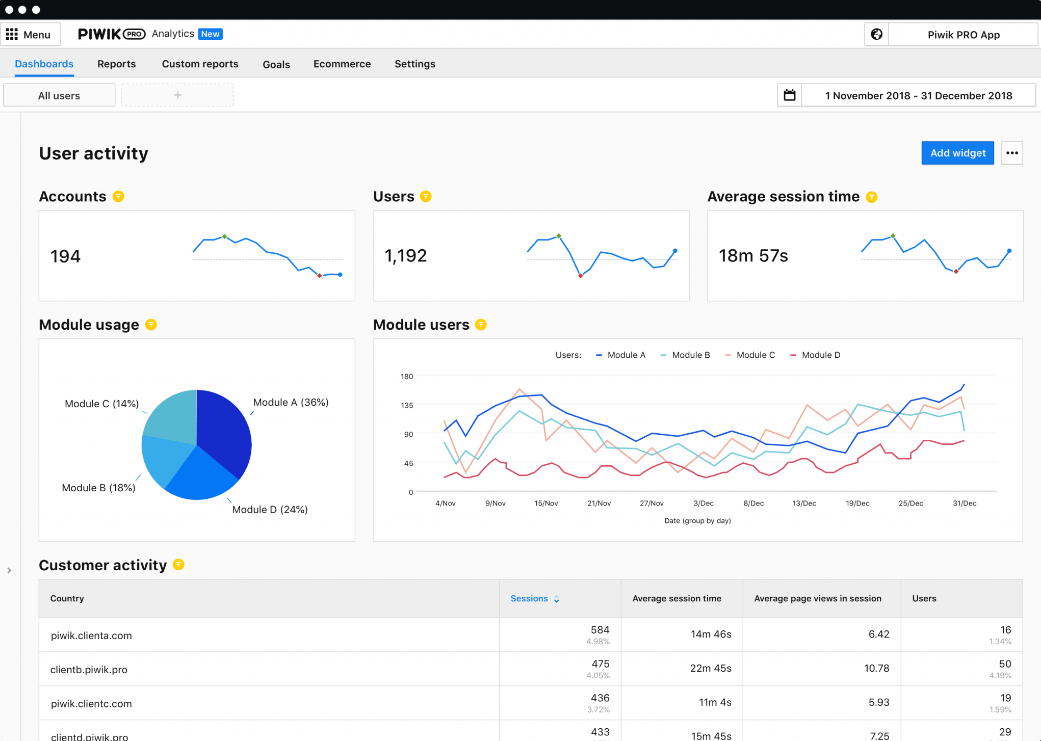
Tools and platforms that handle behavioral data
Managing behavioral data effectively requires specialized tools and platforms that can handle large volumes of data, integrate various data sources, and provide actionable insights. Here are some of the key types of tools and platforms for managing behavioral data:
| Tool | Function | Examples |
|---|---|---|
| Customer data platforms (CDPs) | Centralizing customer data from multiple sources into a unified database for a 360-degree customer view, segmentation and data activation. | Segment, Tealium, Adobe Real-time CDP, Piwik PRO CDP |
| Data management platforms (DMPs) | Managing data from third-party sources for advertising, aiding in audience segmentation and targeting. | Oracle BlueKai, Lotame |
| Web analytics tools | Tracking and reporting web traffic and user behavior, providing insights into user navigation and conversions. | Google Analytics, Adobe Analytics, Piwik PRO Analytics Suite |
| Behavioral analytics software | Analyzing complex user behaviors and patterns, identifying trends and predicting user actions. | Mixpanel, Amplitude, Piwik PRO Analytics Suite |
| Marketing automation platforms | Marketing automation based on behavioral triggers across various channels. | HubSpot, Marketo |
| CRM systems | Managing customer data for sales and marketing, tracking interactions throughout the customer lifecycle. | Salesforce, Zoho CRM |
| Business Intelligence (BI) tools | Data analysis, reporting, and visualization for strategic decision-making. | Tableau, Microsoft Power BI |
| Consent management platforms | Managing user consent and ensuring compliance with data privacy regulations. | OneTrust, Quantcast, Piwik PRO Consent Manager |
Choosing a customer data platform (CDP)
A CDP is a key element in any data stack handling behavioral data. It helps businesses align with their strategic goals, compliance requirements, and operational needs. Organizations should consider several criteria when selecting a CDP to ensure the platform meets their specific needs.
Data integration and import
Look for a CDP that can easily connect siloed data sources into clear records, mapping all user traits and behaviors. This includes integration with CRM, ecommerce platforms, and data warehouses without coding.
Behavioral segmentation and audience building
Choose a CDP that allows you to trigger audiences based on various conditions, including real-time customer interactions. The platform should offer flexibility in defining audiences, allowing segmentation based on demographic and behavioral data.
Data activation and personalization
Ensure the CDP can personalize customer experiences across channels and activate data to reach the right people at the right time. This involves customizing user profiles with attributes specific to your business and customers.
Privacy and compliance
The CDP should prioritize user privacy and help you comply with global privacy laws like GDPR, TTDSG/TDDDG, CPPA, CPRA, LGDP, etc. This includes safe hosting options, data governance, and built-in integration with consent management tools.
Integrated analytics and tag manager
A CDP that natively offers analytics and tag management provides a steady stream of valuable user data for more comprehensive insights.
Flexibility and customization
The platform should offer custom connectors and an intuitive editor for activations, catering to unique business needs without involving technical teams.
Support
Leading CDP vendors offer comprehensive professional services and customer support, including implementation, onboarding, product training, analytics consulting, and custom integrations.
Creating behavioral audiences in Piwik PRO CDP
Piwik PRO CDP lets you divide your customer base into smaller groups based on user attributes or behavioral data.
Behavioral audiences are based on the idea that customers who exhibit similar behaviors are more likely to have similar needs and preferences. By focusing marketing efforts on these groups, businesses can increase their effectiveness.
Behavioral audiences can be centered around various interactions with your organization’s website or app. Below are a few examples of behavioral audiences you can create in Piwik PRO CDP and goals you can achieve by targeting them with relevant activations:
| Goal | Audience |
|---|---|
| Increase conversion from free to paid users | Customers who visited the Pricing page three times in the last seven days and are on a free plan. |
| Personalize customer experience for visitors that came from a given campaign | Visitors whose first touchpoint with the brand was the Spring campaign. |
| Increase form completion rate | Users who visited a page with loan-form in the URL in the last two hours, didn’t visit a page with request-thank-you in the URL in the last two hours, and have been inactive for 30 minutes. |
| Increase sales through cross-selling | Users who visited pages with laptop and charger in the URL and didn’t visit pages with headphones in the URL and made no purchase. |
| Re-engage inactive big spenders | Customers who spent at least $5,000 in the store but haven’t performed any actions in 14 days. |
| Encourage people to collect packages from the parcel locker sooner | Customers whose package was placed in a parcel locker in the last 24h and taken out out of the locker in the last 24h. |
Learn about other ways you can benefit from using a CDP: 8 customer data platform (CDP) use cases that will drive your business growth.
Conclusion
Behavioral data shows how well you connect with your customers. When you group them correctly and reach them with the right content, they’ll feel like you’re talking just to them. And, like transactional data, you can make behavioral information work for you using a customer data platform, such as the one offered by Piwik PRO.
If you want to learn more about how Piwik PRO CDP can help you make the most of your users’ behavioral data, reach out to us:
The post What is behavioral data and how can it help you better understand your customers appeared first on Piwik PRO.
]]>The post What is the modern data stack and how it can change the way you do analytics appeared first on Piwik PRO.
]]>This article aims to explain how modern data stacks enable you to navigate the data deluge, break down silos, and derive actionable insights for your business.
What is the modern data stack
The modern data stack (MDS) refers to the technologies and processes that enable organizations to fully leverage data in the cloud. It provides a modular, integrated architecture to ingest, store, prepare, analyze, and visualize data.
Compared to traditional fragmented architectures, the core assumption of the modern data stack is unified access to data from across the business. By leveraging the scalability of the cloud, the MDS makes large-scale data processing and analysis financially viable for organizations of all sizes.
Components of the modern data stack
At the core of the modern data stack is a cloud data warehouse that serves as a repository for all data, providing analysts with a single source of truth. The data warehouse ingests and aggregates data from various online and offline sources.
These data sources include analytics, advertising platforms, testing tools, CRM systems, backend databases and more. Companies can load data from these platforms, send it to a cloud-based analytical database, and finally create a data model to merge it into comprehensive customer information.
Finally, once enriched in this way, the data is sent to various data visualization and BI tools to provide deeper insights into the performance of different activities and product features.
The key components of a modern data stack are:
1. Data sources
This is where raw, unstructured data originates from within and outside the organization. Data sources can include:
- Databases (relational, NoSQL, etc.)
- SaaS applications (CRM, ERP, marketing platforms)
- Mobile and web apps
- IoT sensors and devices
- Social media
- Ecommerce platforms
- Streaming data from APIs
Organizations can have hundreds of fragmented data sources. The modern data stack consolidates information from these sources into a centralized repository.
2. Data integration tools
Since data resides in siloed sources, the first step is ingesting it into a data lake or warehouse. Integration tools extract data from multiple sources, transform it into consistent formats, and then load it into the target repository.
Popular ingestion tools like Fivetran, Stitch, and Airbyte pull data from sources via APIs and database hooks.
3. Data warehouse
This is the central repository where transformed, ready-to-analyze data is stored. Analyzed data was traditionally held in on-premise data warehouses. Modern data stacks leverage infinitely scalable cloud data warehouses like Snowflake, BigQuery, and Redshift.
4. Cloud data lake
Data lakes like Amazon S3 provide low-cost storage and flexibility for storing and analyzing raw, unstructured data from disparate sources. They can ingest any data type and format, and work in tandem with warehouses in most stacks.
5. Data transformation tools
Data transformation tools like dbt and Dataform help clean up and organize raw data from different sources into the required formats. These tools can be used to create data models, track where data comes from, and check the data’s quality before it’s moved into the warehouse.
6. A/B testing tools
A/B testing tools like Optimizely, VWO, and Adobe Target help evaluate and optimize digital experiences by serving different variants of a page or app to users. They provide capabilities to target test segments, analyze performance metrics, and integrate testing data with the broader data stack.
7. Data visualization and BI tools
Data visualization and business intelligence tools help stakeholders explore and extract insights from analyzed data through interactive reports, dashboards, and data stories. Integration with the data warehouse provides access to clean, transformed data. Popular data visualization and BI tools include Tableau, Looker, Power BI, Mode, and Quicksight.
The role of web and app analytics in the modern data stack
Web and mobile application analytics tools play an integral role in modern data stacks. They capture detailed quantitative and qualitative data on how users interact with digital platforms like websites, apps, and SaaS products.
Popular analytics tools like Google Analytics, Piwik PRO Analytics Suite, Adobe Analytics, Mixpanel, and Amplitude record user actions, events, journeys, behavior, demographics, and other engagement data points.
Analytics data enables critical user-centric analyses:
- Understanding user behavior flows and funnels.
- Analyzing feature usage and adoption.
- Attribution modeling and ROI measurement.
- Segmenting users to understand needs.
- Personalizing experiences to drive engagement.
- Predicting churn risk.
- Generating actionable user insights.
Robust web and app analytics remain crucial for understanding digital consumers. And integrating analytics data into the modern stack unlocks more impactful use cases.
What data stack tools should be used by marketing and analytics experts
Data stacks enable marketing and analytics professionals to drive impactful campaigns, customer insights, and data-driven decision-making. But they need the right tools to take full advantage of a stack’s capabilities.
Modern BI tools like Looker Studio and Tableau simplify data access through intuitive interfaces, powerful analytics, and customizable dashboards. Marketers can quickly uncover customer and campaign insights without coding. Integrating BI tools with data warehouses provides direct access to clean, transformed data.
Marketing analytics platforms like Datorama, Mixpanel, and Heap provide event tracking, funnel analysis, and attribution modeling to optimize campaigns. Tight stack integrations produce a feedback loop between marketing execution and data-driven optimization.
Tag management systems like Google Tag Manager enable marketers to self-serve tracking of events needed for analysis. Marketers can debug and update implementation tags without engineering help. Product usage analytics tools like Pendo also provide behavioral data and user segmentation.
Reverse ETL tools like Hightouch and Census simplify moving analytics data back to operational systems like Marketo and Salesforce. This reduces reliance on engineering resources for critical marketing data flows.
With the proliferation of customer data from multiple stack tools, master data management solutions like Informatica Axon provide a single source of truth for customer entities. This connects identities and provides consistent segmentation across tools.
The breadth of modern data stack tools empowers marketing experts to efficiently leverage data in driving business impact. But these experts need solutions tailored to their skill sets and use cases. Getting the right tools for marketing analytics users is key to maximizing data ROI.
Here is a list of some standard tools used in modern data stacks beyond just data warehouses:
| Tool category | Examples |
|---|---|
| Data ingestion | Fivetran, Stitch, Airbyte, Kafka |
| Data transformation | dbt, Dataform, Trifacta |
| BI and data visualization | Tableau, Looker Studio, Power BI, Quicksight, Mode |
| Reverse ETL | Hightouch, Census, Hevo, RudderStack |
| Data science and machine learning | Databricks, DataRobot, H2O.ai, Anaconda |
| Data governance | Collibra, Alation, Atlan, Immuta |
| Web analytics | Google Analytics, Piwik PRO Analytics Suite, Adobe Analytics, Mixpanel, Amplitude |
| Product analytics | Pendo, FullStory, Hotjar, Amplitude |
| A/B testing | Optimizely, VWO, Conductrics, Adobe Target |
Having the right tools for each capability allows organizations to build a comprehensive modern data stack tailored to their use cases. The key is integrating these technologies into a modular, scalable architecture.
Best practices for selecting the right data stack technologies
Constructing a high-performance modern data stack involves carefully evaluating and selecting the right set of technologies across capabilities.
Here are some recommended best practices:
Define your requirements
Start by identifying the types of data and sources you need to integrate, the volume and velocity of data, your analytics and reporting needs, downstream use cases, and technical skill levels in your organization. This foundational understanding allows you to define gaps the data stack must address.
Assess scalability needs
Factor in expectations for data volume growth, spikes in usage, new data sources or pipelines, and potential analytics use cases. Choose technologies that can scale flexibly through modular architecture and cloud-native support.
Evaluate ease of use
Look for modern tools with intuitive interfaces, self-service access, and low-code capabilities. Complex tools with steep learning curves will severely limit adoption across skill sets.
Prioritize data governance
Security, access controls, data lifecycle management, and compliance with regulations should be top considerations. Identify tools that can fulfill governance requirements out-of-the-box.
Review integration capabilities
Shortlist tools that provide pre-built connectivity and seamless integration with other components needed in your stack. Avoid solutions that operate in silos.
Architect for interoperability
Design your data stack architecture in a modular way so capabilities can be swapped in and out as needed. Use open standards to prevent vendor lock-in. Build APIs and microservices for flexibility.
Prototype with trials
Leverage free trials and pilots with real datasets from your organization to validate technology choices across parameters. Get hands-on experience before committing to a tool. Carefully assessing your needs and mapping solutions prepares you to build a future-proof modern data stack. Remember to always put business outcomes at the core of your focus.
Benefits of the modern data stack
So why should your business invest in building a modern data stack? Here are some of the key benefits:
- Scalability. The cloud data warehouse can scale up or down on demand, providing flexibility as data volumes and analytics needs change. There is no longer a need for costly on-premise data warehouse infrastructure.
- Agility. New data sources can be quickly ingested and transformations and analyses applied without disrupting existing flows. Faster iteration means faster insights.
- Single source of truth. All data lives in the centralized data warehouse, providing a unified view across units and functions – no more siloed data repositories giving conflicting numbers.
- Deeper analytics. Large amounts of granular data enable more sophisticated analytics using techniques like machine learning. You can drive better insights and decisions.
- Productivity. Less time spent collecting and reconciling data means more time focused on value-added analysis. Self-service analytics reduces dependency on IT and data teams.
- Cost efficiency. Consolidated architecture and leveraging the cloud reduces costs compared to traditional fragmented systems. It lets you free up resources for high-impact projects.
Choosing an analytics platform for the modern data stack
To derive actionable insights from data, modern organizations build robust data stacks. However, a fundamental aspect of this endeavor is selecting the right analytics platform.
As analytics influencer Timo Dechau points out, placing Google at the core of your data management operations may be a viable strategy. However, he also stresses that this is contingent upon the acceptance of the Google Analytics 4 (GA4) architecture, which is much more intricate compared to its predecessor, Google Analytics 3 (GA3). Moreover, sharing data with Google is another consideration that might sway the decision for companies operating in data-sensitive industries.
Google Analytics alternatives
For those deterred by GA4’s complexity or having reservations about sharing data with Google, the market presents several alternative analytics platforms that resonate with the standard concepts inherent in GA3. These alternatives offer a semblance of familiarity and often provide additional features or different pricing models that might be more aligned with individual or organizational preferences.
The emergence of Google Analytics 4 alternatives reflects a market response to varying business preferences and requirements. For years, Google Analytics has been the industry’s gold standard. However, many businesses reject the complexity of GA4, often in favor of simpler, more privacy-centric alternatives. Deciding what platform to use requires a thorough understanding of the technical merits of each of these platforms and the broader organizational, ethical, and compliance landscapes in which these tools will operate.
If you want to explore GA alternatives, check out our tool comparisons:
How organizations use modern data stacks
By managing data collection, storage, analysis, and visualization, modern data stacks empower organizations to transcend the chaos of data silos.
They help facilitate a coherent understanding and leveraging of data for a whole scope of organizational functions that include:
- Operational analytics. Monitoring and analyzing operational metrics to enhance efficiency and productivity.
- Customer analytics. Understanding customer behavior to improve engagement and drive retention.
- Financial analytics. Assessing financial performance to ensure fiscal health and inform budgeting.
- Supply chain analytics. Optimizing supply chain operations to reduce costs and improve responsiveness.
- Product analytics. Evaluating product usage and performance to guide development and marketing strategies.
- Regulatory compliance and reporting. Ensuring adherence to regulatory requirements and facilitating accurate, timely reporting.
- Predictive and prescriptive analytics. Leveraging historical data to forecast trends and prescribe actionable strategies.
Summary
The volume of data generated today is exploding, suggesting a wealth of information at every analyst’s fingertips. But in reality, many organizations struggle to make sense of the data they ingest.
Silos of data spread across disconnected systems prevent you from creating a unified view and make gaining insights difficult. With more data come issues connected with security, access controls, data lifecycle management, and compliance with regulations.
The modern data stack is instrumental in not only breaking down data silos but also in promoting a culture of data-driven decision-making, fostering a continuum of improvement and innovation across organizational domains.
The post What is the modern data stack and how it can change the way you do analytics appeared first on Piwik PRO.
]]>The post Free comparison of 7 enterprise-ready customer data platforms appeared first on Piwik PRO.
]]>CDPs assist marketers in generating a better customer experience driven by precise information on user behaviors across every touchpoint. In short, a CDP can support the following:
- Data analysis
- Online advertising
- Campaign automation
- Cross-channel customer journey mapping
- Personalization
- Customer support
- Cross-sell and upsell efforts
Marketing teams can manage tasks independently with CDPs without the time-consuming assistance of costly IT specialists.
A CDP creates single customer views by stitching together sources of fragmented data and building an overview of all user information and behavioral details. User profiles can be segmented into audiences that can then be activated on other platforms.
Campaigns and actions based on first-party data that the CDP helps you collect can be more business-specific, effective, and personalized to each user. This type of data is most valuable and relevant to a business, making the insights gathered from it particularly useful for effective marketing and growth. Your marketing strategy gets supercharged faster with real-time data and in-depth insights.
Since the data in a CDP comes directly from users, it makes a great asset for ensuring compliance with GDPR and other privacy requirements.

If you want to learn more about the ways your company can benefit from a CDP, read these posts:
You need to clearly define your expectations to find the CDP that fits you best. Aligning them with features and capabilities from each vendor lets you find the right implementation for your business. That’s why we’ve extensively researched key features of CDPs available on the market.
Below we’ve prepared a thorough comparison of seven enterprise-ready customer data platform vendors. If you’re debating which CDP will work best for you and looking for guidance, you’ve come to the right place.
Customer data platform vendor overview
As you make up your mind about a particular CDP, let’s start by giving you a little peek at the vendors.
Piwik PRO
Piwik PRO combines a data-driven approach with a focus on satisfying the strictest privacy standards worldwide. This makes it the first privacy-oriented alternative to Google Analytics with an integrated CDP. It enables organizations handling sensitive data to analyze and optimize the customer journey and improve their cross-channel marketing efforts.
Tealium
Tealium’s primary focus is the tag management system Tealium iQ and the customer data platform Tealium AudienceStream. The CDP provides data enrichment capabilities that help create unified user profiles and automate actions across all channels. It lets you connect data and deliver it in real-time to make it easier to connect with your customers.
Exponea
Exponea gives marketers complete control over all aspects of the customer experience, especially within the ecommerce industry. Its Customer Data and Experience Platform (CDXP) lets marketers use AI-enriched data to understand customer behavior and run omnichannel campaigns across multiple channels.
Mapp
Mapp’s customer data platform centralizes all data through segmentation, unification of customer profiles, and activation of those in priority channels. With Mapp’s CDP at its core, organizations can connect entire marketing ecosystems to enhance the customer experience.
Segment
Segment is a CDP that helps companies organize, connect, and control their first-party data from multiple cross-device sources. It offers a complete data toolkit to standardize reliable data collection, unify user information, and send customer data into any system. The whole company can use trusted data to accelerate its growth.
mParticle
mParticle provides real-time data that combines quality and governance protections with AI-powered insights and predictions. Focused on mobile and desktop applications, it builds cross-platform user profiles to help marketers drive better marketing and improve conversion and retention for various industries.
Amplitude
Amplitude is a digital analytics platform that focuses on product analytics. It consists of several integrated products, including an insights-driven customer data platform. The CDP lets you un-silo data and connect it across teams, discover new audiences, and unite customer behavioral data across your stack.
Comparing 7 enterprise-ready customer data platforms
In our comparison, we’ve highlighted key differences concerning each CDP vendor’s essential functionalities and qualities.
General characteristics
First, we outlined some general characteristics of the reviewed CDPs to give you quick insights into what you can expect from these platforms. For example, see whether the vendors can be easily integrated with analytics or tag management systems and what hosting options are available.
Data collection and processing
Then, we compared how the CDP vendors approach data collection and processing. Learn how the platforms collect and organize data and what forms of information you can access, including raw or historical data. Find out if they process cookies or allow SDK. See the data types you can import into user profiles to expand and enrich them.
You need access to real-time, adequately normalized data and follow the whole customer journey to ensure your data is accurate and up-to-date. Your marketing strategy should be unified and match data from multiple sources. You should be able to use your stack to its full potential.
Audiences and profiles
We also reviewed the details and possibilities of audiences and profiles in each CDP. Find out how user information is matched to create separate profiles, what attributes are available, and how to segment users who match given traits. You need to be able to merge user profiles over all channels and devices and display the information in single customer views. A well-chosen platform should enable you to continuously update and easily access these profiles and create audiences based on relevant shared attributes or behaviors.
Data activation
Each CDP’s value is connected to how it lets you apply the data in personalization, ad campaigns, emails, remarketing, and other actions you can take to improve customer acquisition and retention and drive more sales. That’s why we couldn’t skip a section comparing the data activation features of each vendor. Learn how to integrate the CDP with other platforms and make it useful.
Privacy and security
On top of that, we’ve evaluated the CDPs in terms of their privacy and security obligations. We have checked which platforms provide privacy-dedicated Opt-out/Do Not Track options, an integrated consent manager, and the ability to onboard sensitive data.
We couldn’t overlook the legal landscape of storing and processing users’ information. We’ve investigated if these platforms adhere to international privacy legislation such as GDPR and whether they boast valid security certifications. Customer data is in your hands. Your company should be able to rely on a vendor that ensures proper compliance with all applicable regulations.
Customer care
Last, we’ve checked what kinds of technical support and customer care services each vendor provides. As an enterprise customer, you may benefit from enhanced guidance through dedicated support and onboarding, personalized training, and custom development & integrations.
Comparison
Free comparison of 7 enterprise-ready customer data platforms
Get to know over 50 key differences to determine which platform fits your business needs best: Tealium, Amplitude, Exponea, mapp, Segment, mParticle or Piwik PRO.
The post Free comparison of 7 enterprise-ready customer data platforms appeared first on Piwik PRO.
]]>The post 8 customer data platform (CDP) use cases that will drive your business growth appeared first on Piwik PRO.
]]>This blog post will explore the concept of a customer data platform (CDP) and demonstrate how it can benefit modern companies. You will learn how to apply a CDP to your company’s operations to help it achieve its goals.
What is a customer data platform (CDP)
A CDP is a single platform that facilitates customer data collection, management, transformation and activation.
The traditional definition of a CDP states that “a customer data platform is packaged software that creates a persistent, unified customer database that is accessible to other systems.”
Here is how we can unpack it:
- “Packaged software” means that a CDP is a prebuilt system whose setup and management don’t require high technical skills as many other types of tools, such as data warehouses, and is associated with less risk, cost and implementation time.
- A CDP “creates a persistent, unified customer database” containing individual customer and visitor profiles. The platform captures and links information related to each user and stores it, expanding the database over time.
- Data in a CDP is also “accessible to other systems,” meaning you can find further uses for the stored information. For example, you could send the data to sales tools to improve how you manage interactions with current and prospective customers.
Advanced CDPs can also store machine-learning-powered predictions, such as the likelihood to purchase.
Piwik PRO’s CDP represents a unique type of software. The CDP is integrated with a web and app analytics platform, rather than seeking to replace it, which is the case with many other CDPs available on the market.
Key functionalities of a customer data platform
Let’s walk through a few specific aspects of a CDP and how Piwik PRO’s CDP benefits you.
Collecting first-party data
A CDP consists of individual-level data from the organization’s online and offline sources. This data reflects a company’s current and prospective customers and their behaviors. It is also more precise than second- or third-party data collected by another entity.
Operating on first-party data can help you comply with international data protection laws. You are more likely to obtain valid consent to the collection of first-party data by asking users directly.
Data import won’t be available in Piwik PRO CDP Beta. In future versions we plan to enable data imports from your CRM, ecommerce platform, data warehouse and other tools using incoming webhooks and no-code automation platforms. A built-in integration with web and app Analytics and Tag Manager will enable you to benefit from a steady stream of valuable user data.
Read more about the benefits of first-party data: Why first-party data is the most valuable to marketers [Updated]
Data privacy and management
The CDP enables you to address data quality at the point of collection, so you’re able to retain its integrity throughout the data pipeline. You have governance over the data you collect and maintain in a CDP and control the sources of information.
It provides a single source of truth regarding a customer’s data and the data processing purposes users have agreed to. It lets you quickly modify or delete specific user data if requested.
With Piwik PRO CDP, you can:
- Integrate Consent Manager and make actions related to activation dependent on whether users grant consent. You can keep the latest consent information in the visitor profile. Moreover, webhooks can be fired based on the consent category in the profile.
- Handle sensitive data. For example, you can add an extra layer of privacy by replacing identifiable data with custom scoring values.
In the future, we have plans to enable an activation log.
Single customer view
Because the collected information gets unified and attributed to the same user, you are able to access it in single customer views. Customer profiles include all the information you’ve gathered, like demographics, purchase history, behavioral data, etc.
Knowing all touchpoints of the customer journey provides insights into their interests, what they’re likely to buy next, or if they need a personal discount to re-engage after some time of inactivity.
Piwik PRO CDP allows you to explore single customer views.
Find out more about single customer views: Single customer view (SCV): what is it and how does it work?
Identity resolution
A CDP can attribute all disparate data from multiple channels to the same customer profile. User profiles are created by merging the data using matching identifiers, such as e-mail address, user ID or cookie ID.
The ability to use multiple identifiers differs from options in analytics tracking tools – these often rely on cookies that tie the data to a browser, not a user. Connecting cookie-based user data to other tools and systems can lead to downstream data quality issues. For example, you will have no way of differentiating between individuals using the same device within the same cookie. Plus, privacy-focused legal and technological solutions make relying on cookies a short-term solution.
The Piwik PRO CDP works on both:
- Persistent identifiers (like user ID), which is how most CDPs on the market work already.
- Non-persistent identifiers (like session ID) for in-session personalization or activations. If there is no other data on a visitor, the session ID will be dropped and the profile will become unusable after the session ends.
Non-persistent, short-term identifiers enable you to perform the following actions:
- Open a chat window during the session for visitors that have bumped on the pricing page twice within the last 5 minutes.
- Alter the look-and-feel of the site to allow more contextual ad slots on it for those who have opted out of targeted advertising.
- Send warnings to your company Slack in case of rage clicks on your most important contact form.
Audience segmentation
Segmentation allows you to create audiences that group customer profiles matching certain conditions.
Once audience segments are built in your CDP, they can be forwarded to downstream tools in your growth stack for data activation. Centralizing audience segmentation saves time on audience building and ensures the segments are consistent and up-to-date across systems.
Piwik PRO’s CDP lets you build audiences based on attributes, such as data relating to:
- Traffic, e.g. source, medium, keyword, channel, and campaign details
- Device and platform
- Location
- Consent
- Other details, like last order time or total revenue
This information is gathered through analytics events and matched with the user profile with first-party identifiers, such as e-mail or user ID.
Another option is to set up audiences based on user behavior (event dimensions). In this case, behavioral conditions are based on the number of occurrences of events over a period of time. For example, you may segment profiles of users who visited specific product pages a few times in a specified period.
By combining the CDP with Tag Manager, you’re able to fire tags based on audience conditions.
Data activation
Data activation involves putting customer data insights into action in other systems and tools. For example, you can add users from a given audience to an email list and send them a discount code for a product. Or you can show an ad banner on the website with a complementary product based on a customer’s previous purchases.
All of this is possible through integrations offered directly from the CDP, enabling businesses to access the data where and when they need it and relieving engineers of managing third-party code.
Piwik PRO’s CDP lets you activate data by sending selected attributes to thousands of destinations through webhooks and automation tools – CRM, ad platforms, email marketing tools, internal communication channels and more. Example platforms include Hubspot, Slack, Mailchimp, Google Ads, Shopify, Marketo and others.
You can also create activations through templates and an intuitive editor without involving tech teams. If needed, this allows you to define more advanced integrations.
Learn more about data activation: What is data activation and how does it fit into your data analytics stack.
Work in real-time
CDPs let marketers work in real-time, which improves the process of preparing audience segments or targeting users with relevant content.
Customer information is also reflected in real-time in the updated profiles. As a result, the data sets expand, and you can constantly access up-to-date customer details.
Now that we’ve defined what a CDP is and how you can use it, it’s equally important to understand the functionalities of similar types of data management software and learn the nuances that determine the best applications of them.
CDP vs. DMP
A DMP predominantly influences advertising to better target ads and reach audiences. DMPs mostly rely on third-party data and reflect anonymous customer identifiers (like cookies, etc.), making them systems with less accurate data. Due to the rise of GDPR-friendly solutions, DMPs are far from optimal for managing and utilizing user data.
Read about 4 key differences between data management platforms and customer data platforms.
CDP vs. CRM
A CRM reports on current or potential customers, so it will primarily help you with analyzing the sales pipeline and forecasting. CRMs cannot register offline data unless it’s manually entered, so you would mainly use them with online data sources.
8 customer data platform (CDP) use cases
The capabilities of CDPs allow you to achieve several things that can positively influence business growth. Below, we elaborate on eight of them.
1. Improving operational efficiency
A fundamental aspect of any enterprise-grade CDP is its ability to unify data from various data-producing channels and platforms.
A CDP resolves the issue of data silos – situations when an assortment of data is available to one department but isolated from the rest of the organization. Data silos make the working environment less collaborative, slow the pace and productivity of the company, and threaten the accuracy of customer profile data.
Removing data silos improves efficiency and productivity and makes it easier for teams like marketing, sales, support, customer success, product and others to collaborate, exchange user data and complement each other’s efforts.
With a CDP, the organization works on more accurate and complete customer profile data and is able to automate many of its operations. For example, since a CDP creates individualized profiles for your customers and prospects, you won’t have to spend hours manually inputting your audience’s information and verifying its correctness.
2. Developing targeted marketing campaigns
A CDP enables real-time campaign activation, allowing marketers to deliver highly-personalized marketing campaigns across all areas of customer engagement. You can effectively use a CDP with a marketing automation platform, simplifying time-consuming activities like lead qualification and campaign creation.
With a CDP, you can quickly decide what content to target visitors with and what channel will be the most effective. At the same time, you can measure and track the performance of the campaigns and channels to refine and improve the assets or messaging in the next campaign.
For example, you could segment users who often open your marketing emails and have browsed products on your website but abandoned their shopping carts. Then, you can send reminders about viewed products to re-engage your audience.
Similarly, a CDP can tell you what message not to send to a customer. You can combine online data from your digital channels with offline customer data from a POS system. A complete view of the customer could prompt you to pinpoint those who have recently purchased an item in your physical store. Then, you can remove them from your next social media ad campaign for that exact item, letting you focus resources on those who are more likely to buy it.
3. Personalizing the customer experience
More than 77% of people choose, recommend and pay more for brands that provide personalized experiences tailored to their interests. Personalized messaging and interactions are more relevant, timely and effective in moving users toward engagement, conversion and customer loyalty.
From the data collected through your sources and stored in a CDP, you will know how users move around your website, what actions they take and whether they complete the funnels. Personalization can involve content recommendations and offers that are contextually added to the site based on a visitor’s past behavior. It can also consist of displaying messages matching the user’s industry, appealing to them with relevant visuals or colors, referring to the user by their company or personal name or prefilling forms with previously input data.
For example, imagine a potential customer browsing your sports website. They have viewed several pages for products in the same category – tennis equipment. Then, the user left your site without making a purchase. The next time they are on your website, you can set your homepage to display tennis equipment offers rather than a generic assortment of sports items.
4. Optimizing customer journeys
A CDP allows you to track a customer’s entire journey and assemble every interaction a prospect has had with your business. But the role of a CDP is far from over after a user makes their first purchase. It helps you optimize every stage of the customer journey, including retention and advocacy.
Your sales team can view where your leads are in the sales funnel to reach out with the right information at the most suitable time. Similarly, marketers can analyze where users are in their journeys, how they move throughout your site, and where they drop off.
To acquire more customers for your business, you must understand which interactions encouraged them to convert into paying clients. You can see which content is not as effective and requires improvement along with what resonates with users the most and should be replicated. This way, you can focus your resources on the strategies that drive the best results for your company.
5. Enhancing customer support
According to research from Zendesk, 66% of B2B customers will stop buying from a brand after a bad customer service interaction.
A CDP offers valuable insights for anyone who contributes to the customer experience in their everyday work, including customer success teams and customer support representatives. They are at the front of customer interactions daily, and they significantly impact overall business performance and long-term customer loyalty.
Agents that interact with customers have immediate access to their detailed customer profiles. The agent can efficiently and effectively answer customers’ questions, make recommendations, or steer conversations toward new purchases or brand experiences. This can lead to meeting their needs quickly and forming better customer relationships.
When agents understand details such as how users are engaging with the brand or what their customer status is, they can easily tailor the conversation to them. There is no need to dig for information, figure out the most accurate details or put customers on hold for long periods to find relevant data.
For example, agents can now reference what product the customer purchased and the channel it was purchased through and get an idea of what topics on your site interest them. They can also see when and what previous interactions occurred with the company, such as opened tickets and their status, issues or requests discussed in conversations to date. This way, they can refer and respond to them and close the tickets faster.
6. Identifying high-value customers
Having all your customer data housed in one spot will help you identify the customers who bring your company the most value. You can do this by analyzing the users’ purchasing habits and history. It’s no secret that a customer who is either spending a lot with you or purchasing regularly is one of your most valuable customers.
Your best customers are also those who, on top of buying from you, frequently interact with your brand, whether through social media or email or by leaving positive reviews on third-party pages. Nurturing and retaining those segments should be a priority for you.
You can also identify shared characteristics of your best customers, such as demographic details (age, location, occupation or industry they operate in) or behavioral data (most visited pages, common user flows on your site or app, most purchased products or services, etc.).
This information allows you to create specific campaigns and customer journeys to target lookalike audiences. It’s worth nudging the users currently in your database who share these traits and approaching them with relevant content that will encourage them to get your product.
7. Preventing churn
A CDP can be useful in pinpointing customers who might be close to churning.
A declining number of interactions with your brand, like fewer email opens, social media or blog engagements, or a decrease in product adoption, may indicate a weaker bond between your business and a customer.
With a CDP, you can identify such individuals and get a step ahead by improving the messaging or experience. For example, you can help show customers the features of your product, or send a time-limited promo code to apply to their subscription and give them more time to try your product for less.
8. Identifying cross-sell and upsell opportunities
Apart from retaining customers, a CDP allows you to discover cross-sell or upsell opportunities among your existing clients. You can hone in on what the customer may need next with information on products or services purchased in the past, the timing of previous purchases, communication preferences and loyalty status.
A CDP solves major issues that often impede a brand’s ability to convert cross-sell and upsell opportunities. These include data silos, problematic identity resolution and the lack of real-time access to data.
For example, you can use a CDP to look at the current customers who use your email software and have been browsing pages on your other products. They may have recently started consuming more of your content on product use cases and features, and visiting pricing and contact pages. Consider targeting these users with a promo code for your other product or start a dedicated campaign with content on using your products together.
How to choose the right CDP for your business
Before deciding what CDP to use, you need to think carefully about your specific use cases and identify a CDP that most closely addresses your needs.
Ask yourself the following questions:
- How often do you interact with your customers and visitors?
- What platforms do you use to reach and communicate with them?
- What are their needs and behavior patterns?
- What tools currently handle your customer data?
- How are these tools connected to each other?
Examine the scale of your customer outreach, the depth of integration with your existing systems and your budget. Discuss the needs and expectations of the key stakeholders, especially those who regularly interact with customer data. Address their concerns and plan out a smooth transition, guaranteeing the CDP works with your current tools.
We are reinventing the Piwik PRO CDP, equipping it with extensive functionalities that will make it an essential component of any enterprise-level analytics stack.
The module will allow you to:
- Collect and integrate customer data from multiple sources, including web/mobile SDKs (soon also: online forms, CRM systems, e-commerce platforms, and social media).
- Segment customers based on their behavior and demographics.
- Trigger personalized marketing campaigns based on real-time customer activity, such as abandoned cart recovery emails or personalized recommendations.
- Monitor and measure the performance of the CDP.
Read more about our CDP’s features and learn why it could be the right fit for your company.
Free comparison of 7 enterprise-ready customer data platforms
Get a detailed overview of their characteristics and choose the right CDP for your company.
Final points on customer data platforms
We hope you now have some idea of how your organization can apply the features of a CDP to its processes and drive business results.
Your company has a shot at bridging potential information gaps, enhancing data integrity across departments and stitching together channels, touchpoints and devices.
We’ve published a few other blog posts related to Customer Data Platforms that may help you get more familiar with these systems:
- Customer data platforms: The best choice in the post-GDPR landscape
- How Analytics & Customer Data Platform Can Help You Track the Full Customer Journey
- What is Data Activation and How Does it Work?
If you have any remaining questions about the use cases of Piwik PRO’s CDP, reach out to us:
The post 8 customer data platform (CDP) use cases that will drive your business growth appeared first on Piwik PRO.
]]>The post Data flow in an analytics platform: How to set up your data collection and analysis process appeared first on Piwik PRO.
]]>Data can stream in different directions and back and forth between systems. It may take a lot of work to figure out how data moves around, how it’s transformed at every stage, and what ways your company can benefit from these processes. If you collect personal information, things become even trickier because you need to ensure privacy and security levels at all times.
In today’s post, we’ll walk you through the ins and outs of a data flow based on an example in Piwik PRO. You’ll see that even with consent collection and management, there are simple ways to design and describe data flow.
pro tip
We’re presenting the most popular setups of analytics platforms. There are many ways you can configure Piwik PRO to adhere to local data protection guidelines. For more details, review our help center article on how you can collect data in a privacy-friendly way.
A basic data flow
In most cases, the first step in a data flow is asking the visitor for consent to collect their data. If they grant consent, you gather their personal information and use it in your analysis. However, if the user declines consent or ignores the consent banner, at most, you will be able to collect and use anonymous data.
After this is settled, you should proceed with analyzing the data. For that purpose, you use the web or app data and import data from other sources, such as a CRM or marketing automation platform. You can also export data to other tools or platforms for further analysis or visualization.
Data flow step-by-step
Data analytics flow depends on consent, which sets the direction of the whole process.
Let’s look into a scenario in healthcare. Imagine a user visits your website, mygoodhealth.com. After they enter the site, they are served with a consent form.
Use a system like Piwik PRO Consent Manager to facilitate the process of collecting consents from users. It will save user decisions and send the information about them to the rest of the analytics platform.
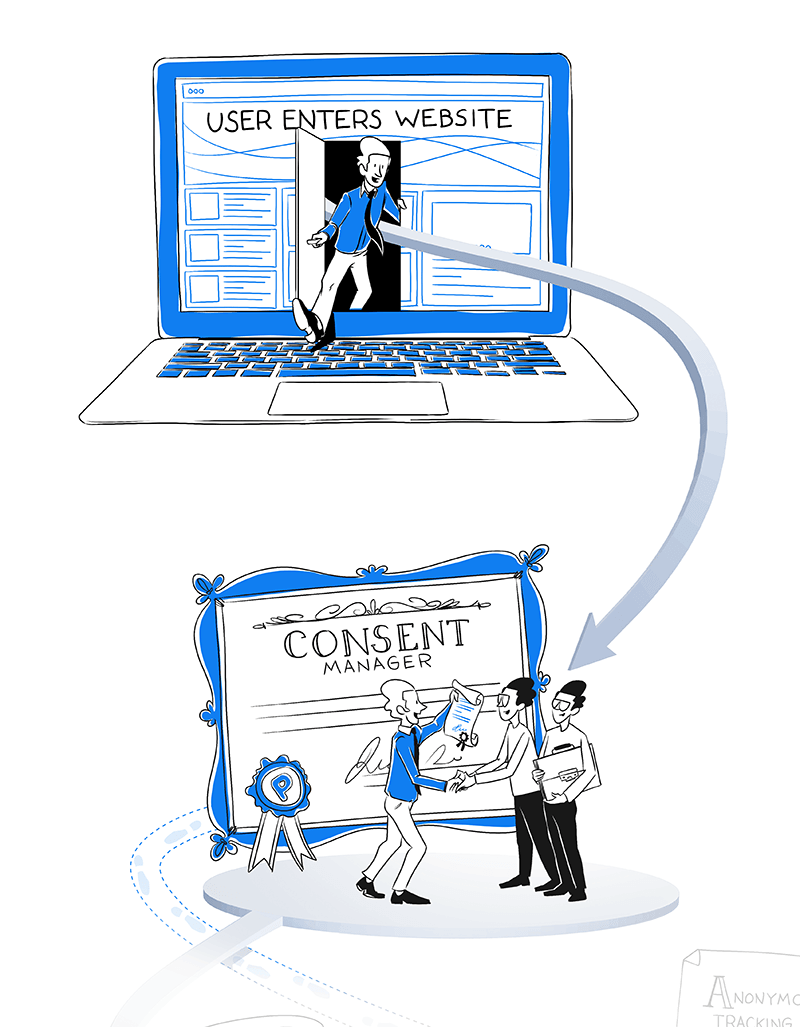
Users decide if they agree, don’t agree, or partially agree to the processing of their data, or they ignore the consent prompt and browse the website without making a decision.
Now is a good time to introduce two more modules of Piwik PRO Analytics Suite and explain their role in the data collection process:
- Analytics – Gathers both personal and anonymous data depending on the received consent. You can set the parameters for the tracker so it collects data in a way that matches your privacy and security requirements.
- Tag Manager – Manages tags – all those little pieces of code that fire based on conditions you define, often sending data to Analytics. If a user consents, tags are fired. Without consent, you still collect anonymous data with the Analytics module but without tags.
Tags won’t fire without user consent – this constitutes a so-called zero-cookie load. As a result, no user can be tracked by default. This setup allows for compliance with strict regulations, such as GDPR and local European guidelines, like those outlined by the French CNIL.
New laws that impose similar restrictions appear all the time, like the California Consumer Privacy Act (CCPA) in the US and the Personal Information Protection and Electronic Documents Act (PIPEDA) in Canada.
Whether a visitor agrees or not, you still get valuable insights, but the process will look different. Let’s analyze the possible scenarios.
A user doesn’t consent or ignores the banner
When a user doesn’t consent or ignores the consent banner, you can activate anonymous data tracking and collect some data using the Analytics module.
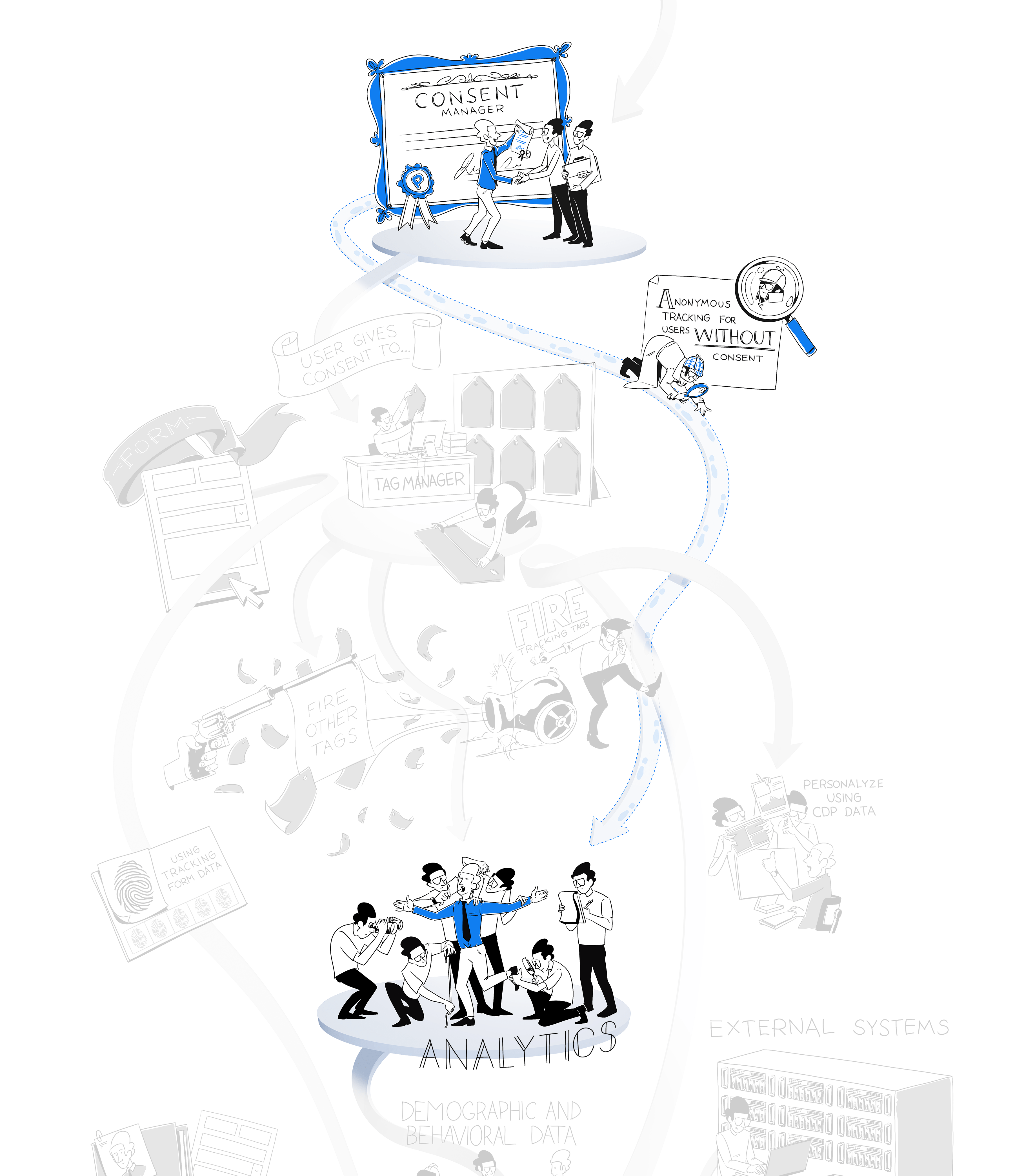
There are a few options available in Piwik PRO for when you don’t get user consent. They differ based on the technology used for data collection.
Here are the methods:
- Collect data using a 30-minute cookie: This method uses a first-party session cookie to collect data. After 30 minutes, the cookie is removed from the browser. The major advantage of this approach is that there are no duplicate sessions. This is also the most reliable anonymous data collection method.
- Collect data without cookies: This method uses a session fingerprint deployed on the device. The analytics platform won’t create or store any cookies in visitors’ browsers. The major advantage of this method is that it’s permissible under several regulations, such as the German TTDSG/TDDDG. The downside is that it creates duplicate sessions, which results in less accurate data. Both of the options mentioned so far let you capture all the traffic, as well as session and event metrics. The tracker collects the information and binds it into a session of a non-returning visitor. Visitor metrics will only be collected after a user consents. There is also a third option…
- Don’t collect data: The tracking code won’t be fired for visitors. If you disable tracking completely, there won’t be a trace of data about visitors that don’t consent to data collection. You won’t even see a page view for that user.
Naturally, anonymous tracking has limitations. It won’t let you collect and store personal data unless you have explicit consent. You also won’t be able to recognize new and returning visitors or identify visitors across sessions. Anonymous tracking will only work if browser fingerprinting is deactivated and geolocation is based on anonymized IP addresses or is deactivated.
If you’d like more details on what data you can collect anonymously, we recommend reading our post on anonymous tracking: how to do useful analytics without personal data.
A user gives consent
You have more opportunities if you receive explicit consent from users.
When a user gives their consent, you can use their information for different purposes depending on what they agree to. These include analytics, A/B testing and personalization, marketing automation and remarketing.
Once consent is registered, Tag Manager fires an analytics tracker. As the visitor interacts with your site, the Analytics module jumps into action by gathering basic information about the visitor’s:
- Device
- Operating system
- Browser name
- Browser language
- Country
It also gathers information about the content the visitor interacts with, such as:
- Pages viewed
- Videos played
- Forms filled
- Files downloaded
- Clicks on elements of the website or app
- Impressions of content
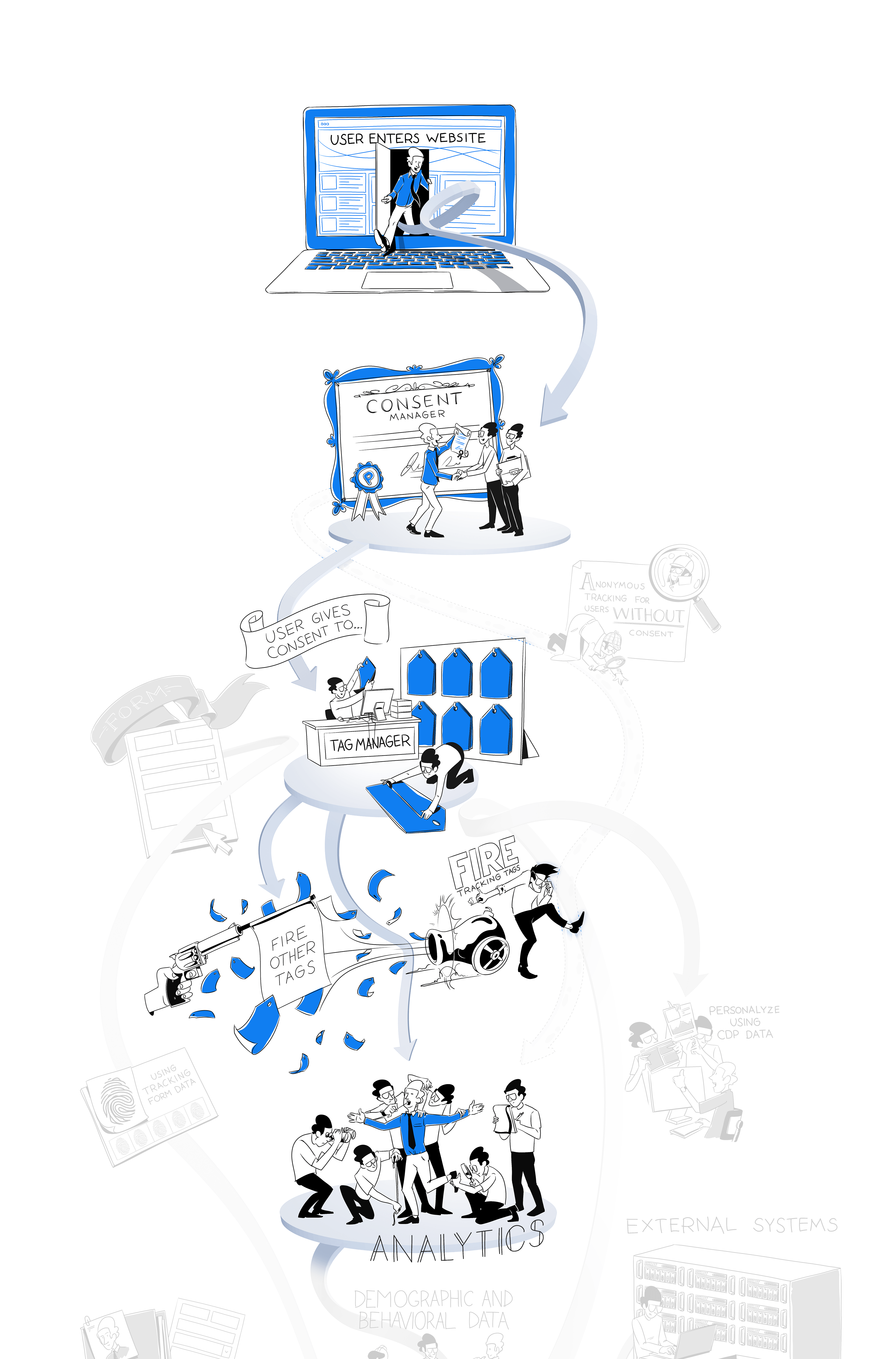
Making more out of data with a CDP
Collecting user data is not the end of the process.
Your web and app analytics data can be integrated along with data from other sources using Customer Data Platform (CDP), the final module of Piwik PRO Analytics Suite.
CDP helps you connect data scattered across different systems into complete customer profiles that map all user characteristics and behaviors.
Your visitor may browse through your site mygoodhealth.com, click on Information for patients, Our facilities, and finally, Specializations. From that page, they can navigate to Contact and fill out the form where they share their name, email address and phone number.
All this behavioral data – visited pages, completed events, clicks, scroll percentages, filled out forms – as well as other acquired information, such as demographics, order history, consent records, sales interactions, data from other sources, and more, will appear in the single customer views. You can enrich user profiles with custom attributes – such as personas that specific users represent or support tickets they’ve created – by integrating CDP with other tools using webhooks and automation tools.

As the user returns to your website or app, performs more actions and lets you collect more data, their profiles will expand over time.
Combining all these sources helps you speed up specific processes as you fill in gaps in the customer journey. With more data at your fingertips, you can better adjust your products and services to the needs of your visitors.
An essential aspect of creating user profiles is deterministic identity resolution, which consists of comparing and matching first-party identifiers such as email addresses, login data, device ID, cookie ID, to recognize that pieces of information refer to the same customer.
To learn more about how customer profiles are built and ways to use them in a CDP, check out our blog post: Single customer view (SCV): what is it and how does it work?
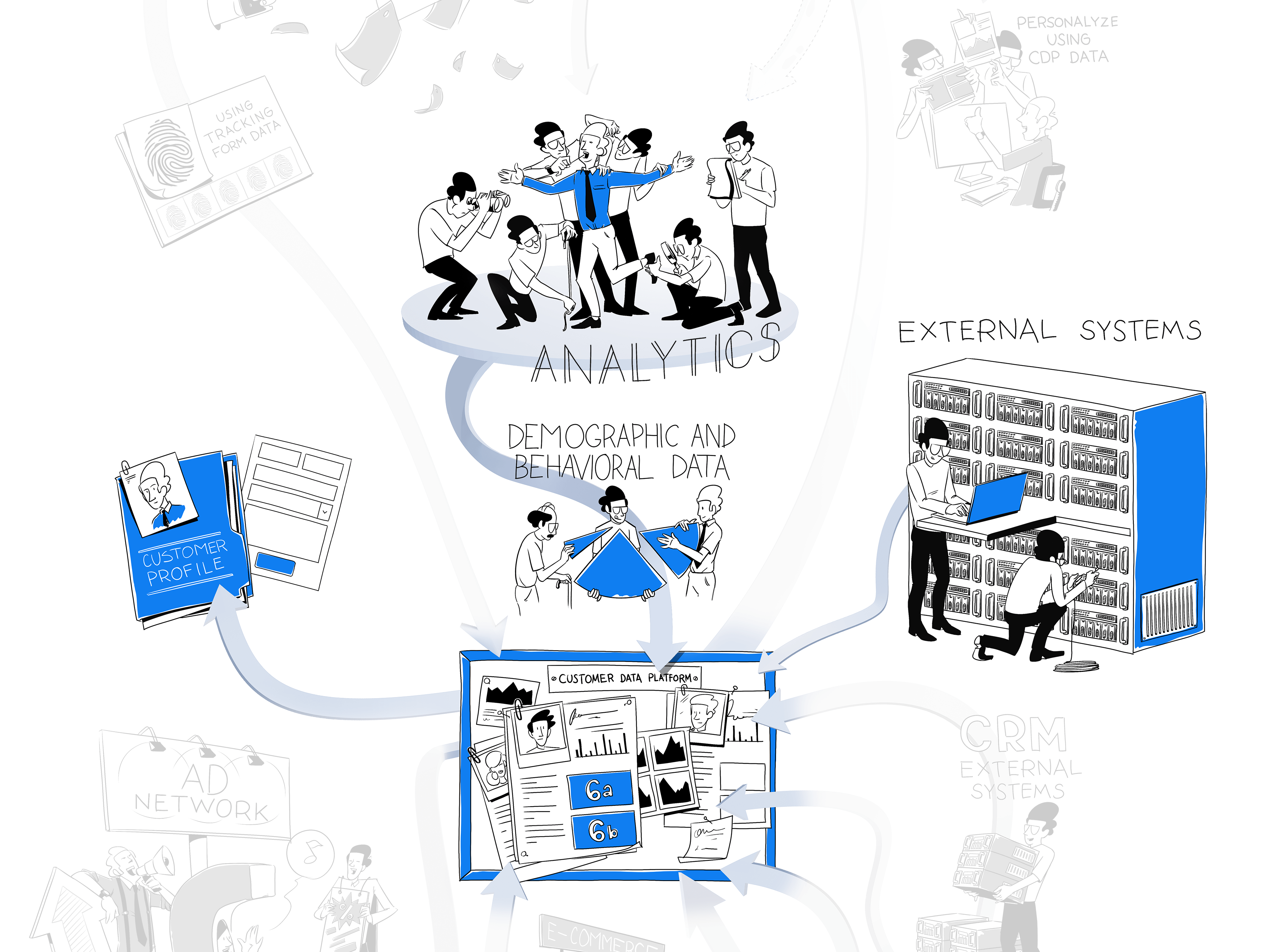
Unified customer profiles come with many new opportunities.
You can trigger personalized marketing campaigns based on customer activity and demographics.
Piwik PRO’s CDP allows you to segment audiences based on user attributes such as source, country, first visited URL or total revenue. Customer attributes are collected by the CDP automatically from analytics events and are matched with the given user’s profile through first-party identifiers.
You can also create audiences with behavioral conditions according to the frequency of events over time. For example, you can create an audience of people who visited a page “store” 3 times in the last 7 days.
If you plan and set up your audiences correctly, you end up with highly specific user segments that allow you to better target clients and visitors and help them convert.
Read our article on Audience targeting: how to successfully use a CDP to find out how you can segment users to improve the effectiveness of your audience targeting efforts.
Once your data is assembled into profiles and segmented, you can easily put it into action in other systems and platforms.
The Piwik PRO CDP lets you send selected attributes to numerous destinations through webhooks and automation tools, such as ad platforms, email marketing tools, CRM and others. Activation sends the customer profile attributes to the webhook’s endpoint. The webhook is triggered when the customer profile becomes a member of the audience.
Keep data protection regulations like the GDPR in mind. Privacy laws are updated frequently, so teams should stay on top to ensure they are gathering, processing, and storing data in a compliant way. Make sure the data you connect from other tools is collected with explicit consent where applicable.
Apart from using the available tools, you have the option to create custom activations and define more advanced integrations.
To get more detailed knowledge on the possibilities of data activation, read our blog post on What is data activation and how does it fit into your data analytics stack.
By combining Tag Manager, Analytics and Customer Data Platform, you create a core pipeline of data flow in which the modules complement one another.
We’ve shown you just a fraction of what you can achieve, but there are endless opportunities to track the right data, get it from selected sources and activate it in other places.
We’ll discuss some of those options in the following sections.
Get more data flowing through your stack
You already have some idea about how Tag Manager signals to Analytics what data to collect, then sends it for segmentation and activation in CDP. These modules work as a trio, collecting and exchanging information as users interact with your website.
Every time a returning visitor engages with your site or uses your app, their CDP profile will keep updating to become richer and more complete. But you should also expand the volume and improve the quality of the data you add to your system by connecting more sources to your CDP.
With Piwik PRO, you get the flexibility to set up your data flow in a way that protects the security of users’ personal data. You can integrate sensitive data and choose one of our safe hosting options. Piwik PRO also holds ISO-27001 and SOC 2 certifications.
You have complete control of your data as Piwik PRO doesn’t share it with any third parties, which is crucial in sectors such as healthcare, finance and government.
Learn more about our approach to data protection and HIPAA compliance here:
Let’s get back to our mygoodhealth.com example. It’s a medical website where people find and book appointments with specialists at different facilities, read articles explaining medical conditions and symptoms, and receive personalized health tips after providing some information about themselves.
Users can also pay for a premium service to get priority access to online and in-person consultations, on-demand medical advice through the phone, and unlimited access to articles and guides. Apart from the website, there is a mobile app where users easily log into their accounts and browse the platform’s features.
With Piwik PRO, you’ll get valuable data about how and when customers use the website and app. You see which of your offerings they are most interested in, what topics they read about most often, and what services they have already used.
You’ll be able to measure the average rating of appointments and video consultations. By looking at ratings of recent appointments correlated with other factors, you can identify possible reasons for churn and customer dissatisfaction. Tracking the last appointment date makes it easy to decide when to ask for feedback via a survey.
You can gather detailed information on the user experience on the site and in the mobile app, such as:
- Time spent on different parts of the service
- Clicks on links and buttons
- Most visited pages
- The adoption rate for new features
- The popularity of specific articles and videos
After analyzing this data, you can present specific recommendations to product designers.
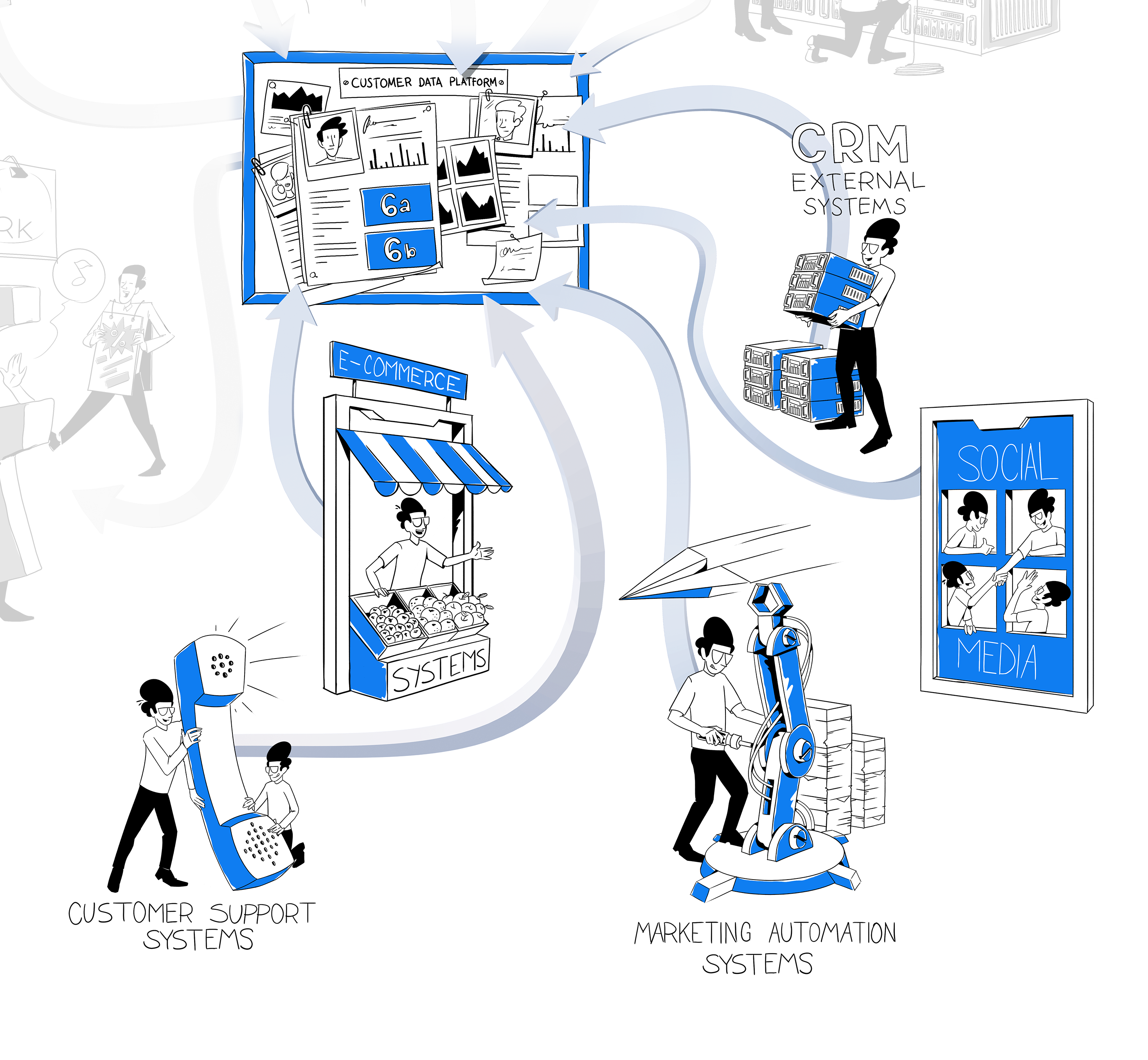
Having this penetrating insight means you’ll be able to connect information about users to how visitors behave on the service and how they renew and cancel memberships. Those connections help you infer what visitor activities lead to higher satisfaction and membership renewals.
Putting the data into action
Piwik PRO allows you to trigger actions based on the CDP audience segments we’ve already mentioned.
You can pick one of the created audiences and tailor your activities – for example, showing an ad, displaying personalized content, sending an email campaign – to your targeted segment. You can activate your audiences with a CDP by sending them to various tools and platforms. It’s up to you what exact user attributes you want to base your campaigns on.
In Piwik PRO, you can use countless integrations and transfer data to numerous destinations like Hubspot, Mailchimp, Slack, Zendesk, Twilio, LinkedIn, Facebook Ads, Google Ads, Zapier, and many more. You can also trigger tags for remarketing ads, A/B testing, on-site retargeting, personalization, and other tools in real-time.
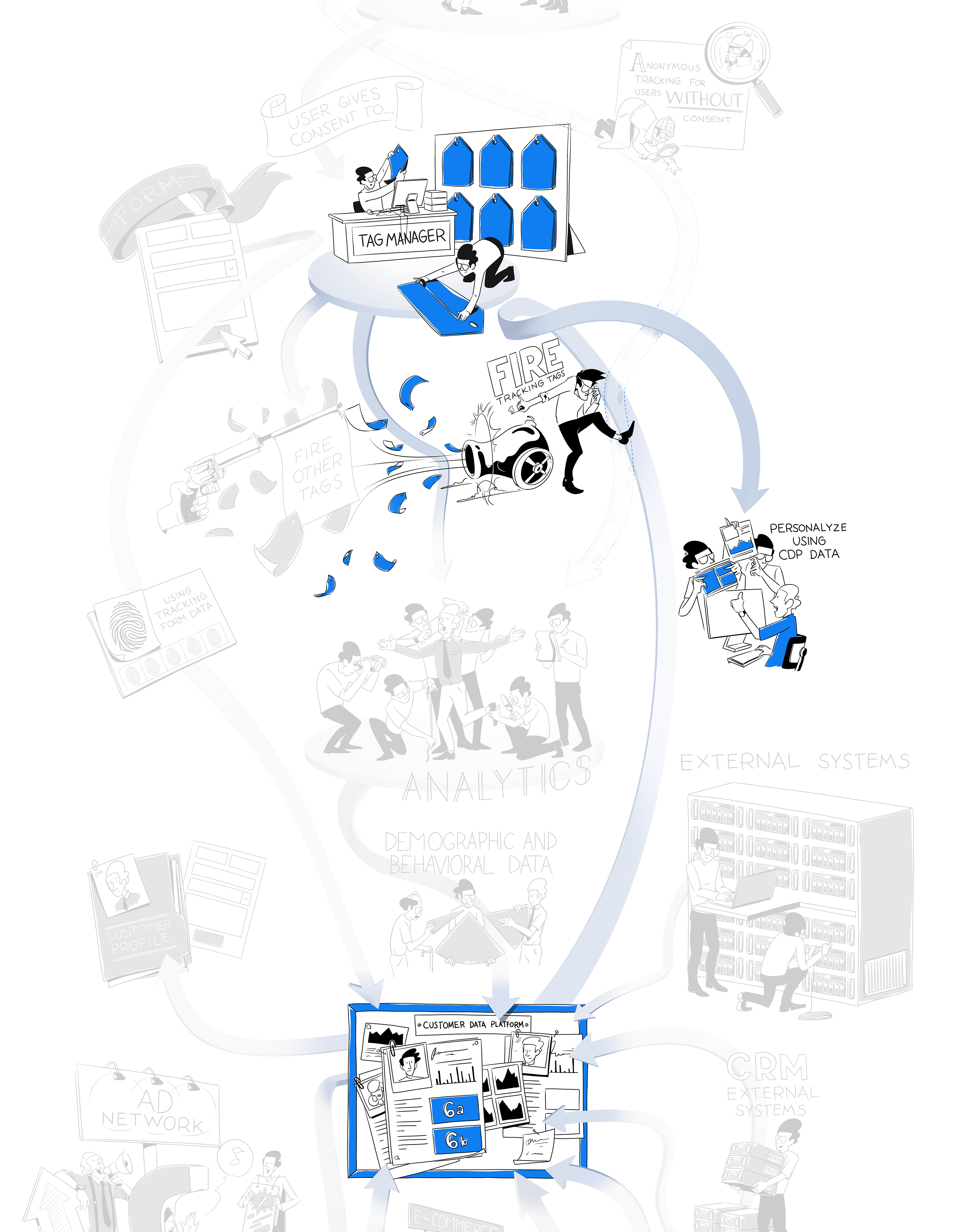
For example, you can segment existing customers who haven’t filled out a survey but have scheduled and completed an online or in-person consultation in the last 14 days. You can then email them a survey to get feedback on their consultation.
Or, you can create an audience of customers who have used your services before – for example, completed three consultations with the same specialist in the last 12 months. You can show them an ad banner with a complementary offer, such as a discount for another consultation.
Or, let’s take an audience of clients that paid for the premium service but haven’t visited your site or app or used your services in the past 6 months. You can serve them branding ads talking about the benefits of your platform and presenting its features.
Activating your audience on ad networks
You can also use the information you have to enhance your marketing outside the Piwik PRO ecosystem. One such option would be activating your CDP audience on Facebook Ads, Google Ads or other ad networks.
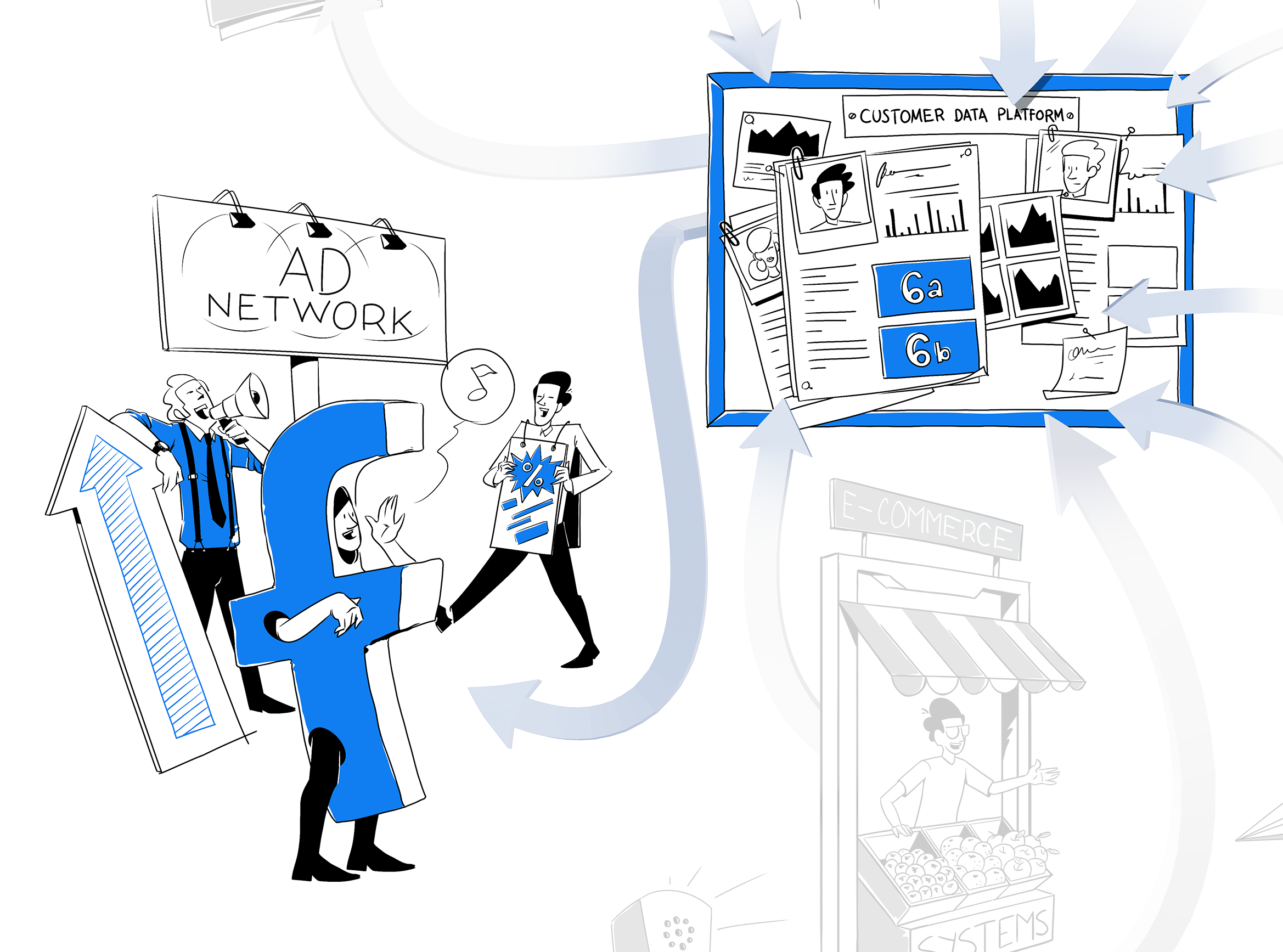
CDP recreates your audience in Google Ads or Facebook Ads but only using the data these two platforms already have. The data you have in Piwik PRO will not be exported or copied to these tools in any way during audience activation. The process is essentially an audience approximation in external ad networks.
You still benefit from targeting your CDP audiences and running personalization campaigns on external platforms while maintaining high data privacy and security standards.
Infographic
Data flow for analytics with consent and anonymous data
Learn how your data pipes are connected to ensure that data stays safe and private
The benefits of understanding how data flows
Analytics users often focus exclusively on deciding what data to gather, interpreting it, and making strategic decisions based on the results. These are all good things to think about, but you should still understand how your data pipes are connected to use the gathered data to the full extent of its capabilities.
Understanding data flows empowers you to make new connections with the help of complex platforms like Piwik PRO Analytics Suite. You can do so while ensuring the data stays safe and private throughout the process.
- 6 ways analytics software collects data online – plus a comparison of 5 popular platforms
- How Analytics & Customer Data Platform Can Help You Track the Full Customer Journey
- What is privacy-friendly analytics?
If you have any questions about the data analytics process or the features of Piwik PRO’s modules, reach out to us! Our team will be happy to address any questions.
The post Data flow in an analytics platform: How to set up your data collection and analysis process appeared first on Piwik PRO.
]]>