The post Unlocking the potential of digital analytics in finance and banking appeared first on Piwik PRO.
]]>SUMMARY
- Financial organizations must optimize the digital experiences they offer to meet evolving customer expectations, focusing on user-friendly features and responsive customer service to reduce churn and improve retention.
- The implementation of web analytics presents challenges for financial institutions, as they need to consider aspects like regulatory compliance, data security, and the integration of disparate data sources.
- By leveraging analytics, banks can personalize customer experiences, optimize marketing campaigns, and refine product offerings based on real-time data and customer behavior analysis.
- Selecting an analytics platform that offers real-time insights, cross-platform analytics, high-level privacy and security features, and access to reliable data is essential for financial institutions to maintain competitiveness and ensure compliance with privacy regulations.
Many financial organizations do a great job gathering customer data. But to stand out, they need to anticipate customer expectations better and quickly adapt products and services to changing preferences.
Banks must ensure that their digital platforms are user-friendly, offering features like easy account management, instant transactions, integrated banking services in mobile apps, responsive customer service through chatbots or other digital tools, and more. Enhancing the overall digital experience can significantly reduce the likelihood of customers switching to competitors.
Strategically applying analytics is what banks are struggling with today. With this come the challenges of efficiently meeting customer needs, managing compliance, mitigating security risks and effectively applying analytics insights in different areas of business.
In this article, we will explore the challenges financial organizations face in analytics, how they can address them, and ideas for effectively applying analytics in their business.
Challenges of using analytics by financial organizations
Organizations in the finance sector handle large volumes of sensitive data spread across different systems and tools. This generates unique challenges for these organizations in implementing web analytics.
Regulatory compliance
Financial institutions must navigate a complex landscape of regulations, including data privacy laws such as GDPR. These regulations impose strict requirements on collecting, storing, and processing data. Non-compliance can lead to severe penalties, making it crucial for organizations to ensure that their web analytics tools adhere to these standards.
Data security and privacy
Given the high stakes involved in handling sensitive customer information, financial organizations are particularly vulnerable to data breaches. Third-party web analytics solutions can increase this risk, especially if sensitive data is stored on external servers. Organizations in the finance industry must choose analytics vendors that prioritize data privacy and employ the highest security standards.
Integrating data from disparate sources
Finance teams need to build a unified data system to effectively collect and store massive amounts of data from their own systems, different departments, and external sources. Many of these organizations struggle with data silos, where information is controlled by one department and isolated from the others. Data is often trapped in legacy systems that do not integrate well with modern analytics tools. This fragmentation makes it challenging to obtain a comprehensive view of customer behavior and limits the effectiveness of analytics.
Data quality
The effectiveness of web analytics relies heavily on the quality of the data collected. The sheer volume of data financial institutions collect can complicate reporting and analysis, requiring robust data management systems to ensure accuracy and relevance. Access to inaccurate data hampers the ability to effectively use analytics insights in marketing, sales or product development. Low-quality or inconsistent analytics data poses significant challenges for financial organizations, affecting their operational efficiency, decision-making processes, and overall trustworthiness.
Experts opinion
Jarek Miazga
Product Manager at Piwik PRO
Financial institutions are struggling to create comprehensive customer journeys because of insufficient data tracking capabilities in post-login areas. Additionally, they must carefully develop data-tracking strategies to comply with stringent regulatory requirements. This is just the tip of the iceberg, as they face numerous other challenges that demand attention and innovation.

Privacy compliance in finance
The finance industry deals with extremely sensitive data, often including personally identifiable information (PII). Examples include collecting visitors’ details such as names, dates of birth, home addresses, email addresses, demographic information, browsing history, device IDs, IP addresses, and more.
On top of that, they handle personal financial information (PFI), which includes account passwords, tax information, credit reports, credit card security numbers, and a lot more. Handling such information requires extra caution as any breaches can be particularly dangerous, leading to potential regulatory fines and loss of trust.
Financial institutions must comply with a large number of regulatory regimes and laws, which include strict sector-related restrictions, such as:
- The Gramm-Leach-Bliley Act (GLBA),
- The Dodd-Frank Wall Street Reform and Consumer Protection Act,
- The GLBA Safeguards Rule,
- The Sarbanes-Oxley Act (SOX), and many more.
At the same time, because financial organizations typically handle personal data and/or PII, they may fall under privacy laws governing these types of information, such as GDPR, CCPA, LGPD, DORA, and other global or local data protection regimes.
To align with regulatory requirements and ensure data privacy, financial organizations can employ the following strategies:
- Understand what privacy regulations they must adhere to and continuously monitor their compliance.
- Choose secure data hosting (e.g., in a dedicated database) in the location of their choice. For example, select an EU-based hosting provider if the institution is located in the EU.
- Maintain full ownership of data, how it’s used and what third parties it is shared with.
- Integrate analytics with a consent management platform to obtain valid user consent before collecting personal data.
- Communicate data collection practices to users through updated privacy policies.
- Apply data minimization to only collect the necessary data for specific purposes.
- Choose a privacy-conscious analytics provider that follows the privacy by design and privacy by default standards.
- Ensure their analytics vendor offers robust security features, such as SSL encryption, SSO authorization, access control, and data backups.
Practical use cases for web analytics in finance
Financial institutions can leverage web analytics to gain deeper insights into customer preferences. By understanding how customers behave across different channels, they can offer personalized financial advice, proactive product recommendations, faster response times, and customized alerts.
Let’s dive into the most important ways a financial company can practically apply analytics insights to their organization’s operations.
Personalizing customer experiences
Web analytics helps financial institutions track user interactions on their websites or apps, offering valuable insights into their engagement and interests. For example, they can understand how users navigate the website or app, their actions, and whether they complete funnels for specific goals, such as submitting a loan application or filling out a contact form.
By integrating analytics with a customer data platform (CDP), organizations can segment customers based on demographics, products or services they purchased, and website or app interactions. This segmentation enables banks to deliver personalized marketing messages and tailored content that resonates with specific customers, enhancing their experiences.
Find out about other practical applications of CDP: 8 customer data platform (CDP) use cases that will drive your business growth.
Improving marketing campaigns
Organizations in the financial sector can effectively use analytics data to improve their marketing campaigns.
They can measure and track their performance to refine and improve marketing assets and messaging in future campaigns. For example, they can analyze which channels drive the most traffic and engagement, recognize their audiences, and determine the best launch time for increased effectiveness.
They can also monitor content-related trends based on visitor activity and conversions, using these insights to influence their future content plans. For example, they can analyze page views, clicks, time spent on page, or file downloads.
Optimizing customer journeys
Web analytics also allows companies to identify pain points within the customer journey. With customizable reporting features, financial institutions can track how users navigate their websites or apps and analyze whether they complete the desired journeys.
One approach focuses on the small steps that users take that make up whole customer journeys, including:
- Evaluating available account options.
- Opening a bank account and onboarding.
- Making money transfers.
- Checking the account balance.
By identifying friction points for customers and where they drop off, organizations can address users’ issues and understand which interactions drive users to convert into paying customers. This can ultimately lead to a smoother user experience, increased customer satisfaction, and better business outcomes.
Reducing churn
Understanding customer behavior through analytics helps financial institutions predict and prevent churn. Financial organizations can establish feedback collection across channels – such as through surveys or social media – to understand the issues behind churn.
They can spot other signs of dissatisfaction, such as reduced engagement, to proactively reach at-risk customers with personalized retention strategies, including tailored products, incentives, or dedicated support. Additionally, they can regularly monitor KPIs such as customer lifetime value (CLV), churn rates, and satisfaction scores to measure the effectiveness of their retention strategies.
Developing products and services
Analytics insights are essential for continuous product optimization. By tracking metrics such as page views, clicks, conversion rate, or bounce rate, financial institutions can evaluate the performance of product pages and see how well their offers respond to prospects’ needs. They can also regularly analyze customer feedback gathered through surveys to refine their offer and adapt to customer expectations, ensuring their competitive edge.
Predicting trends
With analytics, financial organizations can assess historical data to predict future trends. For example, they can use available data to identify potential customers’ interests, target them with relevant offers at the right time, and optimize cross- and upselling opportunities. They can also make informed decisions regarding loan approvals and customer segmentation by assessing the risk levels using existing data.
Learn more about the benefits of analytics for financial institutions: BOŚ optimizes its business, product and marketing strategies with insights gathered through Piwik PRO.
Experts opinion
Carmen Jiang
Senior Digital Analyst at Vekst
An organizational and technical routine is crucial for organizations within banking and finance to set their digital analytics for success. Such routine should systematically encourage cross-department collaboration in both implementation, documentation and periodical review of its data collection. Digital analytics needs allies to foster a strong foundation within an organization, so don’t do this alone, and be vigilant and proactive in all your practices.
Key features of an analytics platform for finance and banking
When selecting an analytics platform, financial institutions should prioritize several key features to gain access to accurate, integrated data that they can effectively apply to their marketing or sales operations.
Access to actionable data
Web analytics should provide actionable insights to drive marketing strategies and improve user experiences. Companies need accurate, unsampled data to better understand customer behavior, optimize marketing efforts, and enhance the customer journey. Features like A/B testing, heatmaps, and customer journey mapping can help in identifying strengths and weaknesses in user interactions.
By combining analytics with customer data platforms (CDPs), organizations can apply the collected insights to create targeted marketing campaigns, provide tailored offers or send personalized emails.
Learn more about CDP benefits: Customer Data Platform: Generate meaningful insights with customer data activation and import.
Real-time data insights
Real-time data analytics is crucial for timely decision-making, risk management and operational efficiency. It shows how many people are interacting with a website or app, and what goals they are converting.
Financial institutions can use this data to dynamically manage their marketing content and campaigns. On the other hand, they’re able to monitor transactions and identify anomalies to detect fraudulent activities as they occur. They can customize real-time dashboards to visualize the most critical data and simplify day-to-day data management.
Learn more about real-time analytics in Piwik PRO: Real-time reporting: The complete guide.
Integration between systems and data
Integrating customer data across different systems and tools is essential for smooth data flow. It also provides access to unified first-party data sets that can be effectively used by other departments, be it marketing, sales or customer service. Working on consistent data reduces the risk of errors and helps enhance the effectiveness of data processes.
Financial institutions should opt for analytics platforms that offer seamless integration with other tools in their data ecosystems. They can also connect a customer data platform (CDP to integrate data from multiple sources, segment customers based on behavioral or demographic attributes, and activate data to target audiences with relevant marketing campaigns or personalized offers.
Cross-platform analytics
Cross-platform analytics provide insights from different platforms, helping financial institutions create funnels to identify and track users between native mobile app, WebView and website. This is especially vital for banking, where customers have grown accustomed to an omnichannel experience.
Reliable data
Financial organizations need to use an analytics platform that gives them access to accurate data. Analytics vendors often use data sampling, which only shows a subset of data. While sampling may be helpful in certain situations, it can lead to far less accurate reports and hide crucial insights, directly impacting business efficiency. Additionally, financial institutions can benefit from access to raw data, which gives analysts more possibilities for in-depth analysis, exploring data insights and making them actionable.
Dedicated support
Reliable support services from the analytics provider can significantly improve the platform’s effectiveness. Institutions should look for vendors that offer dedicated support services rather than relying solely on automated systems or chatbots. For complex data setups, companies may benefit from access to technical support in implementing their analytics infrastructure.
Conclusion
As the financial landscape continues to shift, having access to actionable insights will be crucial for maintaining competitiveness and fostering customer loyalty.
By choosing an analytics vendor that prioritizes privacy compliance, data security and access to valuable, actionable data insights, financial organizations can improve their marketing strategies, enhance user experiences, and ultimately drive better business outcomes.
Reach out to us to discover the full potential of Piwik PRO as an integrated analytics platform that satisfies the needs of financial organizations:
The post Unlocking the potential of digital analytics in finance and banking appeared first on Piwik PRO.
]]>The post Cross-platform analytics: Deep dive into benefits for various businesses appeared first on Piwik PRO.
]]>SUMMARY
- Cross-platform tracking is the activity of collecting data and analyzing user behavior across multiple platforms. Cross-platform tracking lets you track users as they move between the website and mobile app (in both directions).
- Cross-platform data collection offers several benefits, particularly for businesses and marketers looking to understand consumer behavior and enhance their strategies, such as a holistic view of the customer journey, Improved targeting and personalization, and more.
- Cross-platform tracking has a variety of uses across different industries and business functions, particularly in marketing, product development, banking, and ecommerce.
- An analytics platform that offers cross-platform tracking allows you to identify and collect data about users between your native mobile app, webView, and website, as well as create a unified dashboard that aggregates data from these different sources. It also offers various other features and capabilities to provide comprehensive analytics across multiple platforms.
Users no longer follow a neat and organized path when interacting with products and services. The customer journey is much more complex than it used to be. Visitors use different platforms, often switching between native apps, mobile apps, and desktop browsing as they progress toward becoming clients.
For instance, customers could begin on the website and switch to the app. Alternatively, users may see your products on the app and prefer to see them on a bigger screen before purchasing. Tracking across different platforms helps better understand the customer journey regardless of direction.
Most mobile app and web analytics tools can only analyze one platform at a time, siloing user behavioral data into different tools or dashboards. Using a tool designed to perform cross-platform analytics offers a better approach to this problem.
This article will discuss the basics of cross-platform analytics and why it matters for various businesses, and explain how to use it to understand your customers better. In addition, you will discover some business-specific use cases and what a comprehensive cross-platform solution should offer.
What is cross-platform tracking?
Cross-platform tracking is the activity of collecting data and analyzing user behavior across multiple platforms. Thanks to cross-platform tracking, you can track users as they move between the website and mobile app (in both directions).
How it works: You can track the entire customer journey by employing an extension to the web tracking client and mobile SDKs. Keep events attached to the same visitor, even while switching from a native mobile app to a mobile web browser and vice versa.
Benefits of cross-platform tracking
Cross-platform data collection offers several benefits, particularly for businesses and marketers looking to understand consumer behavior and enhance their strategies. Here are some key advantages:
- A holistic view of the customer journey: Cross-platform tracking provides an overview of the customer journey from initial contact to conversion across different platforms.
- Improved targeting and personalization: Businesses can provide more relevant content and ads by understanding how users interact across platforms, increasing conversions and engagement.
- Better campaign measurement: It helps marketers determine which platforms drive the most conversions and where resources should be allocated, as well as assess the effectiveness of their campaigns across different channels.
- Enhanced user experience: By analyzing cross-platform behavior, businesses can ensure consistency and re-engagement strategies that appeal to users on their preferred platforms.
- Reduced data silos: Using cross-platform tracking eliminates data silos and allows insights and analytics to be more unified, resulting in more informed decisions.
- Identifying consumer trends: Businesses can stay ahead in product development and marketing by grasping consumer trends on various platforms.
- Increased ROI: Data-driven marketing can help businesses improve their return on investment.
Experts opinion
Antoni Bartczak
Product Manager (Integrations) at Piwik PRO
The significant increase in mobile devices per capita over the last 5-10 years and developers making navigation between browsers, applications, and embedded WebViews on these devices almost seamless means that cross-platform tracking is critical to web analytics. By relying on vendors that provide consistent visitor journey tracking across different environments, you can increase the accuracy of attribution reporting and potentially reduce costs by eliminating tools that previously served as a stitching mechanism in your data collection pipeline.
What are the uses of cross-platform tracking?
Analyzing user behavior across platforms is essential for companies that have both mobile apps and websites, especially in cases where users have multiple touchpoints with brands’ sites and apps before making a purchase.
Cross-platform tracking has a variety of applications across diverse industries and business functions, particularly in marketing, product development, banking, and ecommerce.
Let’s dive into business-specific use cases.
For marketers
Advertisers can use cross-platform tracking to estimate their ad performance and ROI more accurately. You won’t be able to see the complete customer journey if you use traditional attribution tools or the data provided by ad networks, which means that each campaign or ad network could be overestimated or underestimated.
One of the common uses of cross-platform tracking is deep linking from the mobile browser to the mobile app, and vice-versa. Let’s say your company is web-first, but you also have a mobile app: thanks to deep links, you can send website visitors to your app install page. Deep linking-enabled journeys deliver higher conversion rates. Using deep linking, you can track and analyze user behavior across the entire user lifecycle, including re-engagement and acquisition campaigns.
As a marketer, you run several campaigns across multiple digital channels. A comprehensive cross-platform analytics solution allows you to integrate with Google Ads to track marketing campaign performance. This encompasses monitoring analytics for each campaign, including impressions, clicks, conversions, revenue, and cost per action (CPA). These insights allow you to assess how campaigns fare across platforms and introduce effective optimizations.
Marketers benefit from cross-platform marketing in many ways, including increased reach, enhanced targeting, improved engagement, consistent messaging, and higher conversion rates.
If you want to learn more about analytics for marketers, read:
- Digital marketing analytics: The beginner’s guide to data-driven marketing success
- How to optimize Google Ads campaigns with Piwik PRO Analytics Suite
- What is first-party data and how does it benefit your marketing
- Harmonizing marketing and privacy: How EU organizations are developing their compliant digital marketing strategies
For product teams
Cross-platform tracking provides product teams with a complete overview of how users interact with the product, enabling them to understand user needs and challenges better.
Product teams can comprehensively view user behavior across various channels through cross-platform analytics. This allows them to recognize patterns and trends that might go unnoticed when examining customer data from separate platforms. As a result, they can better understand what users need and where they struggle, enabling them to use data to make informed decisions that enhance the user experience, boost engagement, and improve user retention.
Let’s say you are a SaaS company. Cross-platform tracking gives you information you need to enhance your funnel analysis and consequently improve user journey.
A funnel is a series of steps that lead to an important event. Here are the steps users take to sign up for a SaaS site:
The funnel analysis shows how many users progress from one step to another and how many drop-offs occur. When many users struggle to finish a step or fail to do so, it indicates that there is excessive friction in that area. That’s the key area for you to target to boost conversion rates.
If you want to learn more about analytics for product teams, learn more about our solution.
For banking
Cross-platform tracking allows financial institutions to grasp more user insights across the native app and web. But there are more uses.
Let’s say you have an app and a website. But you also use an app channel, an internal website accessible only via your banking app. You use an in-app browser from within the banking app to access this channel. Cross-platform tracking will help you capture more in-depth measurements of these pages and how your customers use the channel. You will see the funnel from the app to the app channel pages.
It provides seamless user experiences, improves operational efficiency, and embraces innovation through cross-platform data collection.
If you want to learn more about analytics for banking and financial institutions, read: BOŚ optimizes its business, product and marketing strategies with insights gathered through Piwik PRO.
For ecommerce
By utilizing cross-platform tracking, you can gain valuable insights into the effectiveness of all your marketing channels’ performance. Analyzing the platform that drives the most traffic to your website can help you enhance it and increase customer conversions. This evaluation will also aid in recognizing the best-performing content or products, allowing you to prioritize them and guarantee their visibility on all platforms.
One of the use cases for cross-platform tracking is launching a webView inside an app to display web content within an app. It’s an efficient way for ecommerce to increase conversion rates and sales figures overall. WebView enables product pages and other web elements to be shown within an app. Whether you’ve built a site from scratch or have a Shopify store, webView allows for relevant online content to be easily accessible and works in tandem with native application features. It also helps simplify the maintenance of a consistent user experience.
This kind of analytics is also helpful when you monitor the performance of your content across multiple platforms. This monitoring can assist you in deciding whether investing time and effort in creating new content for those channels is worthwhile or if it would be more beneficial to concentrate on optimizing existing content.
If you want to learn more about analytics for ecommerce, read:
How Piwik PRO facilitates cross-platform tracking?
Use Piwik PRO’s extension to web-tracking client and mobile SDKs to follow the full customer journey across the web and app. Using event analytics is the easiest way to track user behavior on websites, web applications, and mobile applications.
It’s now possible to track app and web data together, giving you a more accurate picture of the user’s journey. Having separate streams for iOS, Android, and the web allows for more granular analysis.
With Piwik PRO, you can:
- Identify and track users between your native mobile app, webView and website.
- Create a unified dashboard that aggregates data from these different sources.
See how Piwik PRO facilitates cross-platform tracking through various other features and capabilities designed to provide comprehensive analytics across multiple platforms:
- Unified user profiles: Piwik PRO Customer Data Platform (CDP) creates a single user profile aggregating data from various platforms (web, mobile apps, etc.). This lets you see a complete view of user interactions and behaviors across all channels.
- User ID tracking: Piwik PRO supports User ID tracking, which lets you assign unique identifiers to users. This enables accurate tracking of a number of users across different devices and sessions, maintaining continuity in data collection.
- Custom event tracking: You can set up custom event tracking to monitor specific actions taken by users on different platforms, such as downloads, clicks, or form submissions. This helps understand user engagement across channels.
- Integration with other tools: Piwik PRO integrates with various tools, enabling data sharing and collaboration across systems.
- Data ownership and privacy compliance: Piwik PRO prioritizes data privacy, offering you control over your data. This is crucial for compliance with regulations (like GDPR, PIPEDA, or CCPA) as organizations collect data on user behavior across platforms.
- Cross-domain tracking: For businesses with multiple domains or subdomains, Piwik PRO allows seamless tracking across them, ensuring that users are followed effectively throughout their journey, even when transitioning between sites.
- Customizable dashboards and reports: Users can create personalized dashboards and reports that reflect cross-platform performance metrics, aiding in strategic decision-making and performance measurement.
- Attribution modeling: Piwik PRO provides tools for attribution modeling, which helps you understand the contribution of each platform (web or app) to the conversion process, allowing for data-driven marketing decisions.
- Heatmaps: It lets you quickly visualize user engagement with UI elements and features.
- Real-time data processing: Real-time data capabilities enable you to observe user interactions across platforms and react swiftly to trends or issues.

Learn more about analytics:
- Real-time content analysis for publishers
- Real-time reporting: The complete guide
- Anonymous tracking: How to do useful analytics without personal data
- How you can drive growth for your business with an integrated analytics platform
- Reports in Google Analytics 4 and Piwik PRO: Everything you should know
By providing these features, Piwik PRO enables businesses to gain meaningful insights from cross-platform user data, facilitating improved marketing strategies, enhanced user experiences, and ultimately driving better business outcomes.
Reach out to us to discover the full potential of Piwik PRO as an integrated analytics platform offering cross-platform tracking capabilities
The post Cross-platform analytics: Deep dive into benefits for various businesses appeared first on Piwik PRO.
]]>The post How Oxford Online Pharmacy increased data volume by 15% with Duga Digital and server-side Piwik PRO Analytics appeared first on Piwik PRO.
]]>The post How Oxford Online Pharmacy increased data volume by 15% with Duga Digital and server-side Piwik PRO Analytics appeared first on Piwik PRO.
]]>In this text, we'll explore real-time content analysis, detail its advantages, and show how publishers can take advantage of such reporting. Furthermore, we will discuss how to choose an analytics platform that offers real-time functionalities that suit your needs.
The post Real-time content analysis for publishers appeared first on Piwik PRO.
]]>SUMMARY
- Real-time reporting in analytics refers to generating and delivering reports on data collected and updated in real-time. It enables businesses to instantly monitor their operations, performance, and key metrics, allowing for quick decision-making and timely actions.
- Real-time content analytics is a game-changer for businesses like publishers. It provides valuable insights into how your audience engages with your content instantly. This allows you to monitor trends and quickly make adjustments to improve the performance of your content.
- Real-time reporting has many use cases, including optimizing content performance, improving article distribution and ad campaigns. It also allows for the quick creation of content based on trends.
- Choosing an analytics platform with real-time reporting features requires careful consideration of your organization’s specific needs, goals, and technical requirements.
Collecting and processing data in real-time is more than a reporting method: it’s a game changer for publishers and media companies. It’s essential to keep up with the rapidly evolving trends and interests of their audiences.
In this text, we’ll explore real-time content analysis, detail its advantages, and show how publishers can take advantage of such reporting. Furthermore, we will discuss how to choose an analytics platform that offers real-time functionalities that suit your needs.
What is real-time content analysis?
Real-time content analytics is the process of analyzing and deriving insights from various digital content types, such as text but also images, videos, audio, and other multimedia formats, at the same time users are engaging with them. The purpose of this type of content analytics is to understand the meaning, sentiment, relevance, and patterns within the content, allowing media companies to react immediately and leverage data-driven decisions, enhance processes, and improve readers’ experiences.
Analyzing content in real-time helps you answer the following questions:
- Which articles are trending right now?
- What is sparking the most interest on social media?
- Which stories or topics are most popular with your audience?
Benefits of real-time reporting for publishers
Real-time reporting is crucial for publishers as it instantly provides valuable insights into how your audience is engaging with your content. This allows you to monitor trends and quickly make adjustments to improve the performance of your content. Media teams without real-time analytics often struggle to align on content decisions – what to change, when to change it, and most importantly, why. Real-time analytics gives publishers data-driven insights, allowing teams to take effective, informed action on the spot.
Experts opinion
Jarek Miazga
Product Manager at Piwik PRO
Real-time data provides immediate insights into audience engagement, enabling rapid response to evolving trends and news, optimizing content performance, adjusting article distribution strategies, and enhancing ad campaigns effectively.
Optimizing content performance
If you are a publisher, understanding how your audience interacts with your content on different platforms, channels, and devices helps you optimize visitor engagement at critical moments for your site and fuels content analytics and content personalization.
Here are some examples of how real-time data can help you improve the performance of your content:
- Real-time content analysis: By analyzing content in real-time, you can update articles to be more engaging.
- Website improvement: Since an article’s lifecycle lasts an average of a few hours, acting quickly and making necessary adjustments is essential.
- Headline and title adjustment: Adjust the title of your article to make it more appealing to your audience. Thanks to instant real-time feedback, you can test different headlines and quickly find the most engaging one in seconds.
- Photos and copy adjustment: You can swap in other images or texts if you get negative reactions to certain photos or language.
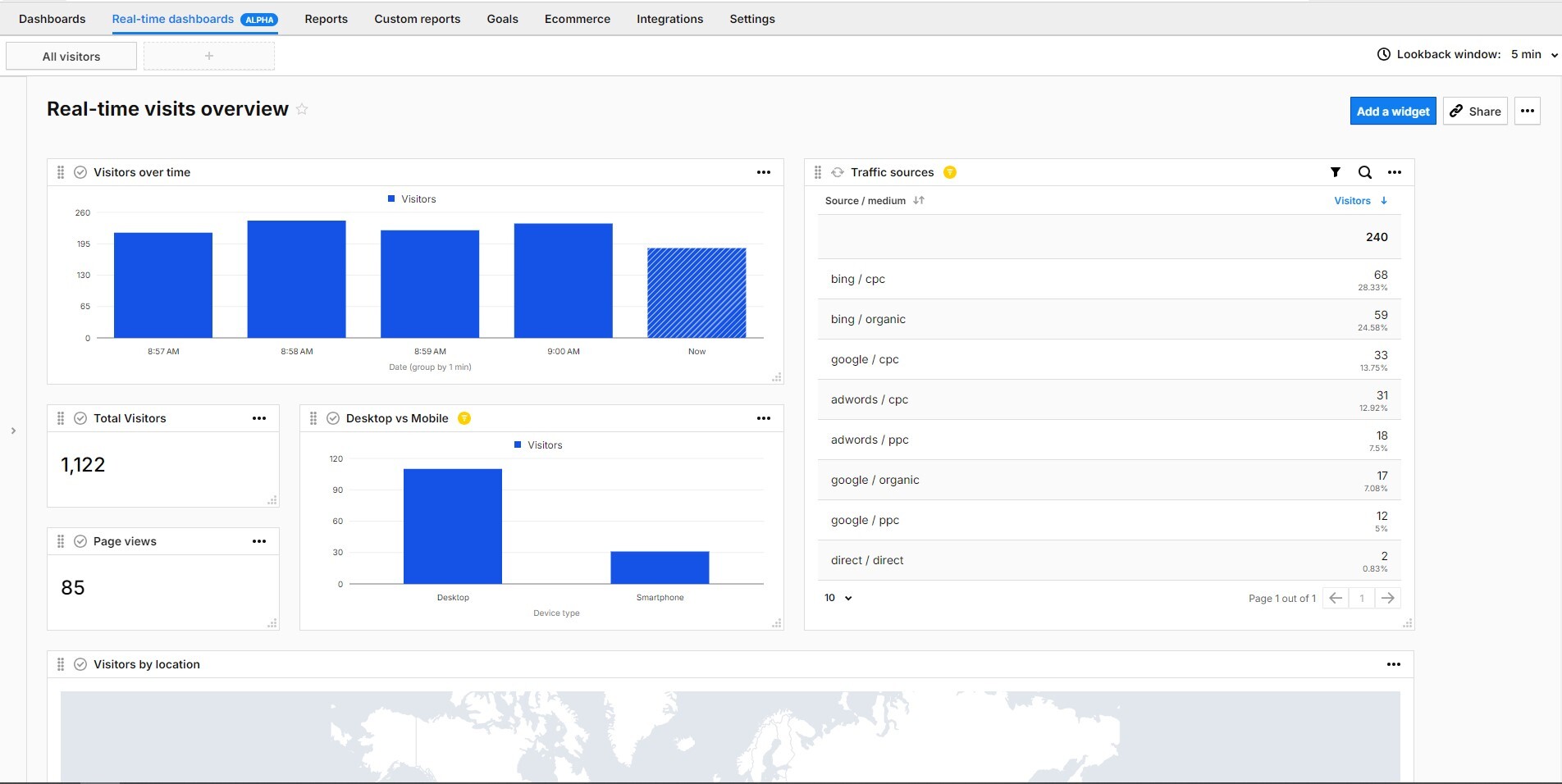

Thanks to real-time dashboards, you can easily see and analyze who’s on your site, where they’re coming from, and how they interact with your content. This can significantly improve your content strategy and make team collaboration smoother. Using real-time dashboards, you can maximize the benefits of real-time data for monitoring traffic and interacting with readers.
Improving article distribution
If you want an article to perform better, monitor in real-time which promotional strategies are attracting attention to your articles and which are not. Enhance your successful promotional tactics, experiment with different strategies, or share your article in the suggested sections to maximize exposure.
Let’s see how real-time data can help you:
If an article gains traction on specific platforms, you can make the most of its popularity by sharing it on other platforms like your newsletter, social media, or homepage. For example, you discover that a new article performs well on Facebook among millennials. You can use paid advertisements on this platform that target that demographic to increase its visibility. Or include the article in an email newsletter targeted at your millennial readers.
Improving ad campaigns
If you’re running multiple campaigns, it’s important to be efficient and agile. By monitoring your campaigns’ performance in real-time, you can quickly optimize them using insights from live data. You can see how your target audience responds to campaigns as they happen. Analyze the number of visitors from specific areas, their peak activity times, and the advertisements, emails, and content that are most engaging. If your platform relies on ads, you can improve the content using real-time insights to engage visitors and increase their time on the page.
If you want to learn more about marketing, check these articles out:
Real-time reports will help you to:
- Ensure that campaign tracking is correctly implemented before you launch it.
- Quickly evaluate if your campaign is delivering the expected results by analyzing data in analytics.
- Change the targeting, messaging or other characteristics of underperforming campaigns.
Campaign performance can be measured not only based on traffic but also on the number of conversions per channel or type of campaigns. You can see the number of live conversions related to the channel and campaign. Keeping an eye on these conversion rates offers a useful way to analyze and compare the effectiveness of various advertising channels.
Creating content based on trends
Using real-time content analysis, you can monitor the most popular topics on your website and react quickly to new developments. By identifying what people care about and want to explore in greater detail, you can write and publish relevant and engaging content quickly.
For instance, you write a piece about the French Open and notice a sudden spike in audience engagement on content about one of the tennis players. While audience interest is high, consider writing a dedicated article about this player.
What to look for in an analytics platform if you are a publisher
Choosing an analytics platform with real-time reporting features requires careful consideration of your organization’s specific needs, goals, and technical requirements.
Having this in mind, you have to evaluate a few things:
Real-time reporting capabilities
With the right analytics platform, you can track article performance, social shares, conversions, and topics, authors, and article tags in real-time. The combination of these will help you make sense of insights and take action on them.
Data analysis possibilities
Opt for a platform that provides an accurate picture of audience engagement with metrics like the number of conversions per channel. Check the latency of its reporting and dashboarding features, as well as customization options. Consider also features like access to the metrics and dimensions that you need.
Audience segmentation option
By segmenting your audience and matching it with your performance metrics, you can effectively serve each segment. There will always be subsets of audience members that are more interested in certain topics than others.
Availability of customizable dashboards
Create customized dashboards tailored to the specific needs and roles of different users within the organization. Provide relevant insights and visualizations that empower users to make informed decisions quickly and efficiently.
Low learning curve
Make sure that real-time dashboards and their visualization possibilities are easy to use for all team members. For journalists and editors on tight deadlines, finding data-driven insights quickly is crucial.
Integrations options
Ensure that the analytics platform integrates seamlessly with your existing systems and tools, such as PowerBI, and fully supports your data-driven strategies for decision-making processes.
Security and compliance
You should also consider your organization’s security and compliance requirements. Look for features such as data anonymization, safe hosting options, and compliance with applicable regulations like GDPR and HIPAA.
Experts opinion
Jarek Miazga
Product Manager at Piwik PRO
When choosing a platform for real-time reporting, prioritize those with robust analytics capabilities, user-friendly dashboards, and seamless integration with your existing tools. Ensure the platform offers customizable reports and scalability to handle increased data loads. Additionally, consider the platform’s support and training resources to maximize its utility.
Piwik PRO Analytics Suite provides real-time reporting capabilities and is distinguished by:
- Flexibility: Built on our powerful dashboard engine, it allows you to enjoy extensive customization options.
- Data freshness: Data is refreshed every 10 seconds.
- Lookback window: From 5 to 60 minutes.
- Segmentation: Analyze specific segments of your data and compare them effortlessly for deeper understanding and actionable insights.
- Real-time data API: Integrate our dashboards with your existing systems for a truly unified experience (e.g., data can be taken into PowerBI).
- Integrations: Easily analyze and activate your data thanks to the integrated modules.
- High privacy standards: Remain compliant with privacy regulations around the world.
Piwik PRO’s real-time dashboards enable you to optimize content, improve article distribution, monitor campaign performance, create content based on trends, and adapt strategies promptly.
Reach out to us to discover the full potential of Piwik PRO as an integrated analytics platform offering real-time reporting capabilities
The post Real-time content analysis for publishers appeared first on Piwik PRO.
]]>The post How to optimize Google Ads campaigns with Piwik PRO Analytics Suite appeared first on Piwik PRO.
]]>SUMMARY
- Google Ads offers great reach and impressive ROI, but successful campaigns require careful optimization and continuous refinement.
- Supplementing the data from Google Ads with analysis tools such as Piwik PRO enables an iterative approach to campaign optimization.
- Piwik PRO Analytics provides detailed insights into campaign performance, including metrics such as sessions, bounce rate, goal conversions, and revenue.
- Landing page optimization is crucial for maximizing advertising effectiveness, and Piwik PRO facilitates the analysis of landing page performance and user behavior.
- Piwik PRO’s custom segmentation and reporting provide deeper insights into audience behavior, enabling more targeted and effective advertising strategies.
- Integrating Piwik PRO CDP and Google Ads enables personalized campaigns based on first-party data, improving targeting and ROAS.
Google Ads has a reach of over 90% of internet users worldwide. According to Techreport, the return on investment for companies using this platform is an impressive 8 dollars for every dollar spent.
However, such figures are not easy to achieve. Managing a Google Ads campaign is difficult, and the results sometimes take time to crystalize.
Optimizing Google Ads campaigns, analyzing data, and developing a system for continuous targeting refinement are all art in themselves and require experience.
This is why you should not only rely on the information available in the Google Ads panel. You should also use other analytics platforms, such as Piwik PRO Analytics Suite.
The idea is to introduce an iterative process in which you repeat a cycle of experiments, data analysis, conclusions and improved methodology. Empirical data, allows you to optimize your Google Ads campaigns more efficiently, eliminate errors, and gain more confidence in your decisions.
This blog post presents tips and tricks for optimizing your Google Ads campaigns with Piwik PRO. These tools enable you to precisely determine your target group, track user actions, and quantify the effects of your marketing efforts.
Google Ads optimization using the basic report in Piwik PRO Analytics Suite
Start with the basic report in Piwik PRO Analytics Suite to optimize your Google Ads campaigns.
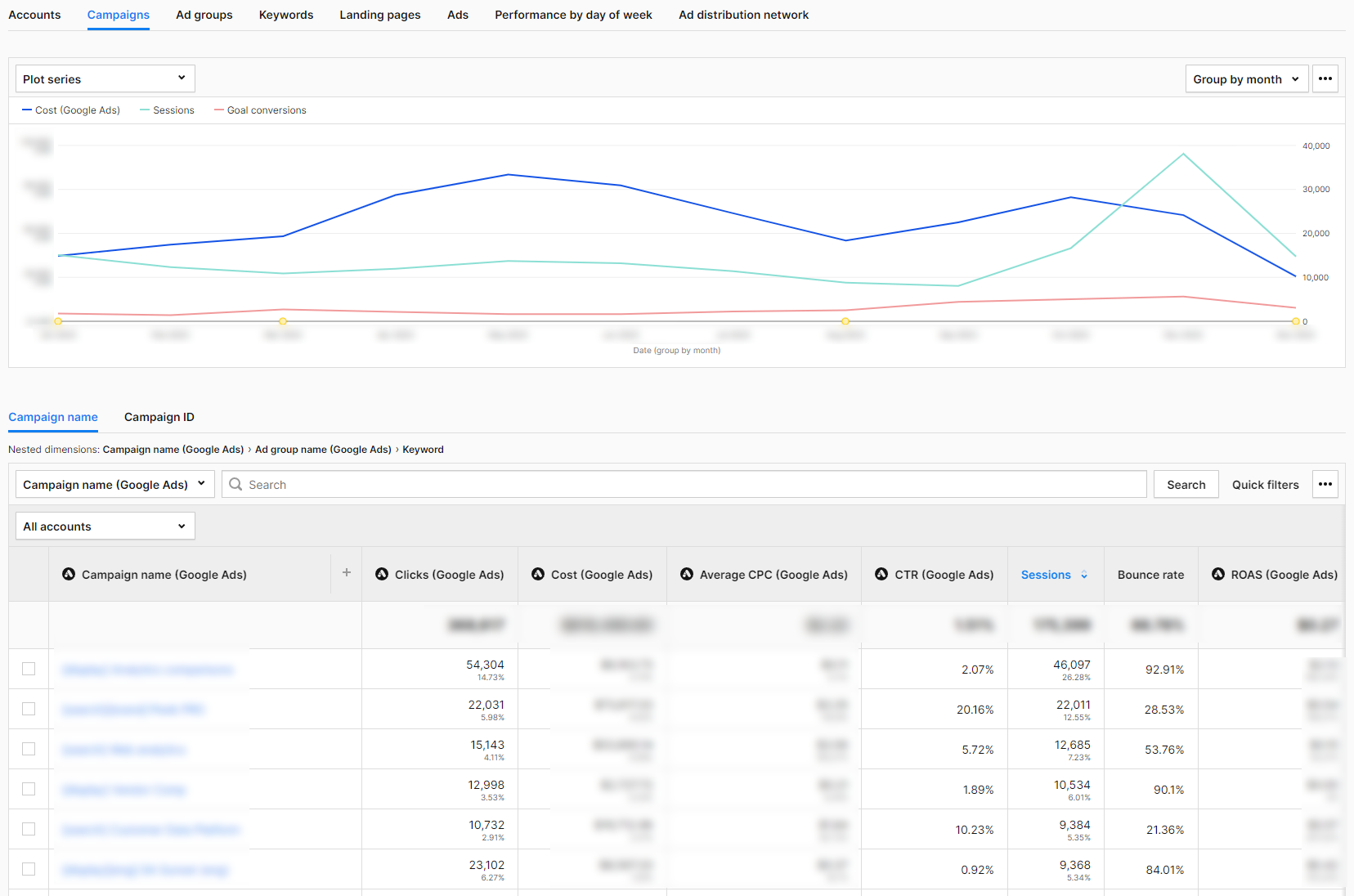
Once you integrate Piwik PRO with Google Ads, the report’s structure in the Analytics platform mirrors the workflow in the Google advertising platform. You move from the general level to increasingly detailed data.
Accounts
This report shows the Google Ads accounts that you have connected to Piwik PRO. If your company has branches in different countries, you can set up a separate account for each one. In this report, you then analyze the key metrics for each account individually. The table combines information from Google Ads:
- Account – Account name.
- Clicks – The number of clicks on your ad.
- Cost – The amount you have paid for your ads in Google Ads.
- Average CPC – the amount paid for your ad divided by the total number of clicks.
- CTR – The click-through rate measures how often visitors click on your ad in Google Ads after it has been displayed to them.
- ROAS – It shows whether the expenditure for Google Ads has been converted into sales.
with additional data from Piwik PRO Analytics, such as:
- Sessions – The number of sessions carried out by visitors. A session starts with the first event and ends 30 minutes after the last event that happened in this session.
- Bounce rate – The percentage of sessions in which visitors only viewed one page and did not move on to another page, goal conversion, or order.
- Goal conversions – The number of goals completed in a session (if you have set goals).
- Goal conversion rate – The percentage of sessions in which visitors completed a goal.
- Sum of goal revenue – The total of sales for a given goal.
The Piwik PRO Analytics Suite metrics allow you to see what happens after a click in Google Ads and whether it was a valuable click for you. We’ll take a closer look at this at the campaign level.
Campaigns
This report shows the performance of campaigns set up in Google Ads that drive traffic to your website.
Here, we analyze campaigns by type, such as display, search, etc. We can also aggregate traffic from one, many, or all campaign types to analyze selected segments.
The report allows you to examine the data clearly and intuitively. The basic view consists of the same metrics as at the account level. Thanks to the analysis of the performance metrics in Google Ads together with those from Piwik PRO Analytics, you can check whether the clicks you got were worth the effort.
The bounce rate provides information on whether users took action after clicking on the ad or simply visited the landing page and left immediately.
Sessions show you which campaigns have prompted your target group to visit your website the most.
If you have set a goal in Piwik PRO Analytics for one or more Google Ads campaigns, you can filter the report by that goal to see if it has been achieved.
Ad groups
This report shows the performance of ad groups in Google Ads that drive traffic to your website. Performance Max campaigns don’t support ad groups, so the data from these campaigns is listed under “no data” in this report.
Keywords
This report shows the performance of the keywords set in Google Ads that drive traffic to your website.
Landing pages
This report shows the performance of landing pages, sorted by the dimension “Session Entry URL”. Like the other reports, it combines metrics from Google Ads and Piwik PRO Analytics Suite. Here, you can see how many conversions you achieved thanks to pages the visitors were redirected to by ads in Google Ads. If the results are below expectations, you can continue the search for possible causes. To do this, examine selected metrics, starting, for example, with the bounce rate, performance on different devices, and page speed.
Ads
This report shows at the ad group level the performance of ads placed in Google Ads that drive traffic to your website.
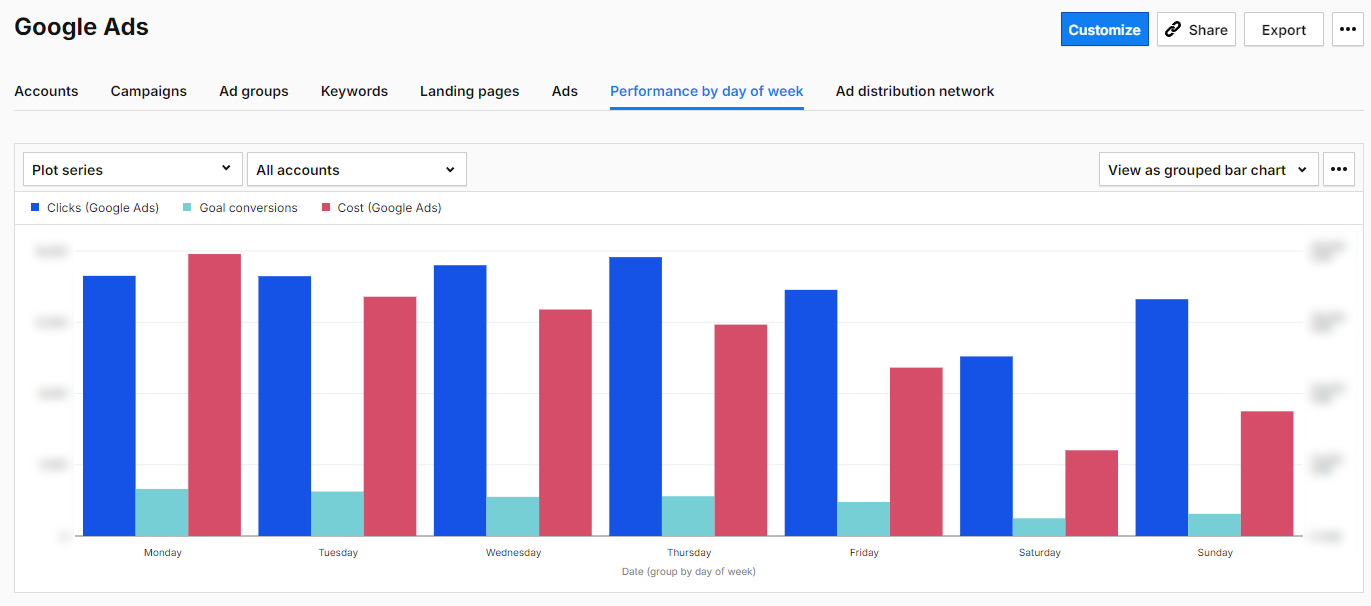
Performance by day of week
This report shows the traffic generated by your ads each day of the week. It combines data on clicks, costs, and target conversions.
Ad distribution network
This report shows where your ad was placed. The networks include Content, Mixed, Search, Search Partners, Unknown, Unspecified, YouTube Search, and YouTube Watch.
Based on this data about your Google Ads campaigns, you can determine which areas require more in-depth analysis. With other features of the Piwik PRO Analytics Suite, you can find out how to optimize your website, ad content, and campaign structure in Google Ads.

Currency conversion
With Piwik PRO’s new Currency Conversions feature, businesses can now consolidate revenue data from multiple currencies into a single standard currency. This ensures accurate financial analysis across diverse markets, enhancing your ability to assess the performance of your Google Ads campaigns globally. Learn more in our article: Currency conversion.
Google Ads optimization with other functions of Piwik PRO Analytics
Landing page optimization
With Piwik PRO, you can identify landing pages that do not fulfill the promise of the ads used in marketing campaigns. This problem manifests itself in various ways. Sometimes, the messaging of the ads and the landing page don’t match. Certain landing pages may perform poorly for certain marketing campaigns. It is also worth checking whether there are marketing campaigns and channels that are directing visitors to the wrong landing pages.
To do so, go to the “Landing Page” tab in the Google Ads basic report. Sort the landing pages in descending order by bounce rate. Look for landing pages with a bounce rate higher than the average bounce rate and a target conversion rate below the average. These are the landing pages you should take a closer look at.
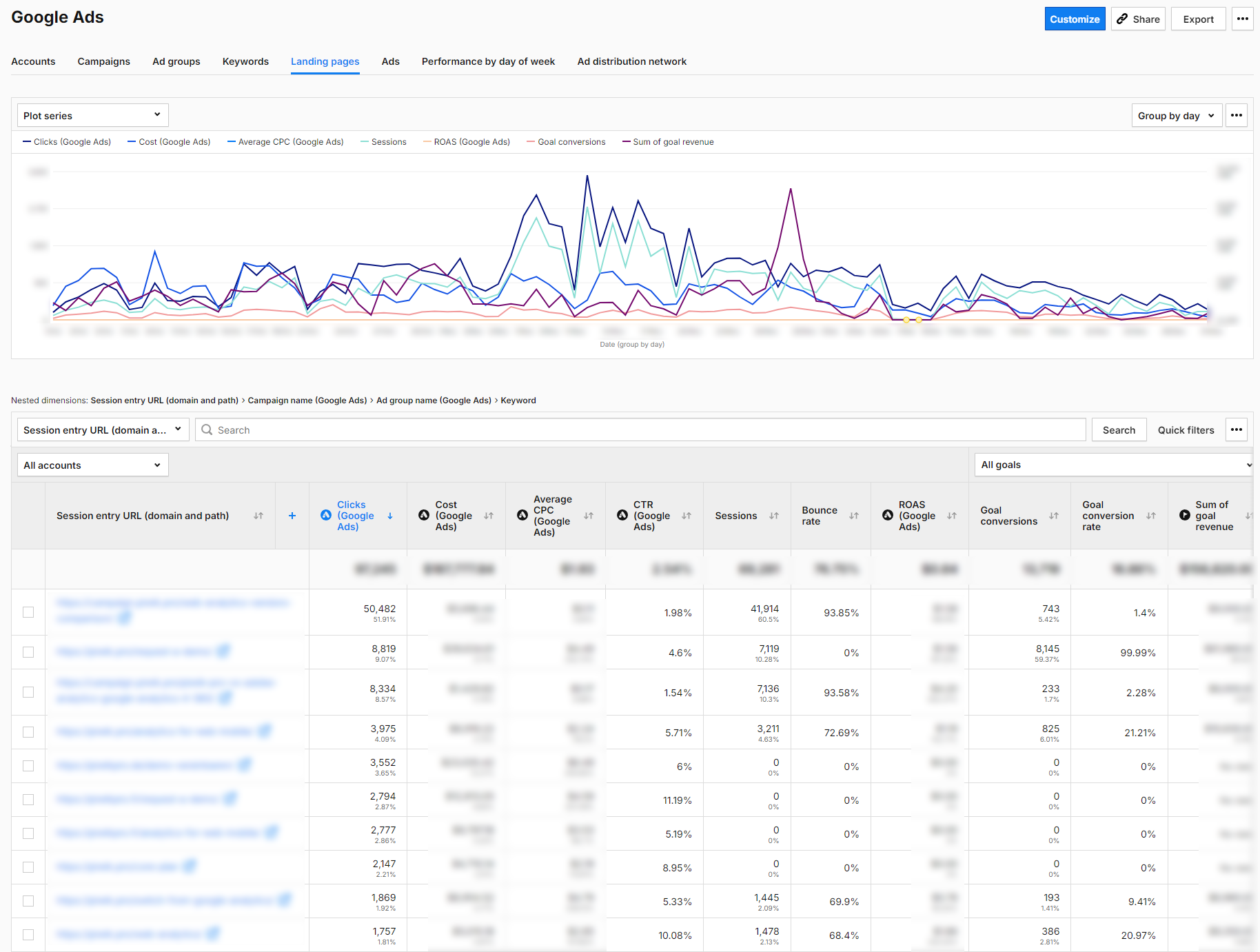
Landing page performance check
In Piwik PRO, go to Behavior—Pages. Enter the URL of the landing page there and check its average loading time.
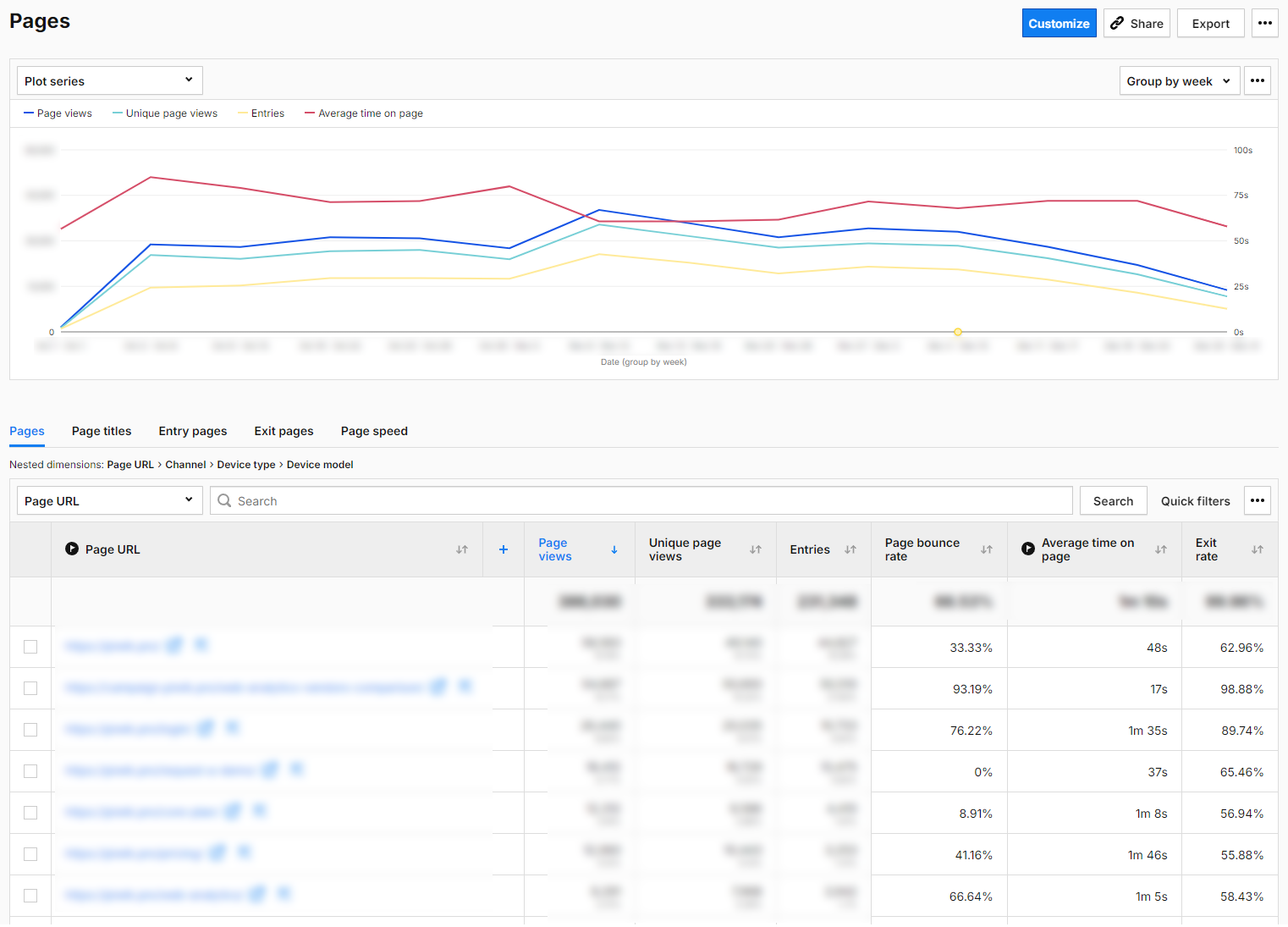
The loading time of your landing page influences your success. If it takes too long to load, your audience could leave the page and never return.
As a result, you spend money on campaigns and, at the same time, rob yourself of the chance of conversions and sales. More importantly, you are also depriving yourself of reliable data for analysis and potentially making the wrong decisions.
For instance, you might think that a landing page’s content or design is flawed, even if it would actually work fine if the loading time was right.
If you notice that your landing page’s loading time is slow, consider optimizing images, CSS, or JavaScript files.
Landing page design check
Is your landing page geared toward conversion? Does it have a clear CTA?
Take some time to analyze the scroll depth of your landing page (you will need a custom report in Piwik PRO to do this). If visitors are not scrolling to the CTA, you are not getting the targeted number of clicks. Check if the page’s content engages the target audience enough to direct visitors to the CTA button. Perhaps you should consider placing the button further up or below the relevant text section.
Run A/B and multivariate tests and optimize headlines, images, texts, and CTA buttons. Thanks to the integration with the most popular A/B testing tools (including AB Tasty, Omniconvert, Optimizely and VWO), you can access your A/B test statistics directly in Piwik PRO.
You can find more information about A/B testing tools here: Best 10 A/B testing tools for 2023: Google Optimize alternatives
Landing page content check
Take another close look at your ad and the landing page. Check whether the message users receive before clicking matches the information they see after clicking. For instance, if you offer free delivery in your ad, but it’s not available on the landing page, or if you promote a particular product but visitors end up on a page displaying various products in that category after clicking.
Experts opinion
Arttu Raittila
Co-founder at Hopkins
Most Google Ads optimization work happens within the platform itself. However, Piwik PRO helps you optimize the bigger picture: budget allocation, landing page experience, and interplay with other marketing channels. Here are some lesser-known ways to go beyond basic features:
Optimize landing page experience with Piwik PRO site inspector for Chrome
Use Piwik PRO’s site inspector for Chrome to analyze heatmaps of your landing pages to improve the user experience and conversions rates.
Do users react to your call-to-actions and other landing page elements as expected? Do they scroll down, or is there a confusing element that stops them?
Analyze longer customer journeys with User IDs
By setting up user ID tracking in Piwik PRO, you can analyze longer customer journeys.
User IDs identify visitors across multiple devices and browsers, overcoming the limitations of expiring cookies. They allow re-identification when users log in or provide contact details.
While this is more straightforward for e-commerce websites, Piwik PRO’s Customer Data Platform (CDP) is also capable of managing complex scenarios.
With a complete view of customer journeys, you can better spot the effects of top-of-funnel advertising like Google Ads display or Demand Gen campaigns. You might also gain insights into the interplay between paid social and paid search.
Paid search rarely works best alone; it benefits from top-of-funnel support. User IDs help uncover these effects, justifying your top-of-funnel spend.
Take things further with Piwik PRO CDP and data warehousing
Piwik PRO’s Customer Data Platform (CDP) enables even more advanced analysis.
With it, you can track longer customer journeys, even for offline sales or those facilitated by salespeople.
Store the collected data in a data warehouse. Once you have enough data, create a model to predict revenue using machine learning algorithms like Random Forest.
This allows you to circumvent the 90-day Google Ads conversion window by using predicted revenue as the conversion value at the point of conversion.
This helps optimize Profit-On-Ad-Spend (POAS), even for products with lengthy buying cycles.
Goal tracking
When analyzing Google Ads campaigns, it is essential to compare Google Ads data (mostly clicks) with traffic quality information (such as goal conversion). By setting goals in Piwik PRO, you can measure micro and macro conversions on your website.
You can easily track your goals automatically by using the information you send to Piwik PRO Analytics:
- Page URL visits
- Page URL title
- Custom events
- File downloads
- Clicks on external links
If you need even more flexibility, you can track your goals manually with the Piwik PRO Tag Manager. This type of goal is tracked when a specific conversion action takes place. Possible scenarios for this type of goal tracking include:
- You have specific goals that cannot be tracked automatically.
- You want to assign revenue to your conversions dynamically.
If you use the advanced settings, you can assign the revenue to your conversion and allow multiple goals per session. The last option is helpful for ecommerce if you want to record all add-to-cart conversions that have taken place in a single user session.
For more information about setting goals in the Piwik PRO Analytics Suite, visit our help center:
By setting up and tracking these goals, you gain valuable insights into the success of your campaigns. At the end of the day, it doesn’t matter how many people clicked on your ad. What matters is whether they take the desired action on your website after clicking the ad.
If you keep your goals in mind, you can analyze these conversions on different levels — campaigns, keywords, and specific creations. It is essential to analyze goals that are similar and have equal weight.
Defining goals also makes it easier for you to segment your website traffic.

If you are still working out the details of your marketing analytics, we recommend the following blog posts:
Custom traffic segmentation
Use segments to divide your visitors into smaller groups and analyze them separately in reports and dashboards. By breaking down your data, you gain insights that would be difficult to discover in a broader analysis.
Here are some basic categories to help you get to know your target groups better:
- Geolocalization at different levels, from continents to regions, countries, and cities.
- Devices that visitors use: desktop, mobile phone, tablet.
- Visitor behavior on the website: whether they are new or regular visitors, how often they have visited the website, and how long their visits lasted.
Compare the visitor groups divided into these categories with the individual dimensions in the basic report on Google Ads or in the Channels and Campaigns reports in Piwik PRO. Then, analyze what results these groups bring you. For example, explore:
- How traffic from mobile devices compares to other channels.
- How the results differ for new and regular visitors.
- Whether a group of visitors who completed a goal (for example, downloaded a file with a report you created) were also interested in other materials (you create a segment for visitors who completed a goal and filter the campaign report by another goal).
- How groups of visitors from different countries fulfilled a specific goal depending on which channel they came from.
This allows you to determine which segments bring you the most clicks, the best target conversion rate, the lowest bounce rate, the highest percentage of new visitors, etc. You can use this information to create a profile of your best target groups. This way, you can more efficiently and effectively determine the target audience for your next Google Ads campaign and your website content.
Find more information on traffic segmentation in our Help Center.
Custom reports
If you have a specific need for information or want to go deeper into data analysis, use custom reports. Custom reports can be created very easily and quickly in Piwik PRO, and details can be found in our help center. These reports can help you with the following:
- Marketing channel efficiency – How your campaigns perform against other website traffic channels, and sources with custom metrics and dimensions appropriate for your business needs.
- Insight into the use and popularity of your landing page in different continents, countries, and cities.
- User flow – How visitors navigate your website after coming across the landing page and whether it is the desired flow.
- Offline conversion tracking.
For more information on how to apply custom reports, click here: How to find website conversion problems with cross-device & cross-browser reports
Google Ads optimization with Piwik PRO Customer Data Platform
Thanks to the new integration of Piwik PRO CDP with Google Ads, you can use the audiences created in the CDP to create personalized and optimized Google Ads campaigns. This integration allows you to leverage your first-party data about how your customers interact with your business at different customer journey stages. You can reach and retarget your customers via Google Search, the Shopping tab, Gmail, YouTube, and Display.
The integration supports two main features:
Customer Match
This feature will make it easier for you to run retargeting campaigns. Let’s say you have a group of users who visit your website, perform specific actions (micro-conversions), or make purchases and have provided you with their identifiable data, such as email address. However, you want to activate them even more.
You can create a list of such users in the Piwik PRO CDP. The CDP’s integration with Google Ads allows you to send this list to Google Ads and target the users with a special ad. The ad will be displayed to them in various places in the Google Ads universe, provided Google identifies the recipient as a listed person.
Let’s say you create a list of your VIP customers in the CDP. To make this segment, select customers who, for example, spend more than x euros per month.
Then, you can directly address your VIP customer group and make them an offer tailored specifically to their needs, with the aim of upselling. Your VIP customers will probably have little interest in your usual ads, which are the same for everyone. But they may respond positively to an exclusive offer. So, instead of bombarding them with everyday ads, send a message offering something unique they can only get from you. By doing so, you approach a one-to-one marketing strategy rather than relying on costly mass marketing.
The Customer Match enables you to:
- Create highly personalized advertising campaigns using detailed customer profiles and behavioral data.
- Target customers more accurately across their entire journey to deliver relevant ads at the relevant stages of the customer lifecycle.
- Optimize your bidding strategies by focusing on keywords and creatives proven to lead to conversions.
- Create target groups that you then exclude from your top-of-the-funnel campaigns (because they contain customers who have already converted, and you only want to target potential customers).
- Create audiences that form the basis for lookalike audiences in Demand Gen campaigns after export from CDP to Google Ads.
Depending on the industry, there are several practical applications for the Customer Match function. Here are a few examples:
Tourism
- Visitors who have looked at offers but not made a reservation: Give them special offers to remind them of the hotels or tours they have looked at.
- Customers who have searched for flights on specific dates: Target them with ads that offer flight deals or travel packages on those dates.
Financial services
- Visitors who have viewed information about a specific financial product: People interested in a mortgage loan, for example, can receive ads with more detailed information or an offer.
- Customers who have used a loan calculator: People interested in calculating loan payments may be interested in certain loan offers.
Education
- Visitors who read course information but have not enrolled: Remind them about the courses and highlight the benefits of enrolling in your ad.
- Participants who have completed an introductory course: Recommend further courses or training to them.
Technology and software
- Users who have downloaded a trial version of the software but have not purchased it: Target them with ads encouraging them to buy the full version of the product.
- Customers using older product versions: Promote the latest product versions or upgrade offers.
Health and wellness
- Visitors who have read articles about specific supplements but have not made a purchase: Offer them promotions or additional information about the supplements they were interested in.
- Customers who have purchased training plans: Offer complementary products such as nutritional supplements or training equipment.
Let’s take a closer look at a typical ecommerce case. We want to see how customers who have abandoned an online purchase can be motivated to complete the transaction.
Use case: Reactivation of shopping cart abandonments with Piwik PRO CDP and Google Ads
Let’s assume you run an online store where the transaction process looks like this:
- The user searches product pages.
- They go to the page of a specific product.
- They like the product and add it to their shopping cart.
- Next, they go to the shopping cart page.
- Once they have confirmed their intention to purchase, they go to the check-out page, fill in their address details, select the shipping method, and enter their credit card details for payment.
- After completing the transaction, the customer is taken to the order confirmation page.
We are interested in users who have placed one or more products in the shopping cart, visited the check-out page, but didn’t complete the transaction and left the website (they never made it to the order confirmation page).
We want to use this target group in a retargeting campaign where a user who placed a product in the shopping cart and then abandoned the transaction sees an ad for this product. When they click on it, they are redirected to the product page.
We start in Google Ads and create a list in Audience Manager called “Website: abandoned cart,” to which we send data from the Piwik PRO CDP.
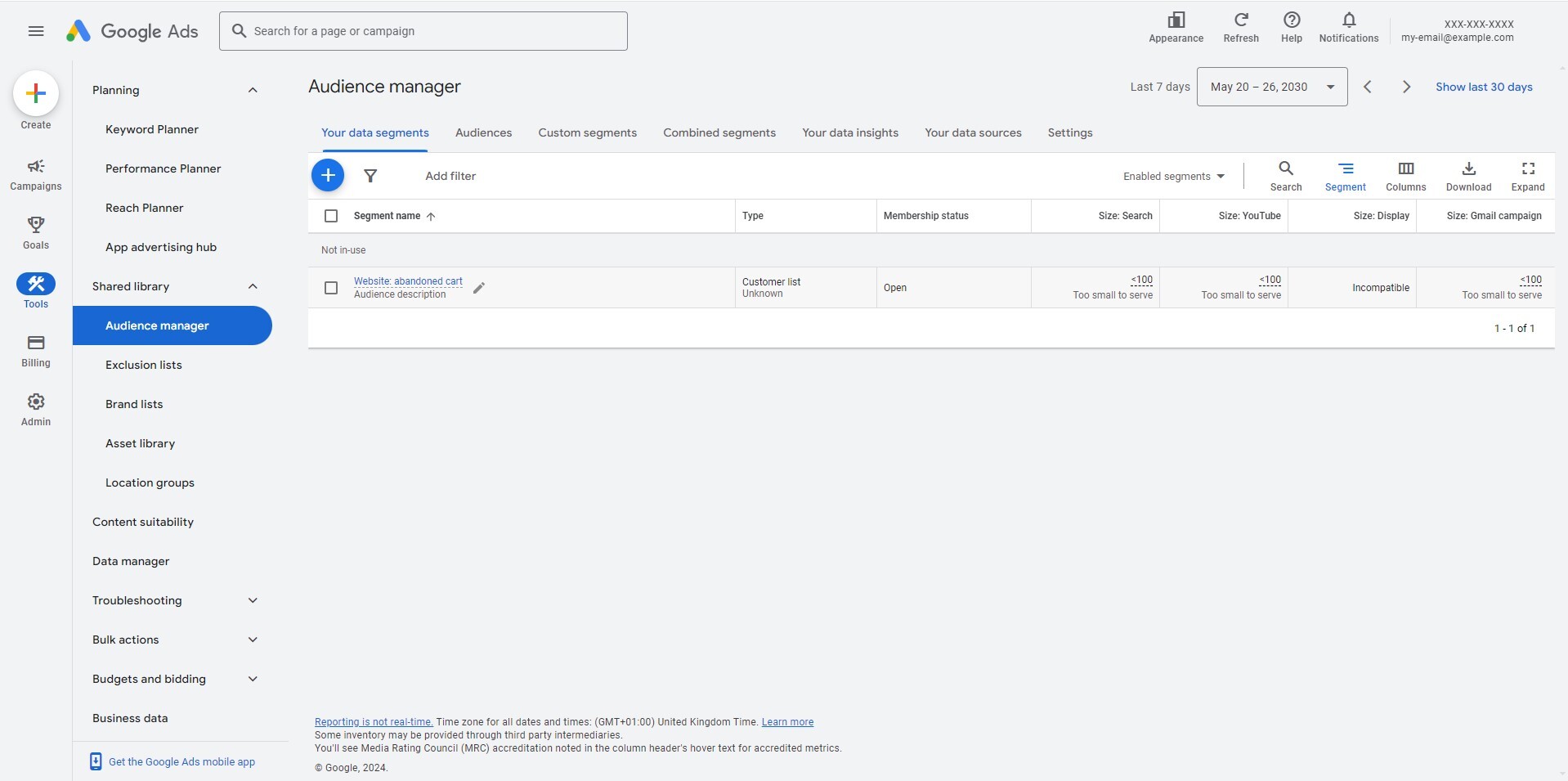
Then we go to the audiences in the Piwik PRO CDP, where we create an audience called “Abandoned shopping cards.” We set the following conditions:
- All users who have performed an event of the type “Page view”, where the page URL contained “/check-out/” – This is because we want to filter in all webshop users who have accessed the page with the check-out form.
- All users who have not performed an event of the type “Page view,” where the page URL contained “/order-confirmation/” – This is to narrow the selection to users who have not completed the transaction.
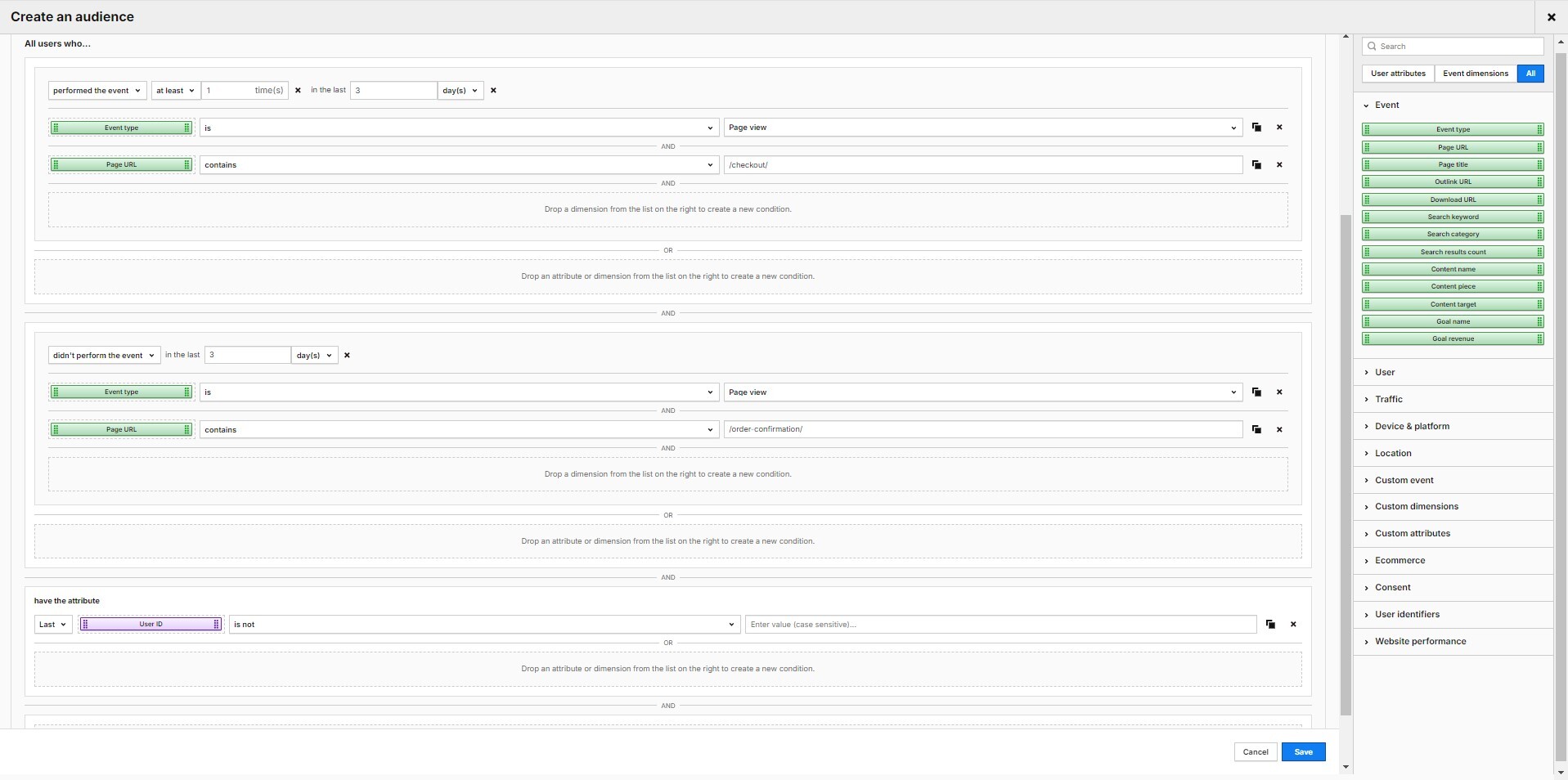
Now, we switch to the “Activations” tab and activate the previously created target group.
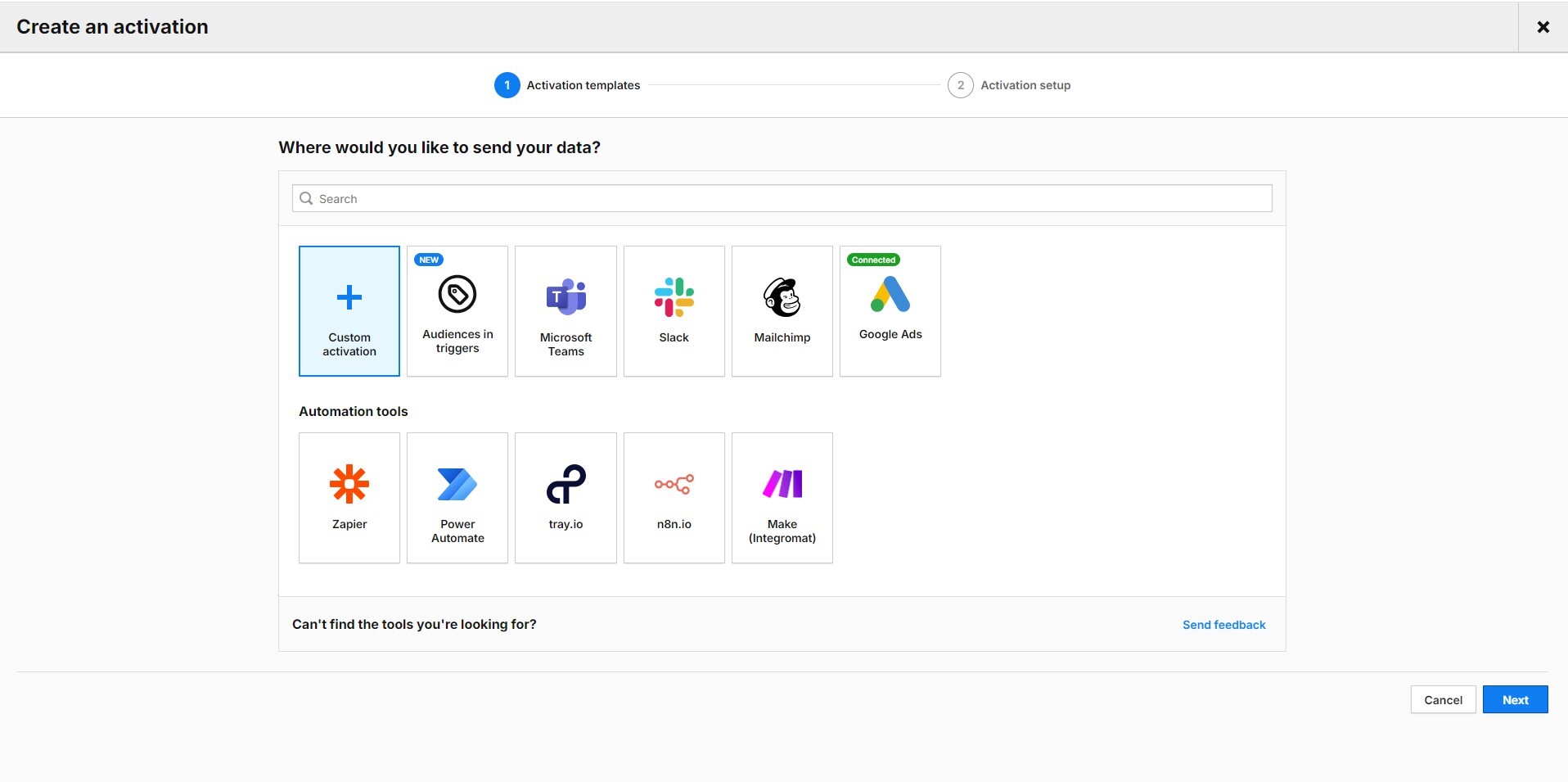
Click on the Google Ads logo and create an activation.
You must first integrate your Google Ads account with Piwik PRO to create an activation. For instructions, please visit our Help Center:
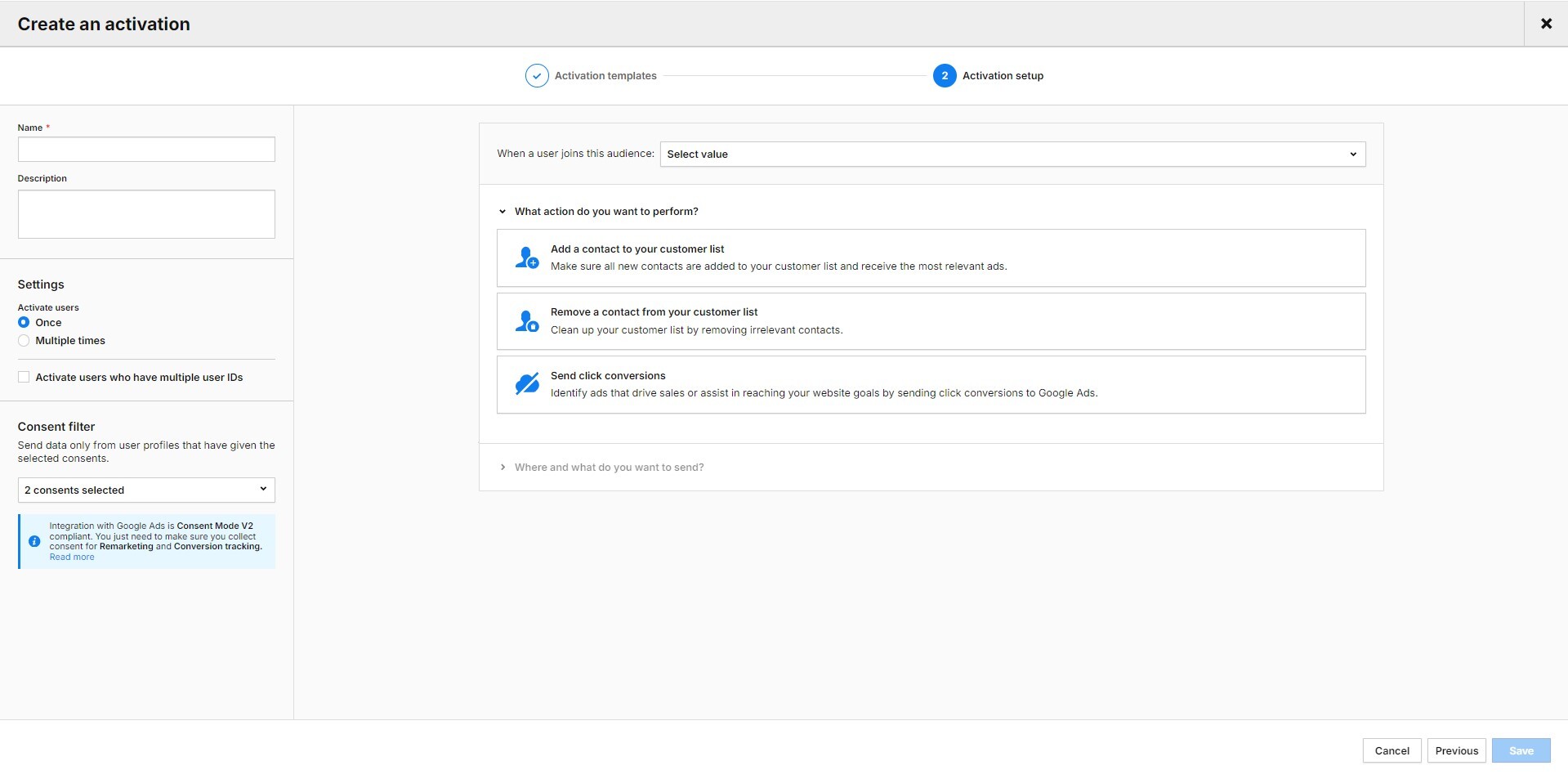
Click on “Add a contact to your customer list.” Select the Google Ads account you want to use for this activation and the name of the customer list (in our case: “Website: abandoned cart”). Next, select the type of data you want to send to Google Ads. You can choose between email address, phone number, postal address, or a combination of these three data types.
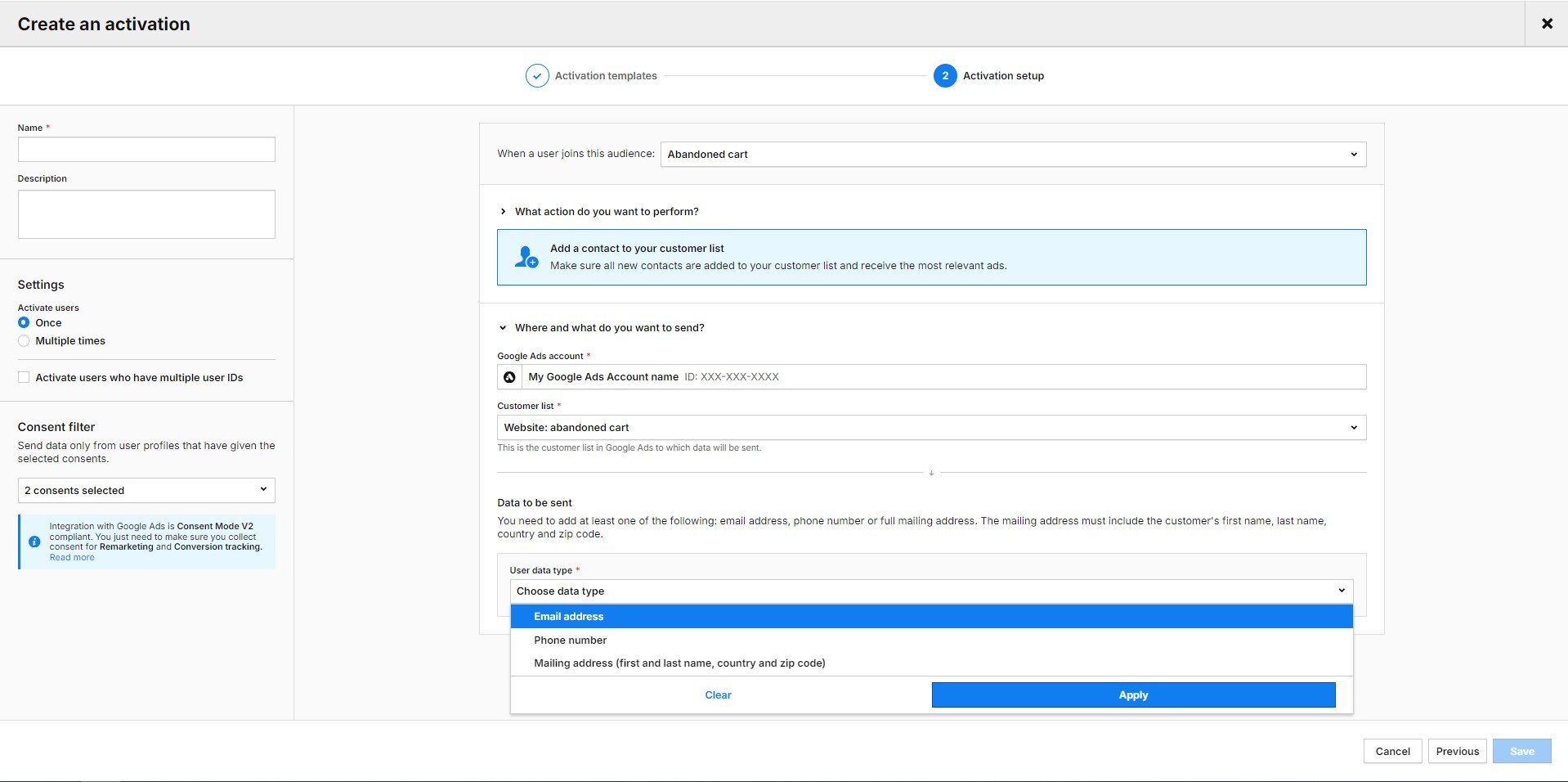
Next, you need to assign a value/attribute to your chosen data types. In our case, we chose the email address and assigned it to the user ID (because, with the correct configuration, if a user fills out a form on the site, their email serves as a User ID in the Piwik PRO CDP).
Finally, give your activation a name, enter it in the field at the top of the left-hand column, and save it.
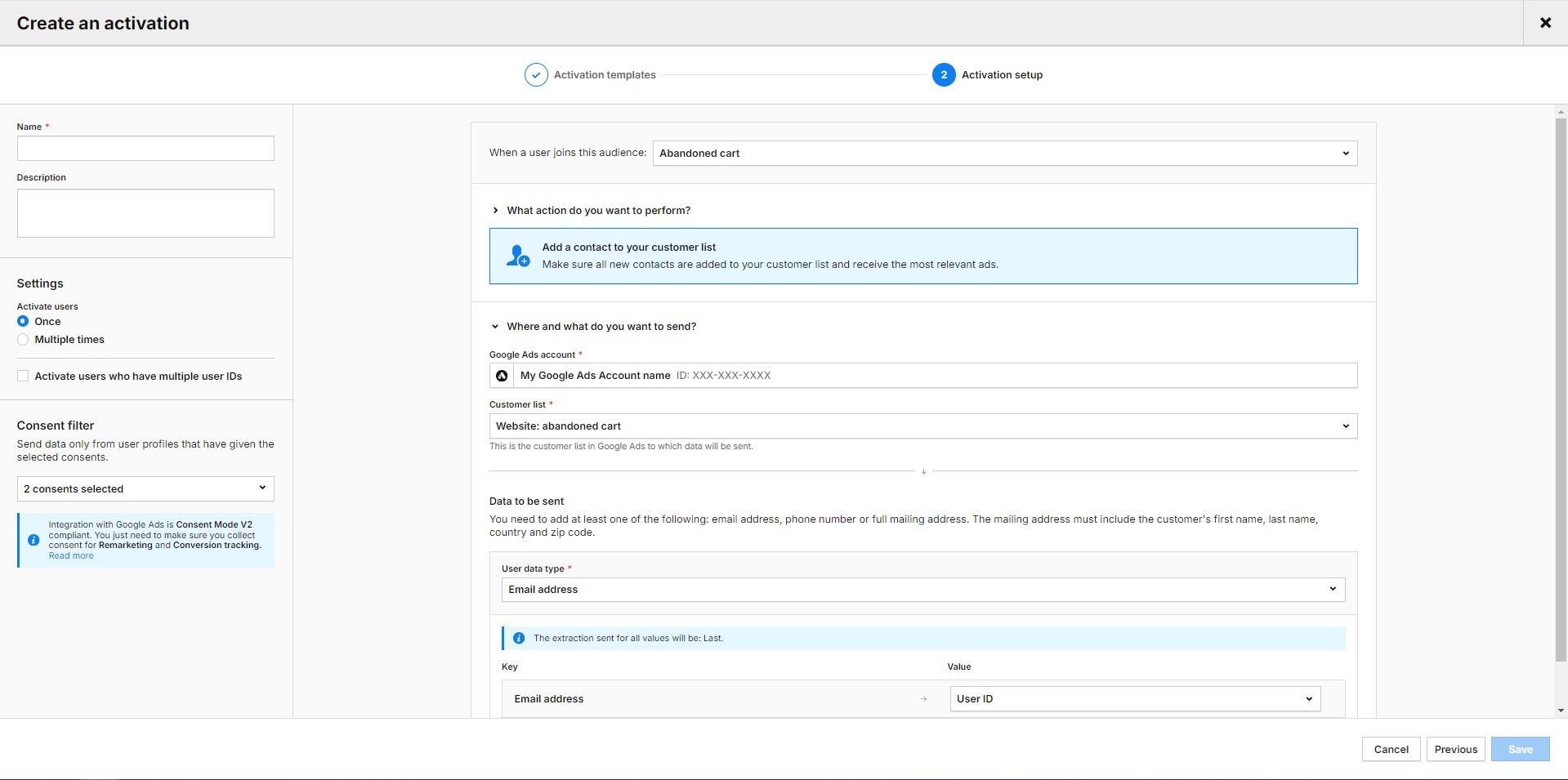
Your activation is ready. However, you must wait at least 24-48 hours for the first profiles to be displayed in Google Ads.
In the activation log in Piwik PRO, you can see which data was sent to Google Ads, when, and how this platform reacted to it. You can also see whether data is still waiting to be sent, whether there was an error, and whether the export was a success or a partial success. We consider the batch a partial success if some of the data is incorrect, such as incomplete email addresses.

Here you will find more ideas on how to personalize your marketing activities with the CDP:
Conversion uploads
In May 2024, Piwik PRO introduced a feature that allows you to automate the import of your conversion tracking information (for example, goals, gclid) to get a more comprehensive view of which keywords and targeting criteria deliver the most cost-effective conversions. By uploading conversions, we teach Google Ads what actions and user groups are most valuable to us. Your data in Google Ads is always up to date, and maintenance costs are minimal.
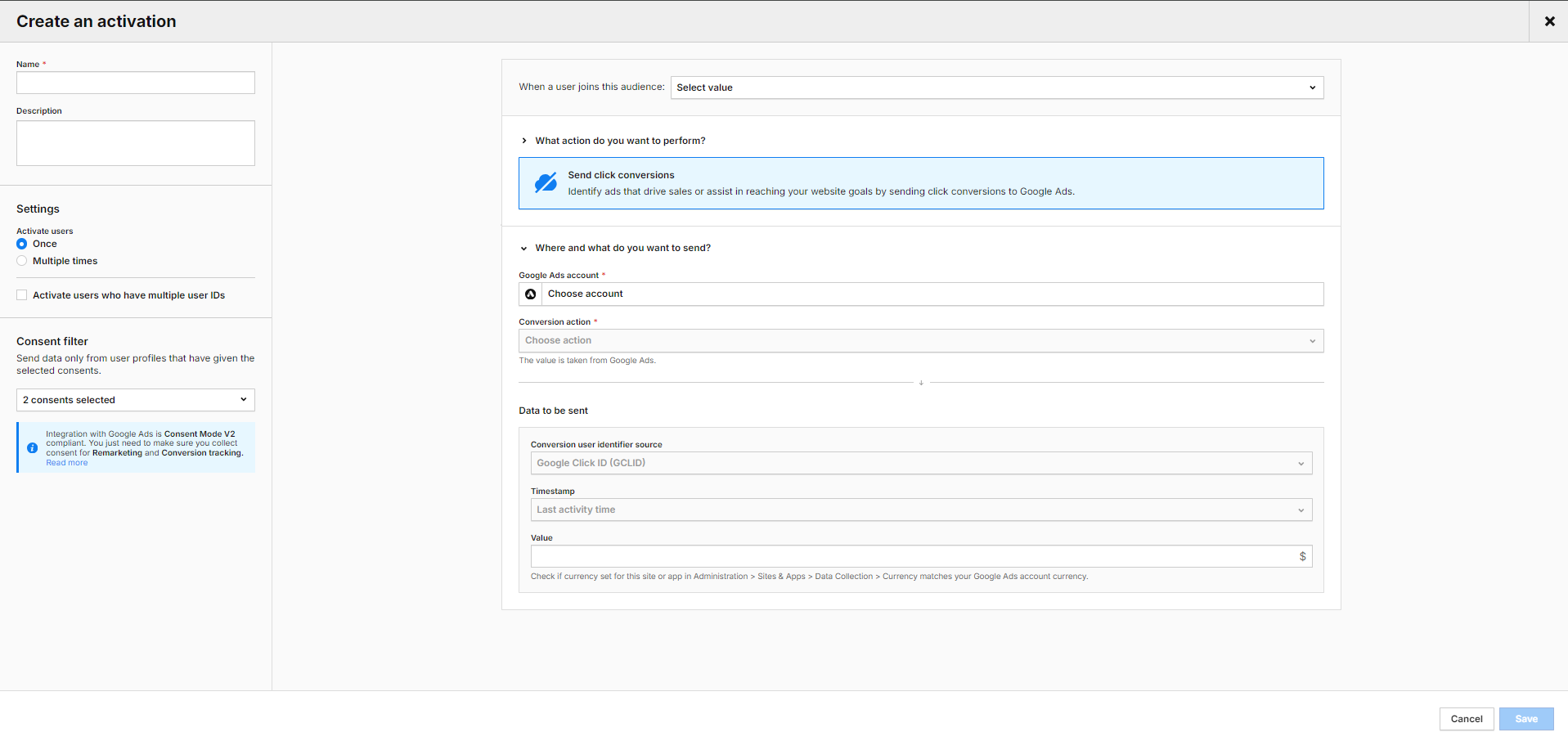
Conclusion
Achieving a high ROAS in Google Ads campaigns requires continuous monitoring, analysis, and adaptation to current developments. As shown above, the Piwik PRO Analytics Suite can be your ally in this endeavor.
The integration of Google Ads and Piwik PRO gives you detailed insights to refine your campaigns effectively and achieve better results. With Piwik PRO, you can optimize your landing pages, analyze visitor behavior and characteristics in-depth, and personalize your campaigns.
However, the Piwik PRO Analytics Suite offers much more. It is a privacy-friendly platform with advanced analysis capabilities. The suite comprises tightly integrated modules: Analytics, Tag Manager, Consent Manager, and Customer Data Platform. It can also be easily connected to other components of your tech stack.
The high data protection standards are complemented by flexible hosting in the cloud and in the private cloud, including data centers operated in the EU.
See pricing of our plans or get a custom demo of the Enterprise plan.
The post How to optimize Google Ads campaigns with Piwik PRO Analytics Suite appeared first on Piwik PRO.
]]>The post Real-time reporting: The complete guide appeared first on Piwik PRO.
]]>SUMMARY
- Real-time reporting in analytics refers to generating and delivering reports on data collected and updated in real-time. It enables businesses to instantly monitor their operations, performance, and key metrics, allowing for quick decision-making and timely actions.
- Real-time analytics is a game-changer for many businesses, such as publishers, ecommerce, ad agencies, and event-related companies.
- Real-time reporting has many use cases, including content performance, live traffic monitoring to improve marketing and ecommerce campaigns, product launches, and website implementation.
- Before diving into real-time data collection, processing, and analysis, consider key steps to prepare for your journey. These include: defining clear objectives, choosing the right analytics vendor, customizing dashboards for different users, and ensuring data quality and consistency.
Not every business requires the ability to access and act on data in seconds. That said, real-time and near-time analytics are increasingly necessary and growing in popularity. With real-time reporting, organizations can make fast and effective data-based decisions. By monitoring real-time data, you can streamline your operations, spot emerging trends, refine content strategy, boost sales, enhance marketing campaigns, and improve event management.
Whether you are new to real-time reporting or already use it and are seeking inspiration for more real-time data-based improvements, you’re in the right place.
What is real-time reporting?
Real-time reporting in analytics refers to generating and delivering reports on data as it is collected or updated on the spot. Real-time data reports can show how many people are visiting your website or using your app right now, what they’re interacting with, and what goals they are converting.
As a marketer or analyst, you can use this data to quickly respond to and dynamically manage the performance of your marketing content and campaigns or find anomalies.
Because real-time dashboards visualize the latest data available, they are also useful if you analyze time-sensitive information such as operational data, sales numbers, and inventory-related metrics and want to be up-to-date with the latest changes.
You can customize real-time dashboards to display the most important data and simplify day-to-day data management. The dashboard allows you to improve reporting by combining numerous data sources into a single view that can be shared with different teams and stakeholders across your organization.
Real-time data collection and processing
Visitors come to the website, and the data is collected while they browse it. In real-time reporting, the data is partially processed and may lack some details as, for many visitors, the session is still pending. So, while we may not know session time, how many pages were viewed in a session, or what the time on the page was, we know what and how many events took place in a chosen time frame, such as 5, 10, or 60 minutes.
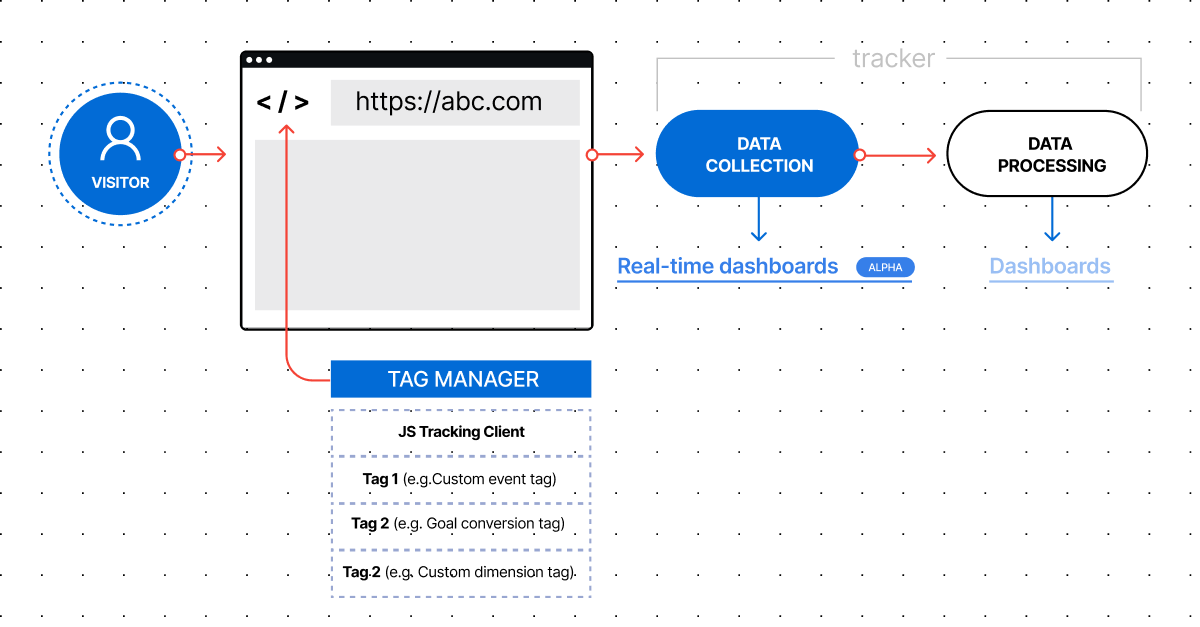
Benefits of real-time reporting
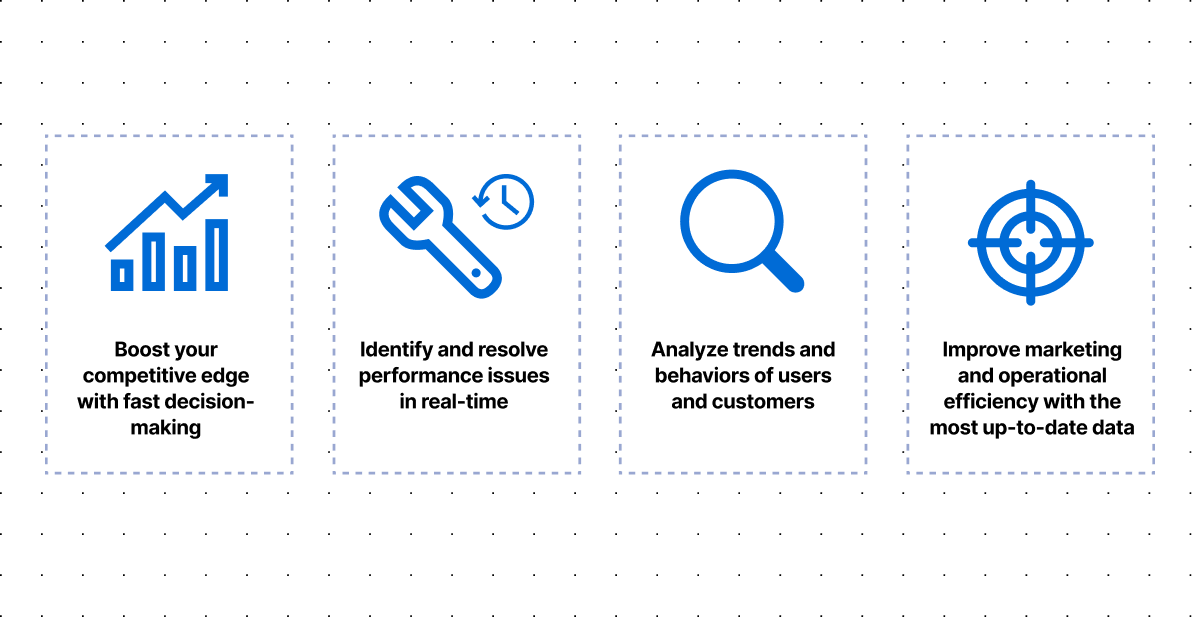
Getting access to real-time data allows you to:
- Improve your decision-making process to gain a competitive advantage: You can make more informed decisions, especially when dealing with time-sensitive cases. This also allows you to make timely decisions rather than waiting for monthly or quarterly reports.
- Keep track of the right KPIs: If your company operates in an industry where real-time data is crucial for assessing your performance (for example, you’re selling tickets for events or running an online magazine), getting access to real-time dashboards is simply a must.
- Detect anomalies to quickly solve problems: Any inconsistencies or variations, for example, in the campaign data, can be quickly identified, enabling prompt investigation and resolution of issues before they escalate.
- Improve the efficiency of your marketing campaigns: With real-time analytics, companies receive feedback almost immediately. This allows them to make more informed marketing decisions and ensures their campaigns are effective.
- Smoothen cooperation between departments: Most platforms that offer real-time reporting make accessing the data and reports easy for different people and teams. This allows you to share important data easily with others in the organization, ensuring all teams have the required information to be successful. Showing reports in presentation mode further facilitates data visualization and improves cross-team cooperation.
- Integrate analytics for better insights: With the use of a real-time API endpoint, you can export real-time data to third-party tools. Real-time web analytics data can be pulled to central reporting managed in a BI tool and combined with CMS metadata or video performance data, further enhancing your insights.

“Not all businesses need real-time reporting, but it is very beneficial for some use cases. It is very helpful when it comes to improving user experience (UX) and monitoring website traffic. Real-time reporting allows you to get instant insights and act on them quickly.”
Mehdi Oudjida
Freelance consultant in digital analytics
Learn more about real-time reporting and dashboards: Unlocking Real-Time Insights: How does Piwik PRO’s Real-Time Dashboarding Feature work?
What are the use cases of real-time reporting?
Real-time reporting is particularly beneficial in industries where timely decision-making is critical, such as publishers, ecommerce, event-related businesses, and ad agencies. It helps organizations from these industries stay responsive to changing conditions, identify emerging trends, and seize new opportunities.
Here are some of the most practical use cases for real-time reports and dashboards.
Experts opinion
Mehdi Oudjida
Freelance consultant in digital analytics
Based on my experience, I can definitely say that having access to real-time data is important when you:
- Run TV campaigns that cause significant spikes of traffic in your ecommerce store and want to keep tabs on your business and technical performance during that time.
- Plan to redirect a significant amount of URLs on your website and want to control the health of your web application and quickly detect any potential errors.
- Run an A/B test with 50% of the traffic redirected to the revamped version of your website to check how it affects your business performance.
Real-time data for improving content analysis
Collecting and processing data in real-time is more than a reporting method: it’s a game changer for content optimization. Without real-time analytics, media teams often struggle to decide what to change, when, and why.
If you are a publisher, understanding how your audience interacts with your content on different platforms, channels, and devices helps you optimize visitor engagement at critical moments for your site and fuels content analytics and content personalization.
Here are some examples of how real-time data can help you improve the performance of your content:
- If the content is trending, you can quickly create new posts and link to them from trending articles.
- If it underperforms, you can adjust the title, headline, and images to make it more interesting for your audience.
- You can test various headlines and quickly discover the most captivating one within seconds, as you receive instant real-time feedback.
- If your platform relies on advertisements, you can optimize the content thanks to real-time insights to keep visitors on the page for as long as possible.
Thanks to real-time dashboards, you can easily see and analyze who’s on your site, where they’re coming from, and how they interact with your content. This can significantly improve your content performance and make team collaboration smoother. Using real-time dashboards, you can maximize the benefits of real-time data for monitoring traffic and interacting with readers.
Real-time data to increase purchase rates and conversions
Data in real-time allows you to react swiftly to customer needs. Real-time data can help you get quick feedback on what works and what doesn’t work to attract new and returning customers. It also allows you to adjust instantly to evolving circumstances.
Businesses have a 60% to 70% chance of selling to an existing customer, while for a new prospect, it’s just 5% to 20% (Forbes, quoting the book “Marketing Metrics”)
If you run an ecommerce store, there are a few use cases:
- By looking at metrics such as the cart-to-detail rate and order-to-detail rate, you can dynamically change the presentation of products, especially for short-lived campaigns like Black Friday.
- You can see which ecommerce campaigns perform and which don’t and respond almost instantly to stop spending money on underdelivering ads.
For more details into ecommerce analytics in Piwik PRO Analytics Suite, watch the full episode of our masterclass
Finally, real-time reporting allows you to quickly spot market trends and shifts, enabling you to make better decisions that can enhance campaigns and inventory management, ultimately boosting sales.
If you want to learn more about ecommerce analytics, visit our ecommerce website or read:
Real-time data to optimize marketing campaigns
If you run multiple marketing campaigns, you need to be efficient and agile. By monitoring your campaign’s performance in real-time, you can immediately optimize it based on the insights provided by live data. You can see how the target audience reacts to campaigns in the moment. You can also analyze the number of visitors from a specific area, their peak activity times, and the advertisements, emails, and content that engage them the most.
If you want to learn more about marketing read:
Real-time reports will help you to:
- Ensure that campaign tracking is correctly implemented before you launch it.
- Quickly evaluate if your campaign is delivering the expected results by analyzing data in analytics.
- Change the targeting, messaging, or other characteristics of underperforming campaigns.
Campaign performance can be measured not only based on traffic but also on the number of conversions per channel or type of campaign. You can see the number of live conversions related to the channel/campaign. Keeping an eye on these conversion rates offers a useful way to analyze and compare the effectiveness of various advertising channels.
See how Piwik PRO’s real-time dashboard works:

This content is hosted by a third party (YouTube). By clicking the button below, you consent to loading the video.
Real-time data to monitor traffic on live online events
Real-time reporting is instrumental in live traffic monitoring. For example, real-time data transforms how events are managed. Collecting data in real-time lets you stay ahead and make informed decisions during live events.
Let’s see how real-time data can help you:
- If you are streaming a football match in real-time and looking to launch ads during the stream, monitoring live traffic allows you to adjust advertising during a game according to the traffic. Moreover, you can display real-time reports in presentation mode to the whole team to make their work smarter. This is particularly useful when displaying your dashboard on another screen or TV.
- Real-time data can also assist you in adjusting infrastructure when launching sales for popular events.
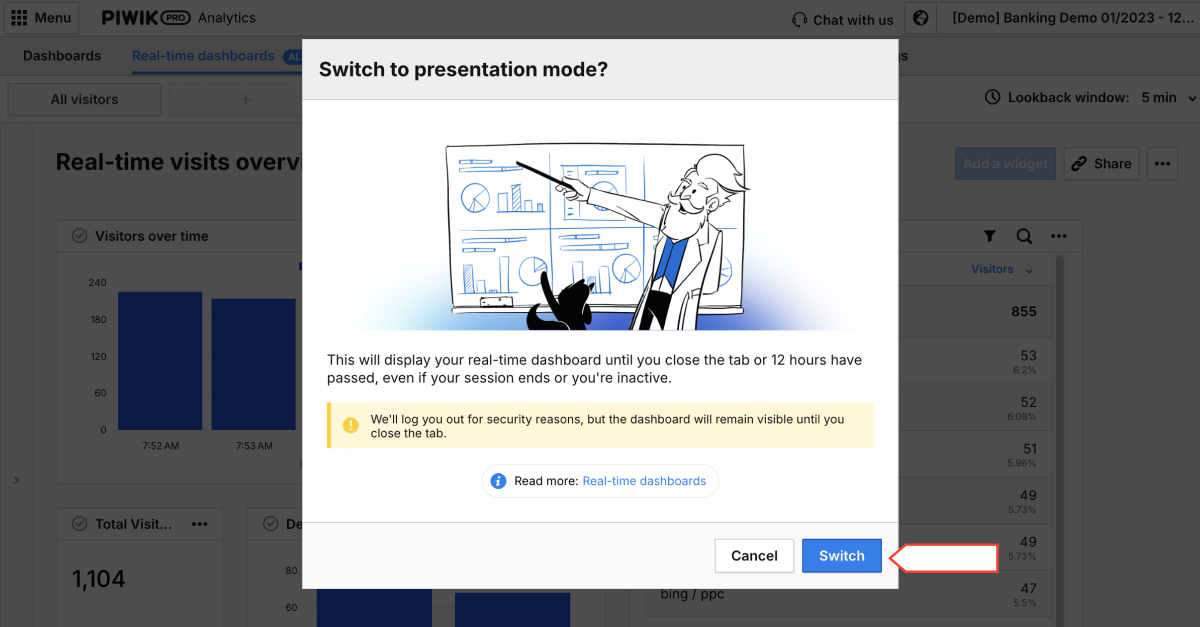
Real-time data to improve product launches
Starting a new product rollout is an exciting but intricate process that demands attention to every detail. Enhancing the product’s features and crafting a strong strategy are key to a successful launch, and tracking your product launch metrics is crucial in the process. You can measure product launch metrics in real-time to determine how close you are to achieving your predefined objectives during the launch.
During a product launch, you can also check whether everything is working, if there are any JavaScript errors, a significant drop in visitors or page views, or whether the data tracking (like the number of page views) is working correctly.
Here are some specific uses:
- You can track progress in real-time. If you aim to acquire 150 active users after launch, tracking the current number of active users will indicate your progress.
- You can instantly analyze your marketing efforts to identify which ones are effective and which are not. Whether it’s analyzing cost-per-click (CPC) in your advertising campaigns, engagement rates on social media, or conversion rates on your website, tracking real-time metrics reveals the effectiveness of your product launch marketing activities and allows you to make immediate improvements.
- You can monitor expenses related to marketing activities, payroll, and other factors in real-time.
Set up a real-time launch dashboard
Launch dashboards enable you to monitor and track your launch metrics in real-time. The results can be compared with your expectations and benchmarks to identify trends, patterns, and anomalies in your data. Furthermore, a launch dashboard assists you in communicating your launch performance to stakeholders and team members, allowing you to adjust your launch strategy and tactics accordingly. Data sources and tools can be connected to the dashboard through APIs or connectors.
Real-time data for better website implementation
A well-designed website launch is key to making a lasting impact on your users. And the process of launching a website doesn’t stop when you publish it. Whether you are creating a new website, updating an existing one, or merging two websites, you can utilize real-time data to monitor the website and guarantee smooth implementation. For example, you can monitor changes in trends in a short lifespan. If the number of visitors remains constant or decreases, it may indicate that the page is not functioning properly.
See how real-time analytics can help you:
- You can check if all the website’s features and functionalities are working as intended. Real-time reports can show the number of visitors and page views compared between desktop and mobile devices (in tables or a line chart to see changes in trends), which can indicate potential issues. You can track JavaScript errors under custom events, so it can be another indicator that everything is functioning correctly, and it can be compared between device types.
- You can check whether campaigns are tagged properly in reports instead of using a tracker debugger.
Real-time data to enhance UX
Good UX design can set you apart from competitors. In a market where consumers have many options, a website or app that offers superior usability can be a significant differentiator. By incorporating real-time analytics into your strategy for optimizing user experience, you can better comprehend user behavior, pinpoint areas of concern, and use data to improve the overall user experience.
Here are some specific uses:
- You gain valuable insights into your users’ preferences by closely observing how they interact with your website, including clicks and scrolling behaviors. These insights, directly from user actions, are crucial for adjusting your UX design to match current market trends.
- You can identify what captures users’ attention by tracking click-through rates (CTRs) for specific elements like banners and CTAs.
Tips for implementing real-time reporting
As you can see, real-time data has many applications and can benefit practically every organization. Before diving into real-time data collection, processing, and analysis, it’s important to consider a few key steps to prepare for this quest.
Here are some tips for effectively implementing real-time reporting:
- Define clear objectives: Clearly define the goals and key performance indicators (KPIs) you want to monitor in real-time. Identify the specific metrics and insights that will be most valuable for driving decision-making.
- Select the right analytics vendor: Choose the right vendor for handling real-time data processing and visualization effectively. Consider such features as access to the metrics and dimensions that you need, segmentation possibilities, customizable real-time reporting, integrations with other products like PowerBI, ease of use, and competitive pricing.
- Ensure data quality and consistency: Prioritize data quality and consistency to ensure the insights derived from real-time reporting are accurate and reliable. Implement data validation processes and quality checks to detect and address any issues with data integrity.
- Customize dashboards for different users: Create customized dashboards tailored to the specific needs and roles of different users within the organization. Provide relevant insights and visualizations that empower users to make informed decisions quickly and efficiently.
- Continuously improve and perfect: Continuously refine your real-time reporting processes based on feedback, changing business requirements, and technological advancements. Regularly assess the effectiveness of your real-time reporting implementation and make adjustments as needed. This is aided by easy-to-use customization options.
- Align with business strategy: Align your real-time reporting initiatives with the organization’s broader strategic objectives and priorities. Ensure that real-time insights support decision-making processes that drive business growth, improve customer experiences, and enhance operational efficiency.
By following these steps, your organization can deploy real-time reporting capabilities that enable decision-makers to access timely and actionable insights for driving success.
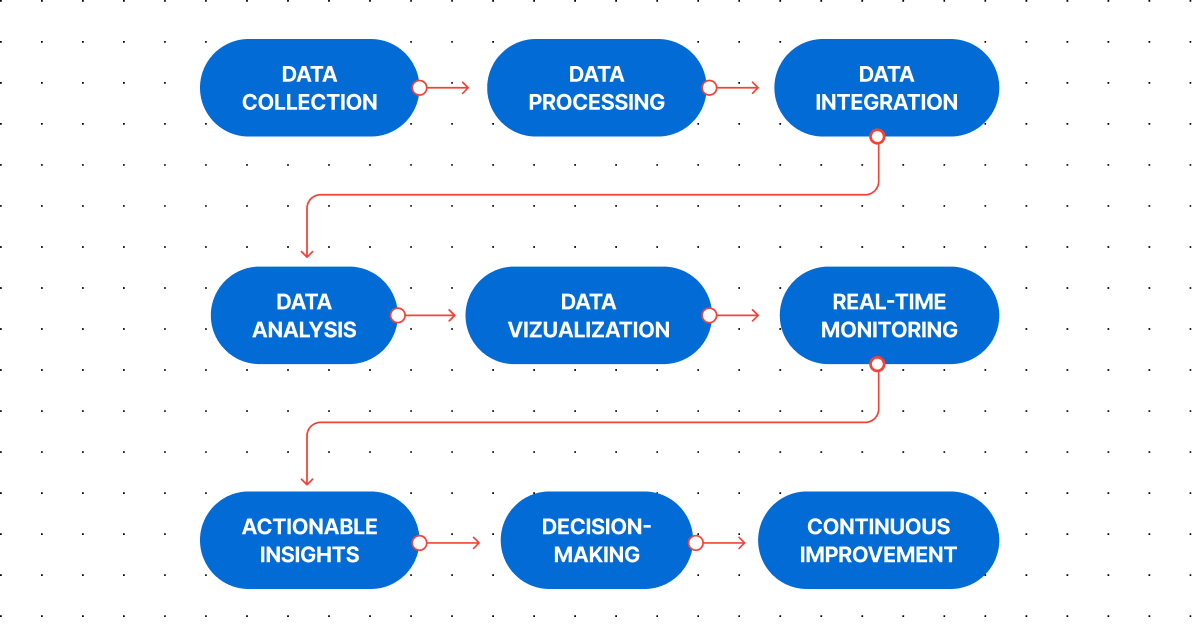
How to choose a real-time reporting analytics platform?
You may be considering integrating real-time analytics into your strategy, or you may already be using an analytics vendor that offers real-time reporting features, but you want a more user-friendly and customizable platform.
“Real-time is not an exception when it comes to adhering to good principles. Like any measurement plan, it should be specific, reflecting the business, functional, or technical data requirements for the relevant digital device to follow. Providing a fixed view with basic dimensions and metrics is just a gadget. Getting access to relevant dimensions and metrics covering all standard fields is an excellent first step. It’s also essential to have the freedom to design your real-time reports.”
Mehdi Oudjida
Freelance consultant in digital analytics
Whatever your motivation, choosing an analytics platform with real-time reporting features requires careful consideration of your organization’s specific needs, goals, and technical requirements. Having this in mind, you have to evaluate the real-time capabilities of the analytics platform and its visualization possibilities, including its ability to process and analyze data in real-time, the latency of its reporting and dashboarding features, and the availability of user-friendly and customizable dashboards. Ensure that the analytics platform can integrate seamlessly with your existing systems and tools and fully support your data-driven strategies for decision-making processes.

“Real-time data can be a game-changer if used correctly. Piwik PRO’s new real-time dashboard feature, even in its alpha version, is already showing promise. I love creating interactive dashboards without being concerned about data sampling problems. It’s straightforward for beginners and robust for advanced users, offering fast solutions without a complex learning process.
This feature allows you to create interactive dashboards from scratch. You can add various filters and visualization types to compare segments side by side. While real-time data is valuable, it comes with challenges. If you have large amounts of data streaming in, it can be overwhelming to identify what’s important. Always seek tools that enable you to use a lookback window to isolate specific time instances you wish to review.”
Juliana Jackson
Mobile Apps, Product & AI. Content Creator
You should also consider your organization’s security and compliance requirements. Look for features such as data anonymization, safe hosting options, and compliance with applicable regulations like GDPR and HIPAA.
Piwik PRO Analytics Suite provides real-time reporting capabilities and is distinguished by:
- Flexibility: Built on our powerful dashboard engine, allowing you to enjoy many customization options.
- Data freshness: Data is refreshed every 10 seconds.
- Lookback window: From 5 to 60 minutes.
- Segmentation: Analyze specific segments of your data and compare them effortlessly for deeper understanding and actionable insights.
- Real-time data API: Integrate our dashboards with your existing systems for a truly unified experience (e.g., data can be taken into PowerBI).
- Integrations: Easily analyze and activate your data thanks to the integrated modules.
- High privacy standards: Remain compliant with privacy regulations around the world.
Piwik PRO’s real-time dashboards enable you to comprehend customer behavior, monitor campaign performance, track live traffic, enhance product launches, and adapt strategies promptly. It’s also valuable when it comes to monitoring the website and guaranteeing its smooth implementation.
Reach out to us to discover the full potential of Piwik PRO as an integrated analytics platform offering real-time reporting capabilities
FAQ
Real-time reporting refers to delivering information or updates instantly or with minimal delay as events occur. Journalists and data analysts use it to deliver news, updates, or insights immediately after they happen. This can involve live broadcasts or continuous updates on websites.
Real-time data is information collected, processed, and made available immediately or with minimal delay after creation. It reflects the current state of a process or environment, allowing users to monitor events as they happen. This data is often generated by analytics platforms and can have various use cases, such as monitoring live website traffic, ad campaigns, events management, etc. Real-time data is valuable for decision-making, analysis, and responding promptly to changing conditions.
Real-time analytics empowers organizations to harness the power of data in real-time, driving faster decision-making, improving operational efficiency, enhancing customer experiences, and gaining a competitive edge in the market.
Real-time data can provide a wide range of information, allowing you to monitor, analyze, and respond to events as they unfold in real-time across various channels. It can reveal trends and patterns as they emerge, giving you invaluable insights into your users’ behavior.
Piwik PRO offers real-time reporting capabilities to track website visitors and activities as they happen. Here’s how real-time reports work in Piwik PRO:
1. Data collection: Piwik PRO collects data about website visitors’ interactions, including events like page views, custom events, conversions, and more, using a JavaScript tracking code installed on the website.
2. Real-time processing: As visitors interact with the website, their actions are sent to Piwik PRO’s servers in real-time. Piwik PRO processes this data immediately and updates the real-time reports accordingly. Real-time data is processed partially. Final processing is done after the session ends.
3. Dashboard: Piwik PRO provides a real-time dashboard that displays key metrics and insights about current website activity. This dashboard is continuously updated to reflect the latest visitor interactions.
4. Metrics: The real-time reports in Piwik PRO include metrics such as the number of active visitors, pages being viewed, referrers, keywords, and events triggered in real-time.
5. Customization: Users can customize real-time reports in Piwik PRO to focus on specific metrics or segments of website visitors. They can create custom dashboards to be notified of significant events or changes in real-time.
6. Integration: Piwik PRO’s real-time reporting can be integrated with other analytics tools, marketing platforms, or data visualization software to create comprehensive analytics workflows and gain deeper insights into website performance. Read more in our Developers resources: Raw events in real-time, Real-time reports.
Real-time reports in Piwik PRO provide users with immediate visibility into website activity, allowing them to monitor visitor behavior, track campaign effectiveness, and make timely optimizations to improve website performance and user experience.
The post Real-time reporting: The complete guide appeared first on Piwik PRO.
]]>A thorough grasp of the large data volumes generated by customer activity in your ecommerce operations is critical to determining what works for customers and what doesn’t.
The post What is ecommerce analytics and how can you use it to grow your business appeared first on Piwik PRO.
]]>SUMMARY
- Ecommerce analytics focuses on collecting and analyzing data from online stores to inform business decisions, track customer journeys, and optimize marketing strategies.
- Businesses are able to track data and gain detailed insights into their store and customers, such as audience demographics, acquisition channels, customer behavior, and product performance.
- Data activation is essential for maximizing the benefits of ecommerce analytics, leading to improved user experience and more sales.
- To benefit from their data, businesses must, among others, take a holistic approach to their customer journeys, define their KPIs, integrate data sources, and adjust data for seasonality and trends.
The global ecommerce market is expected to be worth $6.3 trillion in 2024 – up from $5.8 trillion in 2023. This continuous growth makes ecommerce one of the most competitive industries. The heightened competitiveness has pushed businesses to find ways to gain an edge over their competitors. The best option they have is turning to what’s readily at hand – vast amounts of data shared by customers.
A thorough grasp of the large data volumes generated by customer activity in your ecommerce operations is critical to determining what works for customers and what doesn’t. This is especially important given that the average cart abandonment rate for online shopping exceeds 70%, presenting both a massive challenge and opportunity to ecommerce strategies.
Ecommerce analytics empowers you to better understand your customers’ actions and increase profits. The key is to collect the right data, draw granular insights about your audiences, and put those insights to work. With this powerful tool at your disposal, you have the control and capability to steer your business towards success.
Today, we will discuss using ecommerce analytics to create more effective campaigns, increase sales, and strengthen your brand’s position.
What is ecommerce analytics
Ecommerce analytics involves collecting and analyzing data from an online store to inform business decisions. This process consists of tracking different aspects of the customer journey, including discovery, acquisition, conversion, retention, and advocacy.
These metrics relate to sales, customer behavior, and site performance, providing insights to optimize marketing strategies, improve customer experience, and increase revenue. By gathering and analyzing data from multiple sources, ecommerce businesses can understand their store’s performance and identify the business aspects they should optimize.
Unlock the power of your Shopify store with Piwik PRO
Drive smarter decisions with Piwik PRO’s Shopify app. Track customer behavior, product interactions, and sales performance with ease, without the hassle.
The app simplifies setup, ensures GDPR-compliant data collection, and integrates seamlessly with your Shopify store. Gain valuable insights that help you optimize your ecommerce business and stay ahead of the competition.
Why is ecommerce analytics important
Ecommerce analytics gives businesses the tools to apply business-specific insights to their processes and keep growing in the highly competitive and continually evolving ecommerce industry.
They can use the collected data insights to:
- Understand which channels bring the most customers and optimize their marketing budget and investments accordingly.
- Learn which customer groups spend the most money and what they typically purchase, and target them with custom offers.
- Discover which customers are least likely to make a second purchase and why, and develop an appropriate customer retention strategy.
What types of data can you analyze through ecommerce analytics
Ecommerce analytics allows you to gain insight into different aspects of your business:
Audience
Data about your audience helps you understand your target group’s demographics and interests. You can connect this information with your customers’ behaviors and tailor your offers to their needs, making them feel valued and understood.
Your audience data may consist of the following information:
- Income
- Occupation
- Geographic location
- Languages spoken
- Device
You can use this data to:
- Fine-tune your customer persona and determine the pain points you need to address.
- Plan and adjust your shipping options and ads based on your audience’s locations.
- Offer product recommendations based on your audience’s device type.
Audience reports in Piwik PRO are divided into a few sections:
- Overview: A summary of audience metrics, including the total number of orders, overall revenue generated, and the value of abandoned carts.
- Session log: Details of individual shopper sessions, including duration, page views, and actions taken.
- Devices: Categorizes the audience based on the devices they use to access your online store.
- Countries: Insights into the geographic distribution of the audience, helping you understand your international reach.
Acquisition
Acquisition data informs you about the sources and channels that bring traffic to your online store and result in conversions. You can learn how visitors discover your business, which lets you improve your marketing strategy and attract more potential buyers.
Here are some customer acquisition metrics to keep in mind:
When using acquisition data, you can discover which marketing channels drive the most traffic and lead to the highest conversions and sales. You can see which online marketing channels are the most effective and which aren’t working. This data is crucial in understanding where to focus your resources and what future campaigns to plan.
Acquisition reports in Piwik PRO are divided into a few sections:
- Channels: Insights into the various sources and channels that drive traffic to your online store.
- Landing pages: The performance of different landing pages, including conversion rates and engagement metrics.
- Campaigns: The effectiveness of marketing campaigns in terms of click-through rates, conversion rates, and ROI.
- Attribution: The impact of each marketing channel or campaign in driving conversions.
Behavior
Insights on customer behavior open up a world of opportunities. They let you deep-dive into shoppers’ actions and interactions in your online store, shedding light on shopping stages, product preferences, and loyalty. You can measure and analyze purchase data to learn when and how your audience members tend to convert. Behavior analytics also helps you discover how to improve user experience to boost engagement and conversion rates.
Some metrics you can track here include:
- Sales conversion rate
- Average order value (AOV)
- Cart abandonment rate
- Revenue
- Cost per conversion
- Return on ad spend
Here are some questions you can ask to get an idea of your customers’ behavior:
- When do visitors tend to drop off from their journeys?
- How many viewers leave your website straight away?
- What pages do people visit first after landing on your site?
- What marketing content do users consume the most?
- Which products get a lot of traffic but few sales?
- Which products bring the most revenue?
- How long does a typical shopper take before they make a purchase?
- How often does each shopper buy from your store?
- How many customers abandon their shopping carts?
Behavior reports in Piwik PRO are divided into a few sections:
- Shopping behavior: A funnel-based report that helps analyze the customer journey from product discovery to purchase and spot drop-off points.
- Shopping stages: Depicts shopper behavior throughout the shopping process, identifying potential areas for improvement.
- Days and Sessions to Order: The time and engagement required for customers to complete a purchase, providing insights for optimizing the conversion journey.
- Orders: Detailed order data, including revenue, tax, shipping, discounts and product quantity, to identify trends in customer purchasing behavior.
- Products: Insights into the performance of specific products, such as orders, revenue, click-to-detail rate and order-to-detail rate, guiding product optimization and marketing strategies.
- Customer loyalty: Metrics such as days since last order, order value, and product quantity to identify loyal customers and develop strategies to enhance their long-term value.
Ecommerce features in Piwik PRO
In 2023, we launched a new ecommerce setup with several enhancements to improve your online store’s reporting.
Apart from dedicated ecommerce reports, your store can benefit from other useful features:
Product scope
Product scope is available in all reports, including custom reports, web APIs, and raw data, in addition to the session and event scopes. Product scope lets you use dimensions and metrics related to products to give you more precise reporting and a deeper understanding of your product performance.
New dimensions and metrics
You can benefit from several new dimensions and metrics that will help you better analyze your online store data. For example:
- Product detail views show how many times shoppers viewed the product detail page.
- Cart-to-detail rate shows how product details affect cart additions.
- Order-to-detail rate shows how product details affect product sales.
Introducing Currency Conversions: Unified revenue data for smarter global analytics with Piwik PRO! Learn more from our article.
Sample use case for order-to-detail rate
The order-to-detail rate is calculated as Orders / Product detail views * 100%.
You can compare it for various products based on their details.
If the rate is low, meaning there are many product detail views but few orders, you may need to improve the product images, adjust the description, or make other changes.
Or, you may see that the rate is higher for a specific product color, suggesting that you make that product version the principal one.
See the complete list of ecommerce dimensions and metrics.
How can your business benefit from ecommerce analytics
Ecommerce analytics will show you trends and patterns in data, allowing you to:
- Understand your customers’ interests and product preferences – With this knowledge, you’re able to optimally position your products and support customers’ purchasing journeys. It also lets you optimize your inventory and influence your marketing efforts.
- Optimize pricing and inventory – You get a granular picture of what drives pricing for every consumer segment. Use this insight to discover the best price points at the product level rather than category level and gradually increase revenue.
- Measure the effectiveness of marketing campaigns – You can gain detailed insight into your marketing performance across channels. This lets you monitor all your campaigns and react quickly to adjust your activities if needed.
- Improve customer retention and loyalty – You can analyze customers’ past behaviors and purchases to better understand their interests and the choices they make when they buy your products.
Experts opinion
David Culbertson
CEO at LightBulb Interactive
I deal with small businesses, several of whom have Shopify-based ecommerce websites. While Shopify offers a decent analytics toolkit, it’s very limited compared to a robust analytics solution with a wide variety of metrics; it’s like looking at a website through a keyhole.
When choosing an analytics solution, my clients face many challenges, including:
- Price sensitivity (they’re used to free).
- Lack of expertise to interpret reports.
- Concerns about data accuracy.
In a crowded marketplace, finding the analytics solution that can address those challenges can be bewildering. Luckily, I’ve been able to guide my clients to Piwik PRO which solves many issues and gives them peace of mind.
How to analyze and improve the performance of your ecommerce store
The details of what data you collect and analyze will largely depend on your business goals and the specifics of your company.
Below, we present a sample process for gathering insights that would become a foundation for more in-depth analyses.
Acquisition
The acquisition report gives you a base for exploring your data by providing an overview of channel and campaign performance. It will help you understand how users find your website and how they behave.
Here are some questions you can try to answer while looking at the data:
- What is the split between different traffic sources?
- Which sources bring in the most traffic?
- What keywords do people use to find your website?
pro tip
You can dive deeper into user behavior on your website and consider the following aspects:
- What’s the first thing people tend to do after landing on your website?
- What are the typical paths that users take from the homepage to other pages?
- How long do users spend on the website? An average engagement time of one to three minutes may indicate their intent to explore the page further or make a purchase.
- What is the ratio of new vs. returning visitors? If you’re not retaining many visitors, you need to find out what’s stopping them from coming back.
- What category, product or other types of pages do users visit the most and how do they interact with them? This can help you identify the most engaging pages and understand where the purchasing process begins.
Channels
You can now see in more detail how people from different channels behave and go through the shopping process.
For each channel, analyze metrics like:
- Bounce rate
- Cart abandonment rate
- Total revenue
- Average order value (AOV)
- Product detail views
- Cart-to-detail rate
- Order-to-detail rate
pro tip
Aside from analyzing these key metrics, consider the following questions:
- How do purchases typically happen? When and on which pages do people tend to make a purchase?
- What is the ratio of orders by new vs. returning visitors? Check this data for different countries or regions, especially when evaluating ad campaigns.
- What products are the bestsellers?
- How often do customers take advantage of discounts or promo codes? You might miss out on revenue opportunities if they use discounts too frequently.
- How often do transactions happen? How many days typically pass between orders?
With this analysis, you can determine which channels bring the most revenue and which are underperforming. You may discover channels with hidden potential, giving you an idea of the types of campaigns you should invest in more.
For example, you may find that email brings the highest average order value despite having the lowest number of visitors. Consider allocating more resources to email campaigns or broadening your email audience.
Landing pages
Another aspect is landing page performance.
For each landing page, analyze the following metrics:
- Number of page entries
- Bounce rate
- Order rate
- Cart abandonment rate
- The sum of revenue
- Average order value (AOV)
For example, you may find a product landing page with many entries that has a high bounce rate, low order rate, and low revenue.
To investigate the possible causes, determine which channels bring the most traffic to this page. If it’s paid campaigns, review the different aspects of ad configuration and assets you should adjust – such as product descriptions, images, alignment between the ad and the landing page, and so on.
Paid campaigns
Next, evaluate the performance of paid campaigns to assess whether the revenue is higher than the ad spend.
For each campaign, check metrics such as:
- Cost
- The sum of revenue
- Average revenue
- Return on ad spend (ROAS)
Product categories
Additionally, you can find out which channels drive traffic to specific product categories.
For each product category, check:
- Channels
- Sessions
- The sum of product revenue
The complete Piwik PRO Shopify app playbook
Tap into advanced analytics and a built-in customer data platform (CDP) to improve your Shopify store’s performance. This playbook offers actionable strategies, real-world examples, and step-by-step instructions to help you grow your business while staying compliant with global privacy laws.
Shopping behavior
The next step involves analyzing customer journeys on your website.
For example, in Piwik PRO, you could create a funnel to get an overall picture of the shopping behavior:
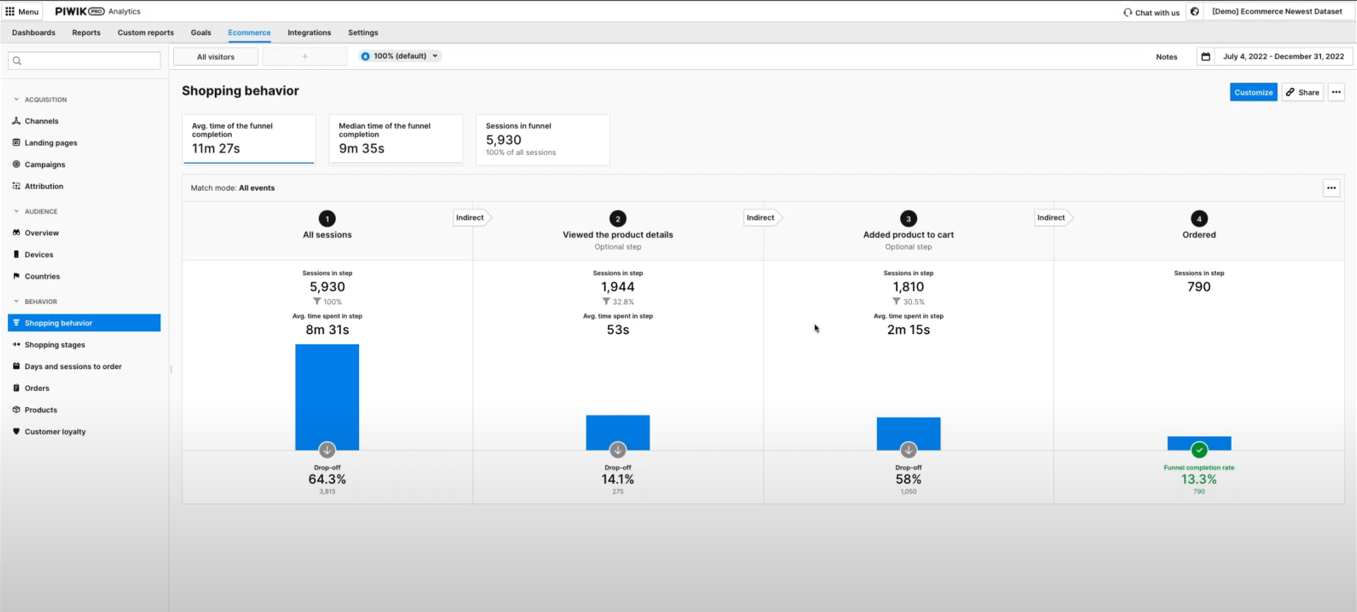
Focus on analyzing the number of users who drop off at each step. To benchmark, you can compare the current numbers with results from the previous period.
For example, you may discover that many people leave after adding a product to their cart. You should then investigate the reasons for the increased cart abandonments.
For that purpose, evaluate the pages users visit before abandoning their carts. If they abandon their carts while on the checkout page, it may indicate the page is difficult to navigate or lacks usability.
You can dig deeper into the checkout process by analyzing a sample funnel report showing the checkout steps:
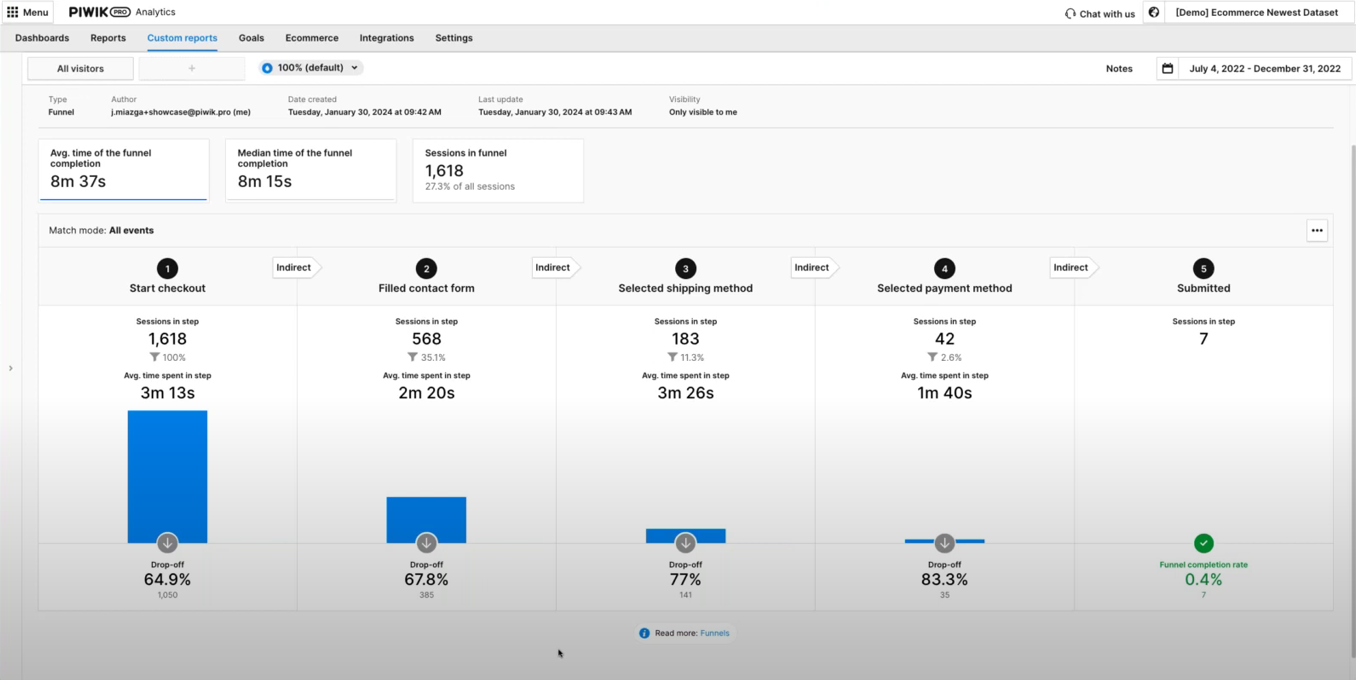
This will allow you to analyze the drop-off points and learn which ones create friction.
Additionally, you can optimize your product pages.
One point of your analysis could be checking the number of product detail views and order-to-detail rates.
For example, a product page that gets a high number of product detail views and a low order-to-detail rate indicates an issue. Analyze your heatmaps to determine what users view on the page, where they scroll, and other aspects of their behavior.
When analyzing the performance of product pages, you should also consider internal search. See what phrases people look for and whether they correspond with any of your products.

WEBINAR
Piwik PRO for ecommerce:
Get data-driven insights to boost your online sales
Watch the webinar recording and learn how to use Piwik PRO Analytics Suite to improve user experience, optimize product pages, and drive more sales.
Experts opinion
Jude Onyejekwe
Marketing Analytics Specialist at Heddy and Hopp, co-founder of DumbData
Ecommerce businesses face a number of challenges in analytics:
- The lack of proper planning and documentation concerning data collection and its purpose
This oversight can lead to a disconnect among the implementation team, marketing, stakeholders, and analysts. As a result, data may not be collected or communicated effectively to other collaborators who require this information.
To address it, involve stakeholders who need the data early in the process. Planning and documenting what data is collected (spreadsheets can be good for a start) will help facilitate collaboration and more effective data utilization across different business units.
- Knowledge gaps and CMS limitations
The types of user actions in the purchase journey that can be measured vary significantly across different CMS platforms. Additionally, the website’s data layer structure can differ markedly from one site to another, complicating data collection, which can be challenging without sufficient domain knowledge. Limitations in tracking user actions on checkout pages due to security concerns are also challenges in this category.
To solve this issue, it’s essential to identify these challenges and limitations inherent in the CMS. Engaging the right experts or resources is crucial to ensure proper data collection as users move through the purchase funnel and interact with your business.
- Silos in the user journey
Ecommerce businesses that have the capability for users to make purchases both on and off their websites, such as in physical stores or via social commerce platforms like Meta, end up having silos in the user journey and can pose significant challenges in collecting data on purchases made outside the website.
The key to addressing this challenge is determining what is feasible and utilizing available resources to integrate data on non-website purchases into your analytics tools. This approach helps create a more unified view of customer interactions and purchase behaviors across all platforms.
How to use data activation in ecommerce
Effective data activation for an ecommerce business requires the right tools. Customer data platforms (CDPs) allow you to integrate data from your CRM, email software, marketing automation tools, analytics, etc. For example, you can import offline conversions from your physical store. On the other hand, you can activate the audience segments using different tools in your stack, such as ad networks, marketing automation platforms, and A/B tools.
There is a range of goals you can achieve through data activation, such as:
- You can increase your revenue by:
- Offering free shipping to first-time customers.
- Providing product recommendations based on products or services that users show interest in.
- Crafting unique purchasing journeys for different customer segments based on their shared traits.
- You can personalize the customer experience by:
- Retargeting users with ads they are most likely to respond to.
- Showing personalized content to users based on the content they’ve consumed.
- Sending customized email campaigns based on users’ purchase history.
- You can improve customer retention by:
- Uncovering customers who haven’t purchased in a while.
- Recognizing potential cross-selling and upselling opportunities using data about previous behaviors and purchases.
- Retargeting users who abandoned their carts.
Since a customer data platform utilizes first-party data, you can control where the data comes from and what happens with it. This helps you better align with privacy regulations.
Privacy compliance in ecommerce analytics
Safeguarding customers’ data and respecting their privacy has become a new standard. The emphasis on privacy and security stems from the growing number of data privacy regulations, higher consumer awareness, and increasing enforcement of regulations.
Ecommerce compliance means adhering to the rules governing ecommerce activities in the markets you sell in. These include but are not limited to ecommerce regulations per se, data privacy regulations, online payment standards, accessibility norms, and the avoidance of dark patterns.
Ecommerce privacy regulations
The focal point of data privacy regulations is processing personal data and protecting consumers’ privacy online. Since your ecommerce regularly deals with all kinds of personal data, understanding and complying with applicable laws is a must. Check what regulations apply to your business, whether laws affecting specific countries, like German TTDSG/TDDDG or French CNIL’s guidelines, or laws with a broader application, such as GDPR, the Digital Services Act (DSA) or the ePrivacy directive.
Privacy-oriented technological changes
The ecommerce landscape is also being affected by technological shifts. The most notable event is the end of retargeting ad campaigns as we know them due to the deprecation of third-party cookies.
To adjust to privacy-facing technological changes, take the following steps:
- Choose privacy-conscious tech providers that build their tools according to privacy by design and privacy by default principles.
- Ensure the tools you use offer features that allow you to respect visitors’ choices or to anonymize data.
- If you run a business in the EU, consider choosing EU-owned and -based tech platforms.
- Prioritize first-party data sources, which means collecting data using your own sources.
Check out our blog post on privacy compliance in ecommerce for an overview of the most important upcoming laws and technological changes.
Experts opinion
Tim Ceuppens
Freelance Digital Marketer
You collect an abundance of data but how should you use it? For example, do you need to see the details of products that are being added to the cart, or is it enough to learn that a specific channel brings more add-to-carts than others? Most companies lack the scale to get accuracy on highly precise data. If I had to choose between these two, I’d always go for accuracy over precision. Think if you’re able to act on this information. If you can’t, or if it takes too long to get a meaningful sample, choose lower granularity.
With GDPR and cookie banners comes a different challenge: Is the data you’re seeing representative of what is happening? Here are two scenarios: One user clicks on a Meta ad, and another one clicks on a Google Search ad. You’ll find that people who are higher in the funnel tend to default more towards clicking the “don’t allow any cookies” option of the banner. People who are lower in the funnel or previous customers tend to select the “allow all cookies” option. In this case, you will be underreporting Meta visitors and overreporting Google visitors. You won’t be able to stitch all of these sessions together to see what contributed to a purchase in a multi-touch funnel.
A major issue with Google’s Consent Mode is that you can’t extrapolate based on what you didn’t measure. Marketers risk turning down channels that are seeding purchases later in the cycle. Back in the day, we solved it by measuring various channels differently. So, we evaluated a higher funnel channel based on how many add-to-carts we saw, and a lower funnel channel based on revenue and purchases. We did this session by session, instead of user by user, to learn whether each session led to a desired outcome. If it didn’t, we analyzed where it went wrong.
Another challenge is making all of this data understandable and relatable to non-data-minded colleagues. I try to make my dashboards and visualizations simple enough for a five-year-old to understand what’s going right and wrong. Complexity only adds more breaking points to advice that usually already needs buy-in from more than one department. You should show the highlights and have the numbers as a backup when asked for. A correct answer, badly given, pushes you off track and forces you to expend energy you could have used for other things.
Best practices for ecommerce analytics
Below we’ve prepared some tips for getting your ecommerce analytics right.
Take a holistic approach to the customer journey
The concept of a holistic customer journey highlights the complex and diverse ways customers engage with brands. You should view different metrics as components of a bigger picture.
Your goals in ecommerce analytics should be to:
- Reduce friction points along the customer journey.
- Increase the customer’s motivation to buy.
You can achieve these by offering a straightforward user experience and helping people complete their selected tasks.
Respond to the expectations of online shoppers
Understanding why people shop online instead of going to a physical store can help you dedicate resources to the most critical areas of your business.
For example, users appreciate online shopping for:
- Being able to shop anytime – Make sure your website and app work seamlessly on different devices.
- Being able to find their product quickly – Ensure the journey to purchasing a product is smooth and quick. Adjust your purchase process to remove any unnecessary or complicated steps.
- Being able to choose from a wide range of products – Find out what products are the most popular with your visitors and which ones they are looking for. See how to adjust your offer to let them buy more of what they need.
Define your KPIs
Defining and tracking the right KPIs is crucial to your ecommerce analytics strategy. Marketers should establish performance indicators specific to every step of the customer journey and evaluate the success of their activities based on these metrics.
For example:
- In the consideration stage, you want to learn more about user behavior and observe patterns to plan improvements and get more sales. Consequently, your KPIs here could include engagement rate, bounce rate, returning visitors, and cart abandonment rate.
- In the purchase stage, you want to convert more users into buyers. Hence you may track metrics such as orders by new vs. returning customers, average order value by channel, revenue by product, and customer lifetime value (CLV).
To learn more about tracking the right KPIs, check out our blog post: KPIs for ecommerce: Maximizing funnel performance.
Integrate the components of your analytics stack
Integrating your data lets you work on accurate, in-depth data sets and apply the insights you’ve gained to benefit your business. You’ll gain a comprehensive understanding of your customers and take action to drive more sales, improve customer retention, and optimize your store to provide a better user experience.
With an integrated analytics platform, you can connect ecommerce data from all your sources with analytics data and make it available to different teams. When choosing the right platform, ensure it meets your teams’ needs, doesn’t strain your resources, and offers a scalable solution that can grow with your business.
Join the dots between your customers and the data
Marketing tools often provide excessive amounts of data – don’t fall into the trap of gathering as much data as possible. You need to have a purpose for every piece of data you collect. Data becomes valuable when you correlate the numbers with your customers. Looking at data in isolation can lead to errors by obscuring the bigger picture.
Adjust data for seasonality and other trends
Analytics lets you uncover trends, identify patterns and discover seasonality. It allows you to better understand your business’s current performance and how it can potentially look in the future. This, in turn, lets you make more accurate business forecasts that can inform your future actions.
Monitor your product performance over time
Tracking product category and individual product performance over time will enable you to discover your biggest revenue drivers and what you should invest in. It’s a great place to begin if you want to find out what products are performing well and which aren’t doing as well as anticipated.
Ecommerce marketing: How to get enhanced online store analytics
Check out our masterclass and learn how to go beyond ecommerce analytics with Piwik PRO to act on customer insights and drive more sales.
Conclusion
Ecommerce businesses deal with uniquely large volumes of data. However, many truths are the same for organizations in all industries that rely on analytics. Specifically, the road to success is paved with understanding which data points are essential and using that knowledge to continuously improve customer experience.
Interested in learning how Piwik PRO Analytics Suite can help your ecommerce business surface valuable insights?
The post What is ecommerce analytics and how can you use it to grow your business appeared first on Piwik PRO.
]]>The post How you can drive growth for your business with an integrated analytics platform appeared first on Piwik PRO.
]]>How can organizations best adjust and grow in the ever-transforming digital world?
This article will explain the importance of data integration and activation in analytics today and how companies can use them by turning to integrated analytics platforms.
What trends do companies need to follow in today’s marketing and analytics
Businesses face significant challenges in navigating the changing digital marketing standards.
Nowadays, they must find ways to recognize and incorporate several approaches:
Focus on personalization
Personalization is no longer just an option. Research by McKinsey shows that 71% of customers expect companies to deliver personalized interactions.
Companies in many industries are increasingly fighting for consumers’ attention. As statistics show, 89% of businesses compete primarily on the basis of customer experience. In a recent study by Qualtrics, over 65% of customers said their experience on the website or app would be at least a very important factor in their willingness to recommend a brand.
With rising competitiveness across industries comes stakeholders’ growing demands for better business results. Companies that utilize personalization generate 40% more revenue from these activities than the average. Additionally, 61% of people are willing to spend more with a company that offers them a customized experience.
Organizations should aim to reach customers with tailored campaigns, offers, and products to increase sales and grow their business. Their best bet to achieve that is by activating their data.
Data activation involves utilizing collected information to target and engage with audiences strategically. Activating customer data helps teams personalize campaigns and messaging across channels.
Through that, businesses can:
- Improve customer experiences.
- Convert prospects into customers more quickly and at higher rates.
- Drive positive business outcomes.
Follow privacy compliance standards
It’s understood that strict privacy and security requirements must be prioritized when handling customer data. Both companies and consumers are aware that data is valuable and must be protected, which is additionally enforced by data protection regulations. Users expect their data to be used responsibly and for their benefit. Acquia’s survey shows that consumers are becoming more comfortable sharing personal data with brands for a better experience.
Companies should use this opportunity to stay transparent about data collection and respect users’ choices concerning their data and its use. Privacy compliance requirements also push companies to analyze what digital data they collect and own and evaluate what tools they use to handle it. Organizations should work with vendors that give them complete control over what data they collect and what happens with it.
Collect first-party data
Since most browsers are moving away from third-party cookies, marketers need to move on from them. According to Acquia, 84% of people say that scrutiny of browser cookies has increased the importance of first-party data obtained through direct interactions between a company and its audience.
Among many others, first-party data lets companies:
- Create more targeted campaigns.
- Enhance customer relationships and trust.
- Improve overall marketing effectiveness.
- Support compliance with relevant privacy regulations.
As a result, to remain competitive, companies must establish a first-party data strategy. It should involve collecting valuable data from users through analytics, social media, contact forms, email, user accounts, and others and strategically activating it. Organizations can also benefit from gathering zero-party data, which is the type of data that customers willingly share with brands.
For more on first-party data, check out our blog post: What is first-party data and how does it benefit your marketing.
Establish a data strategy
Businesses today have access to staggering amounts of data, not to mention the number of tools they use for marketing, sales, customer support, and other purposes. According to a 2017 study, the average enterprise used 91 marketing cloud services, 90 for HR, and 70 for collaboration, to name but a few.
As companies plan their first-party data collection, they need to strategize what information they need and how they want to use it. Instead of randomly collecting every possible piece of data, digital analysts must focus on what’s relevant and ensure the data is high-quality and reflects actual customer behavior. It’s also easier to collect valid user consent if you inform users why you need the data and how you will use it.
Integrate your data
Companies must work on complete data sets in order to gain insights that will help them more effectively target their ideal customers. For this purpose, they need to merge user data from different sources, understand the connections between data points, and determine how customers’ behavior impacts their decisions.
They need to be able to analyze the complete customer funnel, including information relating to marketing, sales, finance, and customer experience interactions. This will help them understand users’ paths from their first interaction with a brand, through their responses to marketing activities and sales communication, to the decision-making process and becoming customers.
Above all, integrating and segmenting data allows teams to better understand their existing customer base and how to reach new ones that match their traits.
Experts opinion
Emanuele Celoria
“For the last few years, marketing and product analytics tools have been launching new modules allowing the import of external data. This is not surprising since companies rely on diverse platforms to collect very different kinds of data. For example, analytics platforms collect behavioral data, CRMs provide customer details, and advertising platforms share marketing budget spend and campaign performance. There is a clear need for data hubs that put together all collected information and act as unique sources of truth.
All these data sources provide complementary information about users and customers. This is why integrating them enables a better business understanding and helps answer complex business questions to deliver real value. A strong prerequisite for obtaining unique insights is to have meaningful join keys across the different input data.”
How to fulfill the demands of modern digital analytics and marketing
Businesses have been looking for tools to help them address the above trends.
MarTech’s 2023 Replacement Survey demonstrates that it’s common for organizations to upgrade their marketing software in favor of solutions with better features that integrate seamlessly with the rest of their marketing technology stacks. The 2022 edition of the MarTech survey showed similar trends. The top two criteria for choosing a replacement tool were integration possibilities and open API, as well as data centralization and data capabilities.
A research report from Pandium shows that 86% of the Top 100 SaaS companies in the world now have a public integration marketplace. Other martech trends involve incorporating products from multiple vendors and having them well-connected with each other.
One solution companies can use today is integrated analytics platforms. These platforms allow businesses to merge all tools into a coherent data system and efficiently collect, analyze, and act on user data. Ultimately, they offer data integration and activation capabilities that let companies maximize the effectiveness of their insights.
What is an integrated analytics platform
An integrated analytics platform combines various data analytics components, such as data collection, processing, storage, and visualization, under a single, unified system. These platforms are characterized by flexibility and connectivity.
Crucially, an integrated analytics platform provides seamless integration with other tools and systems in the stack, consolidating online and offline data from multiple sources in one place.
You can combine analytics with tools such as:
- CRM systems
- Ad platforms
- Email marketing tools
- Data warehouses
- Ecommerce tools
- BI and data visualization tools
- Marketing automation systems
- Social media platforms
- And many others
Teams gain access to consistent data sets and can choose what data they import to the platform, where they send it, and how they activate it in destination tools. They might also define and create their own integrations with third-party tools.
Examples of integrated analytics platforms include:
- Piwik PRO Analytics Suite
- Amplitude
- Piano
- Adobe Experience Platform
Benefits of an integrated analytics platform
Integrated analytics platforms help facilitate a more efficient, cohesive approach to marketing and analytics.
The most important benefits of integrated analytics platforms include:
- Removing data silos – Data from all sources is unified and consistent, creating a comprehensive set and enabling the constant evolution of data models. Organizations work on more accurate and complete customer data.
- Being easy to use and collaborate – The platforms are easy to set up and contain the necessary products within one tool, allowing teams to get their work done faster and collaborate effectively.
- Reducing costs – Your team will spend less time implementing and updating different components of the platform. They don’t need to put as much effort into integrating multiple products.
- Combining data from multiple sources – You can easily integrate data from diverse sources and confidently manage data quality. This allows you to perform advanced analytics, visualization, and other processes in one place.
- Creating complete customer views – You can compile and access all user data in one platform. You’re able to merge customer identities and build a full picture of each customer and their interactions with the brand.
- Allowing insight into all touchpoints – You can collect data from all measurable touchpoints and stitch them together to analyze customer journeys in full detail.
- Offering well-integrated modules – You can swiftly make the data stack more powerful by using the combined powers of all available modules, such as tag managers or consent management platforms.
- Providing integration with external tools – You can enhance the platform’s capabilities by integrating analytics with BI tools, data visualization software, marketing platforms, CRM, etc. For example, you may export data for further analysis or activate it in marketing tools to better reach prospects and customers.
- Enabling data activation – You can fuse data into everyday workflows and applications to make smarter decisions and improve customer communication at all lifecycle stages. For example, you may apply the data to create effective marketing campaigns, optimize revenue, predict trends, and evaluate marketing strategies.
Experts opinion
Celina Belotti
“The fragmentation of digital platforms, particularly due to stronger regulations in Europe, leads to technical limitations. These prevent us from creating a seamless picture of our users’ experience and evaluating the results of our marketing efforts. Bridging data silos and enriching data will help you overcome this fragmentation with increased data quality.
Secondly, with the rise of machine learning applications in digital marketing, advertisers should be aware that the more data they can inject, the better their output will be. Platforms are demanding more data, and advertisers should use their analytics platforms and CDPs to organize and distribute it safely.”
Use cases for integrated analytics platforms
Integrated analytics platforms support a coherent understanding and leveraging of data for a whole scope of functions. They streamline data processes, serving the needs of multiple teams beyond marketers and data analysts. Their possibilities extend to product- and business-related decisions, sales, customer support, and others.
Here are some purposes for using integrated analytics platforms:
Identity resolution
Identity resolution involves merging data from different sources to create customer profiles. Profiles can be merged using matching identifiers. These can include persistent identifiers, such as an e-mail address or user ID, or non-persistent identifiers, like session ID, that work for in-session personalization or activation. This removes the need for manually merging and organizing customer records.
Saving costs and resources
An integrated analytics platform reduces reliance on multiple standalone tools. Companies don’t have to pay for a few subscriptions or create various setups. Once they configure tracking, they have hundreds of data points to use across the platform.
Data integration limits tedious manual work and data manipulation, minimizing the risk of errors. Companies can avoid complicated and time-consuming implementation issues, such as creating custom integrations.
Additionally, integrated analytics platforms also increase productivity and help teams collaborate, exchange user data, and complement each other’s efforts.
Optimizing customer journeys
Brands can segment users based on their shared traits or behaviors to better target them at different customer journey stages. Marketers can analyze how users move around the site, identify where they drop off the funnel and help them complete the intended paths.
For example:
- To encourage a user in the consideration stage to choose your solution, show them product-related content, such as an ad for a product comparison whitepaper.
- To support a user who is ready to buy, create a pop-up on your website with the form to request a free demo.
- To retain a customer, assign a dedicated account manager to provide ongoing customer service and prevent churn.
Improving the customer experience
Marketers get the complete picture of a customer’s interactions with the brand to analyze the content they consume, products they purchase, traffic patterns on the website, and other details. With an in-depth understanding of users, marketers can provide relevant product offers, display messages matching their preferences, or prefill forms with previously input data.
For example, you can:
- Send email campaigns with product recommendations based on a customer’s browsing behavior.
- Request product reviews and referrals from engaged users a few days after purchase.
- Send a text encouraging an existing customer to download and use your mobile app based on their device type.
Through these activities, marketers can provide personalized customer experiences and deliver the information, capabilities, products, and services their audience wants most.
Providing insight for predictive and prescriptive analytics
Brands can leverage historical data on previous purchases, communication preferences, loyalty status and more to forecast trends and prescribe actionable strategies.
For example:
- Identify high-value customers and plan actions to nurture and retain them. For example, you may prepare an exclusive offer and share it with them via email.
- Discover cross-sell and upsell opportunities. For example, you may send users recommendations for related products that complement the other products they have bought in a given category.
- Find customers close to churning and encourage them to stay. For example, you may offer a discount for renewing a customer’s subscription to let them use your service longer and discover more of its value.
Supporting the sales department
Data from support tickets, ecommerce browsing history, previous sales call records, and other information about a prospect all come together. Sales teams may also enrich existing data sets. For example, they can combine intent and CRM data to have more dimensions for segmentation.
This lets sales agents communicate with context and familiarity, enabling a better sales experience.
For example, sales reps can:
- Prepare a more tailored offer for each prospect that addresses their requirements in advance.
- Maximize lead conversions and revenue by prioritizing specific leads based on their scoring rules.
This leads to more sales, increased customer retention, and a higher likelihood of recommending the service to others.
Helping customer support
Customer support agents gain immediate access to detailed customer profiles with data integrated from every system. This includes previous interactions with the sales and customer support teams, the support tickets they have created, any relevant notes from the sales team, and more.
For example, customer support reps can:
- Efficiently answer customers’ questions about their current subscriptions.
- Make recommendations for using the product.
- Steer conversations toward new purchases or brand experiences.
This allows them to meet customers’ needs quickly and form stronger relationships, increasing customer retention.
How can you benefit from Piwik PRO Analytics Suite as an integrated analytics platform
Piwik PRO’s integrated analytics platform gives you connectivity and freedom to integrate and activate your data. Regardless of your industry and business goals, you can benefit from high-level privacy and security features in every aspect of the product.
Below, we break down the top assets of Piwik PRO Analytics Suite.
Flexibility
With Piwik PRO, you can connect various tools and systems, create reports, and perform additional analyses. For example, you’re free to set up dashboards that show you the most vital metrics for your business or complex custom reports for particular scenarios. You also own your data and can decide who has access to it. Through this, you can better adhere to privacy regulations.
Integration
Piwik PRO gives you various options for supplying the platform with data imported from other sources. You can also extend the platform’s analytics capabilities and apply the data to your work processes through different tools and systems.
You’re able to connect ad platforms, A/B tools and others, or integrate BI or visualization tools like Looker Studio or Power BI. You can export raw data to tools like Amazon S3, Azure Blob or BigQuery. Additionally, you get to activate data in other tools to reach your customers better and get practical benefits from your data.
In 2023, Piwik PRO merged with Cookie Information, a leading consent management platform (CMP) vendor. You can also benefit from a seamless integration between Piwik PRO Analytics Suite and Cookie Information CMP.
Using some integrated analytics solutions can lead to vendor lock-in. For example, you are limited to integrating GA4 with Google’s products, such as BigQuery and Looker Studio. However, Piwik PRO doesn’t lock you in its ecosystem – you have possibilities for integration with external tools.
Data activation
Our customer data platform (CDP) allows you to unify, segment and act on your customer data.
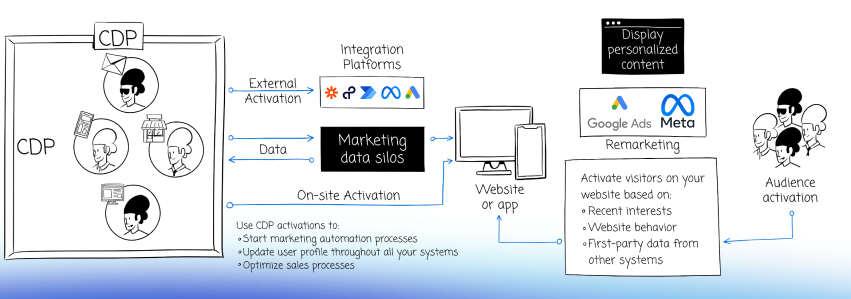
Some of the most important capabilities of the CDP include:
- Connecting visitor data scattered across channels and touchpoints and enhancing insights with data imports from any tool in your tech stack. You can now also import data into the CDP through the API.
- Gaining a detailed overview of user characteristics and interactions with your brand in single customer views (SCV). This lets you view all data gathered about a user in one place to ensure consistent and up-to-date information across systems.
- Triggering audiences across multiple touchpoints, including real-time customer interactions. Create audience segments based on demographic and behavioral data to define audiences more precisely and target them with relevant ads, content, or messaging.
- Activating user data with webhooks and automation tools to send desired attributes to various destinations, such as CRM, ad platforms, email marketing tools, internal communication channels, etc. You can also define advanced integrations if needed.
Connecting multiple touchpoints
Piwik PRO allows you to map out full digital experiences across channels and touchpoints and analyze every step of the customer journey. Your team can swiftly explore and analyze user behavior to inform sales or marketing optimizations. To get insight into customer journeys, you can use the available reporting features, such as multi-channel attribution reports, user flows and funnels.
Tightly integrated modules
Piwik PRO offers much more than Analytics. You can combine other tightly integrated Piwik PRO modules – Tag Manager, Customer Data Platform and Consent Manager – to expand on the features from Analytics and leverage the combined powers of all modules.
- Tag Manager lets you control all aspects of data collection and activation. This saves time and ensures that your tag setup is consistent and effective across different tools.
- Consent Manager helps you maintain transparent consent processes. You can streamline the collection of valid user consent and manage records of user preferences.
- Customer Data Platform offers the ability to integrate user data from multiple sources and segment them into relevant audiences. You can gain detailed insights into customer behavior and act on the data.
Conclusion
Despite the wealth of information at every marketer’s and analyst’s fingertips, many organizations struggle to make sense of their data. The vast technological landscape complicates the process of choosing and combining different tools to create a comprehensive data setup. Not to mention establishing cooperation between teams and making the data usable and applicable to improving business processes and results.
An integrated analytics platform can address these challenges. It’s an effective solution for promoting a culture of data-driven decision-making and supporting continuous development across the organization.
Reach out to us to discover the full potential of Piwik PRO as an integrated analytics platform:
The post How you can drive growth for your business with an integrated analytics platform appeared first on Piwik PRO.
]]>The post KPIs for ecommerce: Maximizing funnel performance appeared first on Piwik PRO.
]]>This article explores the idea of an ecommerce funnel and provides insights on tracking the performance of an ecommerce online store through key performance metrics.
What is an ecommerce funnel?
Marketing funnels represent the various stages of customer journeys. They visually illustrate the steps your customers go through before making a purchase. Often, they also include post-purchase stages such as customer loyalty and advocacy.
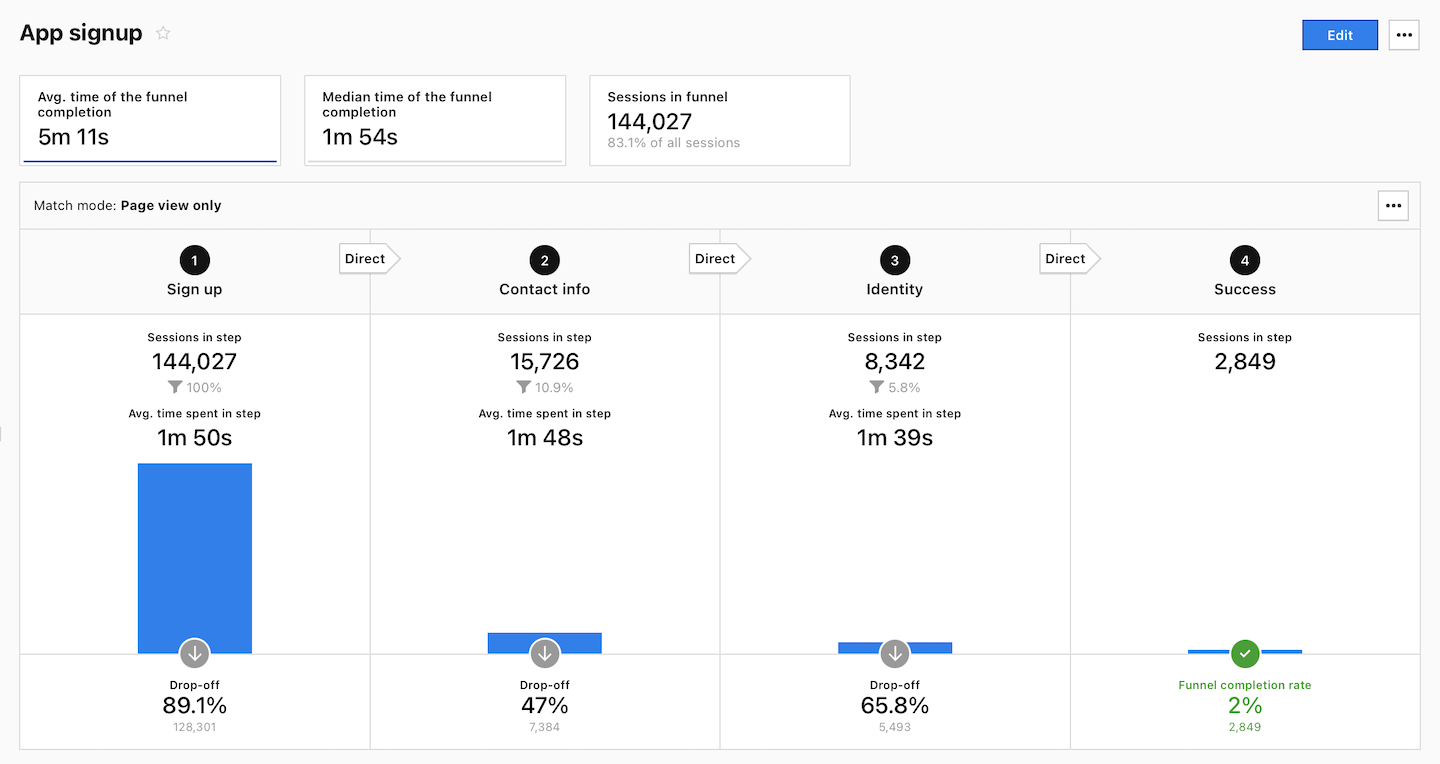
Stage by stage, consumers move through the sales funnel until they become repeat customers. Setting up an ecommerce funnel allows you to categorize clients and design efficient marketing strategies.
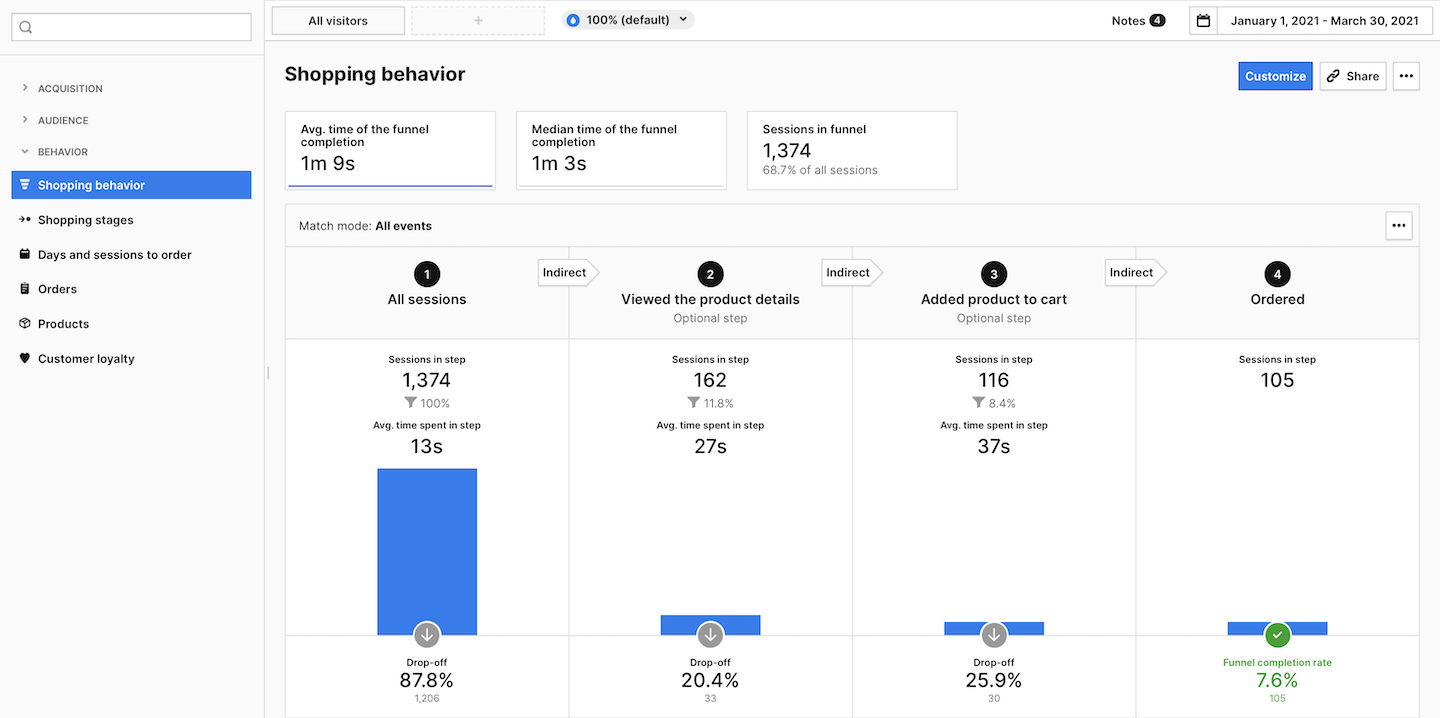
Read more about funnel and funnel reports in:
What are ecommerce key performance indicators?
A Key Performance Indicator (KPI) measures the success or performance of, for example, an advertising campaign. KPIs are set as targets.
The following are some examples of KPIs in online marketing:
- traffic
- impressions
- cost per click
- cost per conversion
- number of leads
Regularly monitoring and optimizing your KPIs helps make your business more successful and highlights areas that require improvement. Without KPIs, it is hard to know which strategies or processes are functioning and which are not. Properly contextualizing data is essential to understanding customer behavior.
Key performance indicators (KPIs) measure the performance associated with key business goals, while metrics measure the progress associated with specific business tasks.
Ecommerce KPIs and the marketing funnel
The abundance of data and analytics tools can quickly become overwhelming if you don’t set core sales funnel KPIs. Online businesses tend to use several tools to track different ecommerce KPIs. But to discover critical indicators and metrics, it’s best to set up analytics tracking for your ecommerce website if you haven’t done so already. Piwik PRO is a platform that lets you analyze the KPIs critical to your success.
There are many customer journeys
There are many customer journeys
A customer’s experience with a brand encompasses multiple touchpoints and channels, such as websites, ads, email, text messages, mobile apps, social media, call centers, and physical stores.
You must analyze how customers find your website and interact with it. It is crucial to know how much time they spend on your website, the first things they see, the top pages they visit, and where the buying journey starts. Depending on the business, there might be many scenarios and customer journeys. It is vital to understand the complexity of customers’ journeys to provide a positive experience and grow your business.
What’s more, the customer journey doesn’t end with the purchase. It includes how customers use your product, how often they return to buy it again, and if they recommend it to others.
Business strategic thinking is crucial. You have to take into consideration different scenarios and funnel models. Segmentation is helpful, as it allows you to group customers, for example, according to their buying cycle.
For more detailed insights into ecommerce analytics in Piwik PRO Analytics Suite, watch the full episode of our masterclass Ecommerce marketing: How to get enhanced online store analytics
KPI-based measurement
The KPI-based measurement model divides customer journeys into four stages:
- Awareness/discovery
- Consideration
- Purchase/conversion
- Post-purchase
Marketers should establish performance indicators for every step of the funnel and evaluate success of their activities based on these metrics.
Now, let’s talk about how to track the top KPIs for ecommerce at every stage of the marketing funnel.
Unlock the power of your Shopify store with Piwik PRO
Drive smarter decisions with Piwik PRO’s Shopify app. Track customer behavior, product interactions, and sales performance with ease, without the hassle.
The app simplifies setup, ensures GDPR-compliant data collection, and integrates seamlessly with your Shopify store. Gain valuable insights that help you optimize your ecommerce business and stay ahead of the competition.
Ecommerce KPIs for the awareness/discovery stage
Your marketing efforts should be focused on brand awareness and product demand at this stage.
The awareness/discovery stage is where users are just getting to know the brand and what it offers. Consider KPIs that indicate where your new visitors come from, how many visit your site, and whether they are eager to engage.
Your top KPIs can include the following:
1. Traffic source/medium
The source refers to the starting point of your website’s visitors, such as a search engine (for example, Google) or a specific domain. The medium specifies the source type, like organic search (organic) or cost-per-click paid search (CPC).
This KPI is crucial as it allows for customized customer experiences, such as aligning content and guiding users to the next stage of your funnel based on how they find and interact with your website. The most important indicator is the number of visitors/sessions incoming from a specific source/medium since this gives you insight into, for example, whether visitors are coming from channels you’re investing money into.
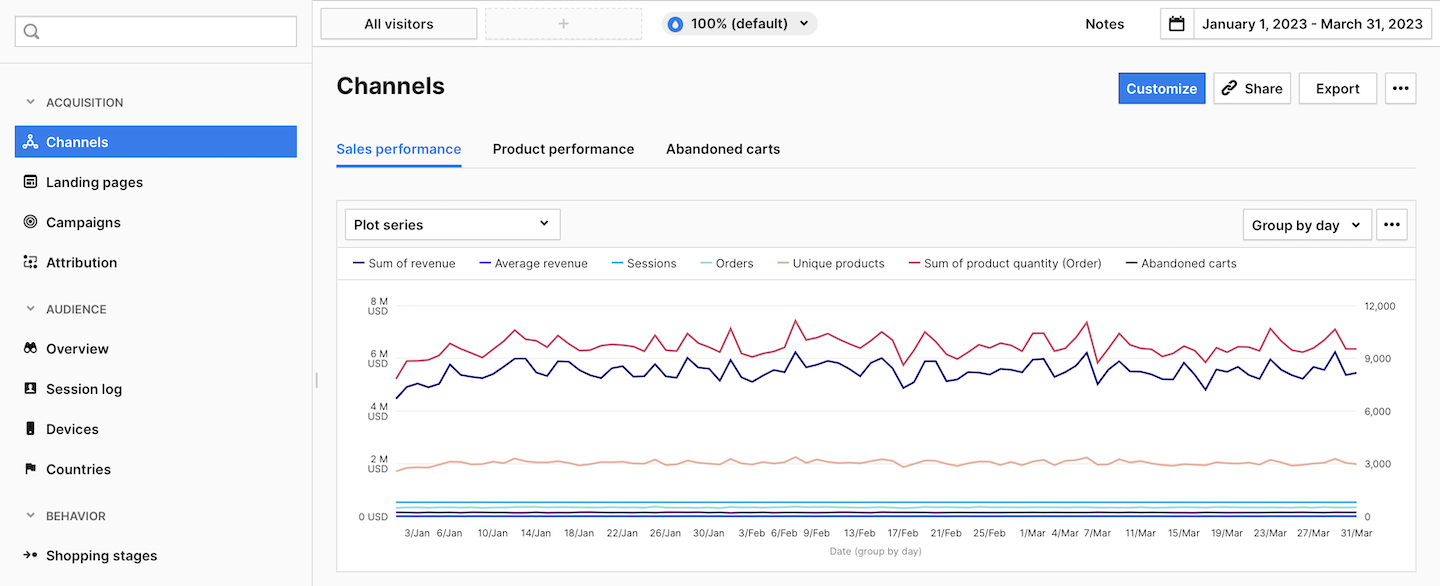
2. Organic traffic sessions
By monitoring this metric, you can assess your website’s search engine effectiveness, trustworthiness, and influence. It provides insight into the number of visitors discovering your site through search engines, which is crucial for those relying heavily on inbound traffic from search results (SEO).
This KPI provides valuable insight into user behavior by tracking the number of website visitors who found your link through a search engine result page rather than through paid ads. You can increase the number of visits from search engines by improving your content’s ranking in relevant search results with SEO. The main goal of your content should be to entice visitors with a clear intent and use.
3. SEO keyword positions
Keyword performance or ranking refers to tracking the topics and search terms on your website that attract the most traffic. With this KPI, you get different keyword positions and search volume. It’s important because it helps you understand the most relevant and high-impact keywords. This guides your optimization efforts and helps you determine how well your site is positioned for those crucial keywords.
If you want to maintain a strong presence in search engine results, it’s vital to regularly check and optimize your top keywords and pages using keyword data to improve your content. Ranking higher means more visibility, more qualified buyers, and more revenue.
4. Click-through rate (CTR)
The click-through rate is a metric that measures the number of users who clicked a link, call-to-action button, or ad in comparison to the number of impressions it received. You can determine whether your content and marketing campaigns are reaching your target audience by measuring CTR.
It can also help assess how different marketing channels affect a business’s performance. We can identify areas for improving our customer acquisition strategy by analyzing the click-through rate. To improve CTR, you can use strategies like optimizing your headline (use keywords), using appealing images, and direct and compelling call to actions (CTAs).
Ecommerce KPIs for the consideration stage
In the consideration stage, your brand must actively engage with potential and existing customers. The essential KPIs should include metrics connected to sessions and returning visitors.
At this stage, you may observe patterns to perform tests and experiments to improve the user experience. The data from the consideration phase helps you learn about people’s behavior and the time it takes them to make a purchase. All the data from this stage can assist you in making the user experience smoother, eventually leading to higher sales.
The complete Piwik PRO Shopify app playbook
Tap into advanced analytics and a built-in customer data platform (CDP) to improve your Shopify store’s performance. This playbook offers actionable strategies, real-world examples, and step-by-step instructions to help you grow your business while staying compliant with global privacy laws.
1. Engagement rate
The engagement rate is a KPI that evaluates the level of engagement with a product or content. A high engagement rate can result in more clicks and conversions, showing that users are actively interacting and, thus, more likely to convert.
To boost engagement, it is crucial to provide users with a seamless navigation experience across your website or app during their interactions and simplify your demo or transactional forms.
High engagement but low conversions indicate that the content is engaging but isn’t driving users to purchase or that it’s not reaching the right audience.
2. Bounce rate
The bounce rate is the percentage of people who enter a single page and leave it without taking any further action. It is calculated by dividing single-page sessions by all sessions. You can use the bounce rate to measure the success of a single landing page. A high bounce rate indicates that the landing page needs to be improved. Using this metric, you can determine whether the visitor’s search intent was met. Also, it can indicate whether landing pages match the expectations created by ad campaigns.
To reduce your website’s bounce rate, you can improve your site speed, optimize it for mobile users, and make your content more engaging.
3. Returning visitors
With the returning visitors metric, you can determine how many people have visited and returned to a website. You calculate it by dividing the number of repeat visitors by the total number of unique visitors to your site in a given time period. This valuable information can help assess if your website keeps an audience engaged and interested.
For example, you can learn if visitors revisit the same product pages and then proceed directly to the shipping information. This knowledge allows you to improve the content of your product page by providing a link to the shipping information on the product page, reducing the time from consideration to purchase.
4. Cart-to-detail rate
This metric shows the ratio of cart additions to views of the product page. It is calculated by dividing the number of unique products added to a cart by the number of times they have been visited. This plays a crucial role in showcasing the success of your store’s products. It demonstrates how attractive your offer is to users, how you can provide a positive user experience, and how simple it is to add a product to the cart. And could indicate that a user wants to make a purchase.
A high rate of cart-to-detail means that your store provides a pleasant and user-friendly experience for customers (on the level of product details). A low cart-to-detail rate suggests possible problems with content or pricing, which must be addressed. Monitoring the cart-to-detail ratio can assist in pinpointing potential areas for growth within your store and implementing necessary adjustments. To do it even more effectively, you can combine the cart-to-detail rate with the order-to-detail rate. In the case of a high cart-to-detail rate and a low order-to-detail rate for a given product, there may be an underlying issue in the sales funnel, potentially at the checkout stage.
Providing customers with detailed product information, accurate descriptions, high-quality visuals, transparent return and shipping policies, and clear calls to action can lead to a high cart-to-detail rate.
5. Cart abandonment rate
This KPI is also known as the abandoned cart percentage KPI or the abandonment rate.
It measures the percentage of sessions that had an interaction with a cart but no order.
Frequently, customers add items to their shopping cart but fail to complete the purchase.
The average online shopping cart abandonment rate is 70.19%. A high abandonment rate can be caused by many factors, such as the unavailability of certain payment methods, high shipping charges, or simply the customer changing their mind about the purchase.
With the help of analytics, you can use your top “Exit pages” to pinpoint areas for improvement and identify drop-off points.
6. Site search usage
Visitors can use site searches to find content on websites, such as product pages, product catalogs, articles, videos, and more. By analyzing site search usage, you can gain a better understanding of how visitors use your site’s search function, including the search terms they enter and the impact of the search results on engagement with your site.
By focusing on this metric, you can significantly enhance your website’s traffic conversion and decrease the bounce rate. With the data, you can adjust your site search and provide a better user experience from the first few seconds of interaction.
Neglecting your internal site search could lead to a poor user experience (UX) and ultimately depress your profits.
Intent plays an important role in the consideration stage.
Intent plays an important role in the consideration stage.
To discover your customer’s intent, you might use interviews run, for example, via customer support chat to gain a powerful source of insights. You may ask your customers where their journey has started, how they arrived at the website, or about factors they have in mind before purchasing – for example, what other products they consider.
Ecommerce KPIs for the purchase/conversion stage
Accurate revenue tracking is crucial in this stage.
Piwik PRO’s Currency Conversions feature allows you to consolidate revenue from various currencies into a single standard currency, providing a clearer view of your financial performance. Learn more in our article: Currency conversion.
To convert more visitors into buyers, consider keeping track of the following metrics:
1. Orders new vs. returning
When analyzing orders by new vs. returning customers, we look at the number of orders from new customers compared to returning customers over a given period.
When you analyze and compare data on orders by new vs returning customers, you can identify trends, patterns, and areas for improvement. For example, many repeat customers suggest that the company maintains a loyal clientele, a vital factor in sustained growth and financial success. Keeping customers is often more cost-effective than attracting new ones, as repeat customers are more inclined to make future purchases and recommend the brand to others.
Tracking the ratio of orders from new and returning customers is essential to gauge the success of marketing efforts and loyalty programs. Returning customers often show their satisfaction and loyalty to the brand, while a large number of new customers can indicate effective acquisition strategies.
2. Average order value by channel
The average order value (AOV) is the average value of each order placed through a specific channel over a set period. This metric is calculated by dividing the revenue by the number of orders. It allows you to see which traffic channels generate the most revenue and consequently justify allocating a larger budget. You can analyze the revenue generated through different sales channels, such as marketplaces like Amazon, social media, email marketing, and your online ecommerce store.
Tracking also helps you analyze customer buying patterns and return on investment (ROI) from advertising spend, thus improving your profitability. For instance, if people spend significantly less than the product’s price, it could indicate heavy use of discounts, so you may need to reduce them.
Each channel offers various combinations of audience reach, content, or performance. It’s important to carefully consider which channels or combination of channels will provide the best returns.
3. Revenue by product
Revenue by product is the percentage of total revenue generated by a particular product. It helps you identify the products with the highest sales, demonstrating their value and importance to the company. It will also help you identify which products are not generating enough revenue.
Based on this information, you can determine whether any of your products should be discontinued, promoted, or marketed more effectively.
Top-bought products
This is another KPI for effective product performance evaluation. It allows you to see your most popular products in terms of volume and revenue in a given period.
4. Revenue per visitor (RPV)
By using this KPI, you can monitor the revenue generated by your business from each customer visit. To calculate this metric, the total revenue is divided by the number of website visitors during a given timeframe.
If you understand how much revenue you generate per visitor, you can identify areas where you need to improve your marketing efforts and optimize your campaigns. This insight allows you to enhance your website. For example, a low RPV could indicate the need to enhance your website’s user experience, which can help drive more sales. Thanks to this KPI, you can also adjust your product pricing or marketing messages to appeal better to your target audience.
5. Customer lifetime value (CLV)
The customer lifetime value reflects the total profits customers generate throughout their interactions with the company. To calculate customer lifetime value, you must multiply the average purchase value, purchase frequency, and customer lifespan of your clients.
This KPI is important as it helps you better understand your current customer base and who you should target to maximize profits. Instead of solely focusing on acquiring new customers and investing heavily in gaining them, you can identify what keeps your existing customer base loyal and replicate those strategies to increase the value of your current customers.
Ecommerce KPIs for the post-purchase stage
You should not focus solely on one transaction. In the long run, retaining existing customers and building their loyalty is cheaper than acquiring new ones. You can increase profits and brand loyalty by incorporating these metrics into your strategy.
Here are the last phase KPIs:
1. Average days between transactions
This metric measures the time gap between a customer’s initial and subsequent purchases. This provides valuable information about your customers’ behavior, which you can use to intervene in the customer journey and encourage another purchase. Your business can benefit from it by sending appropriate messages strategically to increase purchase frequency. You will know when it’s the perfect time to send a new personalized sales-focused email to your customers just before they are expected to place another order.
2. Repeat purchase rate (RPR)
In this KPI, we measure how many customers make multiple purchases with a company. To determine your RPR, analyze the number of repeat customers on your online store and divide it by the total number of customers.
RPR shows how effective you are in keeping customers and encouraging their loyalty. In ecommerce, this is crucial because repeat customers generate higher revenue and can attract new customers through word-of-mouth. This KPI is important as it measures your customer loyalty and customer retention and helps identify potential issues.
A high RPR indicates that your customers are happy with your products, services, and overall experience. They are loyal to your brand and willing to return for future purchases. A low RPR could suggest potential product, service, or customer satisfaction problems. You can identify and address these issues early by monitoring repeat purchases.
3. Return on investment (ROI)
ROI is a crucial metric for your business, indicating the amount gained (positive ROI) or lost (negative ROI) in comparison to the initial investment. Return on investment is typically shown as a percentage or ratio, calculated by dividing the gain or net benefits earned by the cost you paid.
ROI provides marketers with a way to measure the effectiveness of their advertising efforts and aids in making strategic decisions regarding budget allocation, campaign optimization, and strategy adjustments. By monitoring ROI, you can make informed decisions to improve advertising performance and ensure significant results from campaigns.
Choose the right analytics platform for your business
Effective evaluation of a marketing ecommerce funnel relies heavily on key performance indicators. By measuring these metrics, marketers can gain insight into different phases of the customer journey, allowing them to make informed decisions.
But there is more to it: organizations utilize KPI analysis to enhance their products, mitigate risk, and drive revenue growth. Expand your ecommerce analytics capabilities by moving away from generic tools to platforms like Piwik PRO that prioritize critical thinking, simplicity, and adaptability. You can gain valuable insights and a deeper understanding of your KPIs and customer behavior with reliable data, custom metrics, and various integrations.
If you want to learn more about ecommerce analytics, read:
Are you looking to leverage ecommerce KPIs analytics to perfect your marketing strategy and boost customer conversions?
The post KPIs for ecommerce: Maximizing funnel performance appeared first on Piwik PRO.
]]>The post Customer Data Platform: Generate meaningful insights with customer data activation and import appeared first on Piwik PRO.
]]>There is no place for limited data access and integration. With its robust data activation and import options, CDPs allow you to use a variety of tools from your technology stack, such as CRMs, email marketing tools, ecommerce tools, and ad management software, to gain deeper insights.
This blog post will discuss the benefits of a CDP. Specifically, we will dive into data activation and import in a CDP and give practical examples of how it can help your company.
Why do you need a customer data platform?
Customer data platforms (CDPs) enable businesses to organize, analyze, and activate their customers’ data to improve customer relationships. This alone should make CDPs mandatory for most companies. However, there’s more to it.
Here are a few ways a CDP can help your business:
1. Optimizing customer experience
CDPs let businesses provide a seamless customer experience across all channels. Since all customer data is collected in one place, data-sharing between sales, marketing, customer service, and other teams functions in real-time.
2. Elimination of data silos
CDPs centralize customer information by aggregating data from multiple sources, giving businesses effortless access to online and offline data from every touchpoint. This empowers them to decide which experiences will impact their customers most. Most importantly, it allows for improved decision-making through enhanced and automated data accessibility.
3. Data integration
CDPs offer a distinct edge by seamlessly combining data from multiple sources and tools. You can enrich customer profiles with a wide range of information beyond standard attributes such as location, browser, device, and traffic sources. For example, you may add attributes from external sources such as gender, email, and profession or data about recent web behavior to see users’ interests or activities. This gives you far more insights to drive customer acquisition and retention.
4. Access to complete customer profiles and segmentation
With the help of a CDP, you can effortlessly build in-depth customer profiles that include all the data you’ve gathered, like demographic information, purchase history, behavioral data, etc.
Audiences can be created by segmenting customer profiles based on specified criteria. Additionally, streamlining audience segmentation with a CDP reduces the time spent creating target groups and guarantees that the segments remain uniform and current across all systems.
5. Using first-party data
When most browsers abandoned third-party cookies, first-party data became the future of digital marketing. First-party data allows marketers to rely solely on the data they collect and have consent for. With CDPs, marketers can collect and unify first-party data.
You can keep your clients’ data safe as the customer data platform helps you respect users’ right to privacy because you are more likely to obtain valid consent by asking users directly. As a result, CDP can help you meet the demands of GDPR, TTDSG/TDDDG, CPPA, CPRA, LGDP, and other privacy laws worldwide. Moreover, first-party data is more relevant and reliable than second- or third-party data.
What can you achieve with a customer data platform
CDPs offer more than data collection – they are essential for effectively acting on data. This information lets you make wiser business decisions and maintain a competitive edge.
Discover why a CDP is integral to a successful digital strategy and what you can gain.
1. Understand your customers better
A CDP helps you gather and use customer data from various channels and devices, revealing valuable patterns and trends in customer behavior.
Moreover, with a CDP, you can use web behavioral data before you connect it to other systems and platforms, which is powerful on its own. It allows you to look at a visitor’s behavior over time rather than just during one visit.
Finally, you can use a CDP to monitor how often customers visit your website, how much time they spend on different pages, and what actions they take. By employing a CDP, you can quickly make use of the information and act upon it. For example, demographic information enables you to adapt messaging for users from different countries.
2. Predict customer needs and build personalized experiences
Segmenting customers based on their profile characteristics, behaviors, and interests allows you to customize your marketing strategies to match their preferences, ensuring they receive personalized product recommendations and messages.
For example, after creating audience segments in your CDP, you can pass them on to other tools in your growth stack for data activation. Then, you can choose specific audience members that match certain conditions and send them a special discount on a product they searched for.
3. Develop targeted marketing campaigns
With complete customer profiles and segmentation, you can implement highly personalized marketing campaigns across all customer engagement areas. CDP marketing can enhance strategies like social media promotions, targeted ads, and SEO efforts.
4. Use performance metrics to enhance customer lifetime value
A CDP allows you to boost customer retention and lifetime value. As an illustration, suppose your faithful customer has not visited your website in a while. In that case, you can reach out to them (via email, app, or phone) and motivate them to return and browse your website again.
5. Automate processes to save time and money
A CDP enables defining audiences and segments and automating the process of activating them. To ensure efficient data management with a CDP, some setup is necessary initially, but it will require minimal maintenance afterward. Automation is a cost-effective, time-saving solution that streamlines processes and decreases the likelihood of mistakes.
6. Integrate data from disparate sources to activate your target audiences
A CDP allows for a unified and comprehensive view of the data, enabling you to activate it. This is especially crucial in the face of third-party cookies’ deprecation. Moreover, it strongly supports data management processes. Without a customer data platform, your data will be scattered and divided, significantly reducing its usefulness for customer analytics.
7. Enhance customer support
A CDP can help you improve customer support. You could create audiences based on specific website behavior and tailor support team activities accordingly. For example, you can create a backlog for the customer success team to collect user feedback. In communication with customers, account managers can reference:
- What product the customer purchased.
- The channel it was purchased through.
- Previous interactions with the company.
This approach enables them to respond to customers in a personalized manner, leading to faster ticket closures and a boost in customer retention.
8. Strengthen data privacy
Simplify managing customer consents and increase data privacy and GDPR adherence without the burden of manual work. Each activation can rely on customer consent to ensure that data is always used within its limits.
A CDP may not fulfill all regulatory demands by default, but having a centralized approach to customer data is critical to maintaining compliance.
Data activation and import
Data in and data out involves working on customer data to convert it into insights and actions, and it’s vital to unlocking all of a CDP’s benefits. Thanks to data activation and import, you may send customer data from any source and forward it to any other tool in your tech stack using webhooks.
Easy data import and activation from numerous sources allows you to create rich audiences and single customer views (SCV). The SCV may include personal details, communication methods, buying patterns and loyalty program participation, online interactions, and past interactions.
An SCV provides a panoramic view of your customer interactions, equipping you with valuable knowledge to shape marketing plans based on their identity, preferences, and potential for deeper engagement with your brand.
Get more details in our blog post: Single customer view (SCV): what is it and how does it work?
Thanks to data in and data out, you can find further uses for the stored information. For example, you can send the data to sales tools to improve your interactions with current and prospective customers, or it can be imported to enrich CDP user profiles. With data import, you can quickly and automatically bring in data from various sources, such as your CRM, ecommerce platform, data warehouse, and more.
Designed with privacy in mind, Piwik PRO’s CDP enables marketers to unlock the full potential of their activities. You can create complete customer profiles and segment your data into audiences. Activate and import them to provide a personalized experience and run effective campaigns across channels. Piwik PRO’s CDP capabilities serve multiple use cases.
Data activation use cases
A CDP lets you activate data by sending selected, most relevant user data to thousands of destinations. Audience activation can be automated on almost any platform using webhooks. If not available, you can easily link any platform through intermediary workflow automation tools such as Power Automate or Zapier. Examples of other platforms you may use for data activation include Hubspot, Slack, Mailchimp, Google Ads, Shopify, and Marketo.
Data activation allows for unlocking valuable insights and applying them to your company’s processes.
Example use cases:
- Encourage undecided shoppers to buy from you. For this purpose, you can add your audience members to any marketing automation tool you like and send them a discount coupon or information about your fast delivery. This can bring in more customers and increase your sales.
- Improve operational efficiency by assigning account managers to high-value customers. Activate data and send a notification to the sales team to contact the customer. For example, they may receive automated messages via Slack or Microsoft Teams when prospects visit key pages like pricing, unfinished checkouts, or warranty pages. It ensures your sales team is instantly informed, seizing the perfect moment to connect with hot prospects.
This can increase customer satisfaction and trust. It’ll also save you time otherwise spent manually inputting your audience’s information and verifying its correctness.
- Develop targeted marketing campaigns by displaying banners to customers with the propensity to buy (hot leads), excluding people who have already bought your product to prevent wasting ad budget. For instance, you can target customers who visited the site for the first time through a campaign and browsed product pages or visited a pricing page. The activation involves adding the customer’s email to Custom audiences on Facebook Ads and Google Ads.
This can optimize remarketing spending and help focus your resources on prospects most likely to purchase from you.
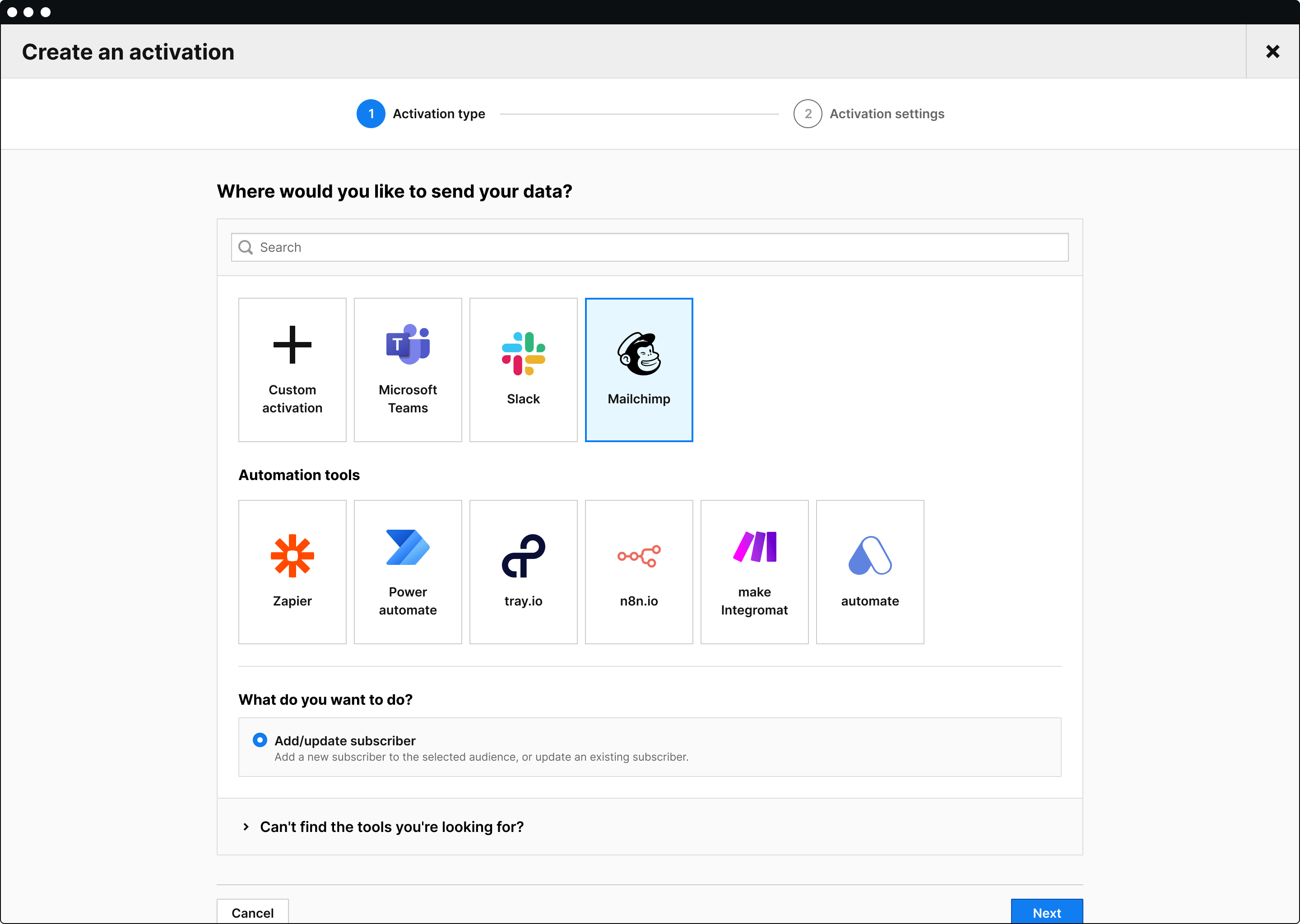
Data import use cases
You can import data from your CRM, ecommerce platform, data warehouse, and other tools into the CDP and use it to enrich and update profile data in real-time. This helps ensure that your CDP profiles have relevant information and are up to date. You can apply the customer data to audiences and activations to combine the data gathered across touchpoints.
Furthermore, if you integrate your CDP with analytics and a tag manager, you can benefit from a steady stream of valuable user data. You can also connect siloed data sources into clear records that map all user traits and behaviors.
Example use cases:
- Send data on offline purchases from retail stores or points of sale. Importing offline conversions is integral in analyzing customer journeys, sales sources, and ROI, and effectively reporting on multiple touchpoints within numerous funnels.
- Import customer lifetime value (CLV) and customer scoring from CRM. It’s one thing to measure customer profit, but game-changing companies take customer lifetime value a step further. With CLV import, you get to tap into the power of CDPs to unlock advanced analysis, actionable insights, and predictive capabilities that allow you to understand customer desires.
- Ingest data from your email campaigns into the CDP and merge the data into existing customer profiles. For example, you can send information about opened emails to Piwik PRO CDP from email automation software. By incorporating data from email automation tools, you can better understand customer engagement, enabling well-defined audience segmentation.
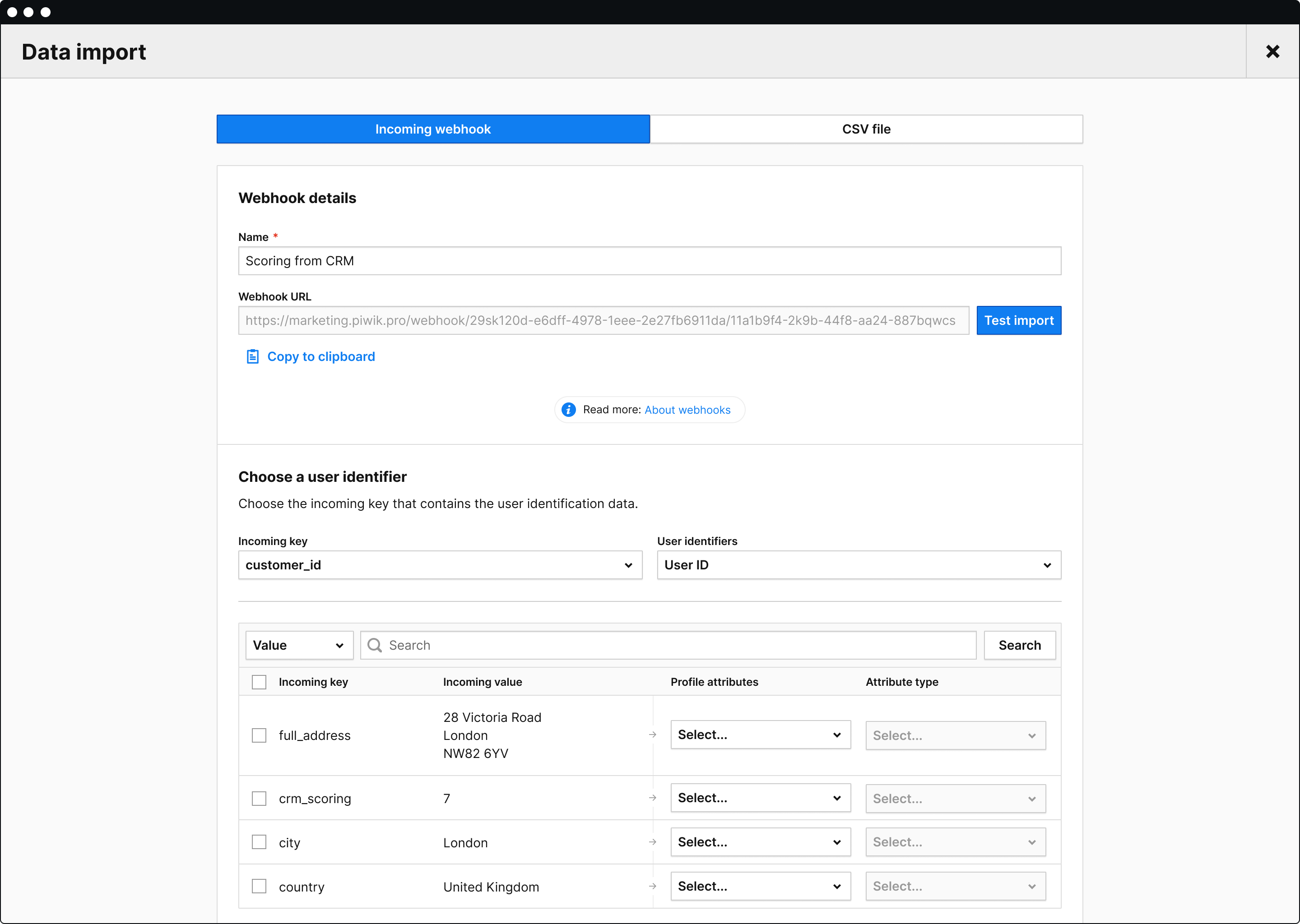
If you are a more advanced user, Piwik PRO also allows you to import data from other tools using the API. This option lets you improve your customer profiles by accessing critical information from external sources and better understanding their preferences and behaviors.
Additionally, you can create custom attributes through the user interface and API.
If you want to learn more, visit our developer docs and guides.
What should you look for in a customer data platform?
To get the most benefit from it, your CDP should have such features as:
- Data integration: An optimal CDP should be able to integrate data from various sources. Examples include web analytics, CRM systems, email marketing tools, social media platforms, and other sources. Review what tools you need to integrate with the CDP and whether your chosen CDP allows you to do it.
- Integrated analytics and tag manager: A CDP that natively offers analytics and tag management provides even more comprehensive insights. Native integrations offer seamless connections between tools and lower entry barriers for end users.
- Data activation and personalization: Make sure CDPs can deliver a personalized experience across channels and activate data to reach the right people at the right time. This involves enriching user profiles with attributes specific to your business and customers.
- Powerful analytics capabilities like behavioral segmentation and audience building: Select a CDP to trigger audiences across multiple touchpoints, including real-time customer interactions. Platforms should allow segmentation using demographic and behavioral data to define audiences more precisely.
- Scalable and secure data storage: The system needs to manage increasing amounts of data and support a growing user base as the business expands. It should also be able to seamlessly and securely integrate with new data sources and systems.
- Flexibility and easy setup: All stakeholders in the company should have access to the information, from marketing and sales to customer service and product development. Non-technical team members can navigate and understand it easily with a user-friendly interface.
- Support: Leading CDP vendors offer comprehensive professional services and customer support, including implementation, onboarding, product training, analytics consulting, and custom integrations.
CDP that suits your needs
A unique feature of Piwik PRO’s CDP is that it integrates with a web and app analytics platform rather than aiming to replace it like most other CDPs on the market. The native integration with Analytics and Tag Manager ensures a steady supply of crucial user data, facilitating a deeper understanding of insights.
With Piwik PRO’s CDP, you can effortlessly activate data by utilizing webhooks and automation tools to send desired attributes to various destinations, such as CRM, ad platforms, email marketing tools, internal communication channels, etc. Plus, the intuitive editor and templates allow you to create activations without needing the help of tech teams, and you can also define advanced integrations if required. Our CDP allows you to further enhance your insights with secure data imports from any tool from your tech stack.
Moreover, Piwik PRO’s CDP prioritizes user privacy and helps you comply with global privacy laws like GDPR, TTDSG/TDDDG, CPPA, CPRA, and LGPD. This includes safe hosting options, data governance, and built-in integration with consent management tools.
Learn more about the capabilities of the Piwik PRO CDP:
If you want to see our CDP in action, contact us for a personalized product demo.
The post Customer Data Platform: Generate meaningful insights with customer data activation and import appeared first on Piwik PRO.
]]>